
Digital design fundamentals - transistors, gates, timing, clocking, memories, and the implementation flow - are the common ground for every chip-design career. From there, engineers usually specialize: verification (proving the design works), RTL design (architecting and writing the hardware), or physical design (turning it into a manufacturable layout). All three can be practised today without installing anything, using browser-based labs built on open-source simulators, synthesis tools, place-and-route flows, and process design kits.
12 min read | Beginner Level
What You'll Learn
- The main specialization tracks after digital design fundamentals
- What each track involves day to day, and which skills it builds on
- Which open-source tools let you practise the whole flow for free
- A project ladder for building practical experience step by step
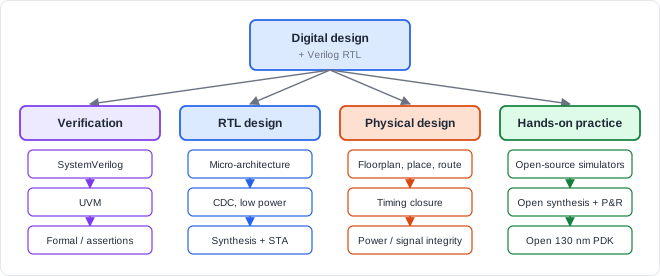
Four Directions From Here
Track 1: Verification
Verification engineers prove that the RTL does what the specification says, before silicon. On large projects there are often more verification engineers than designers. The path typically goes:
| Stage | What you learn | Builds on |
|---|---|---|
| SystemVerilog | Classes, constrained-random stimulus, functional coverage, assertions | Verilog syntax and simulation semantics |
| UVM | A standard methodology for reusable testbenches: agents, sequences, scoreboards | SystemVerilog classes |
| Formal verification | Proving properties exhaustively with assertions instead of simulation | Assertions, logic, state machines |
Continue with the SystemVerilog tutorial and the UVM tutorial. A good habit to start now, even with plain Verilog, is the self-checking testbench:
Self-checking testbench, in outline (example: testing an 8-bit adder)

  repeat 1000 times:
      apply random values to inputs A and B
      wait for the combinational logic to settle
      compare the design's SUM with a reference model (A + B computed directly)
      on any mismatch: count the error and print the inputs
  at the end: print PASS, or FAIL with the number of mismatches
Track 2: RTL Design
RTL designers turn specifications into micro-architecture and synthesizable code that meets performance, power, and area targets. Beyond Verilog syntax, the track deepens the topics that separate working RTL from good RTL:
- Micro-architecture: pipelining, datapath and control partitioning, handshake protocols, FIFOs.
- Clock domain crossing and reset design: synchronizers, asynchronous FIFOs, reset strategies.
- Low-power design: clock gating, power domains, and the power intent that describes them.
- Synthesis and timing awareness: reading synthesis and timing reports, writing constraints, and knowing what hardware every construct becomes.
The Verilog tutorial covers the language itself in depth.
Track 3: Physical Design and Sign-Off
Physical design engineers own everything from netlist to GDSII: floorplanning, placement, clock tree synthesis, routing, and timing closure. Closely related roles focus on sign-off: static timing analysis across many corners, power integrity (IR drop and electromigration), and physical verification (DRC and LVS). The interconnect, timing, and power topics of this course are the foundation of this track.
Where Do These Roles Work Together?
On a chip project, RTL designers, verification engineers, physical designers, and design-for-test (DFT) engineers work on the same database in parallel. A timing failure found in physical design often becomes an RTL change; a bug found in verification becomes a design fix and a new netlist. Engineers who understand the neighbouring tracks communicate faster and fix problems at the right level.
Track 4: Hands-On Practice
Professional chip design uses commercial simulators, synthesis, and place-and-route tools. Their licences are expensive and are usually only available through employers or universities, which makes them hard to use for self-study.
Free, open-source tools cover the whole flow from RTL to a real layout. The catch is that each one has to be downloaded, installed, configured, and connected to the others individually:
| Task | Open-source tools |
|---|---|
| Simulation | Icarus Verilog (event-driven), Verilator (fast, cycle-based C++ model) |
| Waveform viewing | GTKWave |
| Logic synthesis | Yosys |
| Place and route, CTS | OpenROAD |
| Static timing analysis | OpenSTA |
| Complete RTL-to-GDSII flows | OpenLane and similar scripted flows built on the tools above |
| Layout viewing and DRC | KLayout, Magic |
| Process technology | Open-source process design kits for mature nodes such as 130 nm, with standard-cell libraries |
The easiest way to start is ChipVerify Lab, a browser-based IDE with the whole flow already set up, so you can begin immediately with zero installation. You can write and simulate Verilog, view waveforms, synthesize to a real 130 nm standard-cell library, run static timing analysis, place and route, and inspect the final layout - all from the browser, alongside ready-to-run examples and guided exercises.
If you do set up the tools yourself, a first synthesis run with Yosys takes only a few commands:
# Yosys: synthesize a design to a standard-cell library and report its size
read_verilog counter.v
synth -top counter                    # generic synthesis and optimization
dfflibmap -liberty cells.lib          # map flip-flops to library cells
abc -liberty cells.lib                # map combinational logic to library cells
stat -liberty cells.lib               # report cell counts and area
write_verilog counter_netlist.v       # write the gate-level netlist
Where Have Open-Source Flows Been Used?
Open-source RTL-to-GDSII flows and PDKs have been used in university courses, research chips, and shuttle programmes that fabricate small community designs on shared wafers. Taking even a small design through such a flow teaches more about timing, placement, and routing than reading about them.
A Project Ladder
Build experience step by step (each project: RTL + self-checking testbench + synthesis)

  1. Counters, shift registers, edge detectors      -> clean sequential RTL
  2. UART transmitter and receiver                  -> FSMs, baud timing, oversampling
  3. Synchronous FIFO, then asynchronous FIFO       -> pointers, Gray code, CDC
  4. Fixed-point FIR filter                         -> datapaths, pipelining, bit growth
  5. Simple pipelined processor (small open ISA)    -> hazards, forwarding, control
  6. Take one of the above through the full RTL-to-GDSII
     flow in ChipVerify Lab                         -> constraints, timing closure, layout
Common Mistakes
Mistake #1: Learning tools instead of concepts
Tool commands change between vendors and versions; timing, clocking, CDC, and verification principles do not. Engineers who understand why a step exists can pick up any tool quickly.
Mistake #2: Simulating without ever synthesizing
Code that simulates correctly can still infer latches, create huge logic, or fail timing. Run every practice design through synthesis and read the reports, even if you never build a chip.
Mistake #3: Checking waveforms by eye
Manually inspecting waveforms does not scale and misses rare bugs. Build self-checking testbenches with random stimulus from the start; it is the foundation of professional verification.
Mistake #4: Skipping timing constraints in practice projects
Without constraints, synthesis and place-and-route do not optimize for speed and timing reports mean nothing. Always define clocks and I/O delays, even for a small project.
Practice Exercise
Challenge: Plan Your First Full-Flow Project
Choose a UART transmitter as your project. Write a plan that takes it from RTL to a routed layout in ChipVerify Lab, listing what you would produce and check at each step.
Hint
Follow the flow order: RTL and simulation, synthesis, constraints, place and route, timing analysis, and layout checks. For each step, name one output and one thing to check.
Solution
1. RTL: uart_tx.v (FSM: IDLE, START, DATA x8, STOP; baud-rate counter)
   Check: self-checking testbench decodes the serial line and compares bytes

2. Constraints: 50 MHz clock (20 ns period), input/output delays
   Check: every path is constrained (no unconstrained-path report entries)

3. Synthesis (Yosys): gate-level netlist + cell/area report
   Check: no latches, no warnings; flip-flop count matches the design

4. Place and route in ChipVerify Lab (OpenROAD underneath)
   Output: placed, clock-tree-built, routed layout
   Check: no DRC violations; utilization and congestion are reasonable

5. Static timing (OpenSTA) with extracted parasitics
   Check: positive setup and hold slack at all corners

6. Layout review (KLayout): view the GDS, find the FSM and baud counter cells
Summary
In this tutorial, you learned:
- Digital design fundamentals lead into verification, RTL design, and physical design tracks
- Verification builds on SystemVerilog, UVM, and formal methods; start with self-checking testbenches now
- RTL design deepens into micro-architecture, CDC, low-power design, and timing-aware coding
- Physical design and sign-off cover placement, routing, timing closure, and power and physical verification
- ChipVerify Lab lets you practise the whole flow, from simulation to GDSII, in the browser on open-source tools
- A ladder of small projects, each simulated and synthesized, builds practical skill fastest