
A dynamic RAM (DRAM) bit is stored as charge on a tiny capacitor, reached through a single access transistor - one transistor and one capacitor per bit, the 1T1C cell. That makes DRAM far denser and cheaper per bit than SRAM. The price is that the charge leaks away, so every cell must be read and rewritten, or refreshed, periodically - typically every 64 ms - and that reading a cell destroys its contents, so every read must be followed by a write-back.
13 min read | Intermediate Level
What You'll Learn
- How a 1T1C DRAM cell stores a bit, and why reading it is destructive
- Why DRAM must be refreshed, and how refresh is scheduled
- How DRAM and SRAM compare, and why DRAM usually lives off-chip
- How a memory controller schedules refresh, and what it costs in performance
The 1T1C Cell
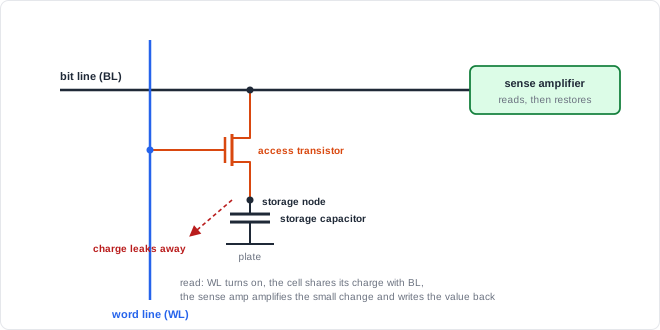
A charged capacitor represents one value and a discharged capacitor the other. The access transistor, controlled by the word line, connects the capacitor to the bit line. With the word line low, the transistor is off and the charge is (mostly) trapped.
Reading: Charge Sharing and Restore
DRAM read sequence

  1. Precharge the bit line to VDD/2
  2. Raise the word line: the cell capacitor shares its charge with the bit line
       cell stored 1 -> bit line rises slightly above VDD/2
       cell stored 0 -> bit line falls slightly below VDD/2
  3. The change is tiny, because the bit line's capacitance is much larger
     than the cell's
  4. The sense amplifier compares the bit line with a reference and drives it
     to a full 1 or 0
  5. Charge sharing destroyed the cell's contents, but the sense amp's full-swing
     value is now on the bit line: with the word line still high, it is written
     back into the cell (restore)
  6. Lower the word line
In a DRAM chip, raising a word line connects a whole row of cells to their bit lines at once, and the sense amplifiers latch the entire row. This is called activating or opening a row, and the latched row is the row buffer. Accesses to data already in the open row are fast; accesses to a different row must first close the current row and open a new one, which takes much longer.
Why DRAM Needs Refresh
The storage capacitor is not perfect: charge leaks through the access transistor (subthreshold and junction leakage) and through the capacitor's dielectric. After enough time, a stored 1 can no longer be distinguished from a 0. Every cell must therefore be read and restored before its charge decays too far.
Refresh timing (typical DRAM standards)

  every cell refreshed within        64 ms   (normal temperature range)
  refresh split into                 8,192 refresh commands
  average spacing between commands   64 ms / 8,192 = ~7.8 us

  hot DRAM (above ~85 degC): leakage rises, retention drops
    -> refresh window halves to 32 ms, spacing to ~3.9 us

  each refresh command refreshes a group of rows and makes the device (or bank)
  unavailable for a short time
Quick Check
Q: Why does the refresh rate have to increase at high temperature?
Show Answer
Leakage current rises steeply with temperature, so the capacitor loses its charge faster. The retention time shrinks, and cells must be refreshed more often - typically twice as often above about 85 °C.
SRAM vs. DRAM
| Property | SRAM (6T) | DRAM (1T1C) |
|---|---|---|
| Transistors per bit | 6 | 1 (+ a capacitor) |
| Density / cost per bit | Low density, expensive | High density, cheap |
| Access time | Fast | Slower, especially when a new row must be opened |
| Refresh | Not needed | Required |
| Read | Non-destructive | Destructive; needs restore |
| Manufacturing | Standard logic process | Special process for tall, high-capacitance storage capacitors |
| Typical location | On the logic chip (caches, buffers) | Separate memory chips, connected through a memory interface |
The special process needed for dense storage capacitors is the main reason DRAM is usually built on separate chips. Embedded DRAM on logic chips exists, but it adds process cost and is less dense than dedicated DRAM.
Where Does DRAM Fit in a System?
Phones, laptops, and servers use DRAM as main memory, holding gigabytes that SRAM could never provide at the same cost. Graphics cards and AI accelerators use high-bandwidth DRAM stacks placed beside the processor. In every case, an on-chip memory controller schedules reads, writes, row activations, and refreshes, and SRAM caches on the processor hide most of the DRAM latency.
Refresh in the Memory Controller
The logic chip's memory controller must issue refresh commands on schedule. At its core is a timer that raises a request every refresh interval:
Refresh request timer in the controller

  a counter counts controller clock cycles up to one refresh interval
  7.8 us at 800 MHz = 7.8 us x 800 MHz = 6240 cycles
  when the count reaches 6239 (the last cycle of the interval):
      the counter restarts from 0 and a "refresh due" request is raised
  when the controller issues the refresh command:
      the request is cleared
The timer is a counter, a constant comparator, and one flip-flop for the request. Real controllers also track how many refreshes have been postponed - DRAM standards allow a limited number to be delayed and caught up later - so refresh can wait briefly behind urgent reads, and they switch to the faster refresh rate when the DRAM reports high temperature.
Where Does Refresh Cost Performance?
While a DRAM device or bank is refreshing, it cannot serve reads or writes. Depending on the device and conditions, refresh can keep memory busy for a few percent of the time, and the fraction grows with larger, denser DRAM chips because each refresh command must cover more rows. Memory controllers schedule refresh around traffic and use per-bank refresh where available to hide as much of this cost as possible.
Common Mistakes
Mistake #1: Treating a DRAM read as non-destructive
Charge sharing wipes out the stored value; only the restore step puts it back. This is why row activation and restore are built into every DRAM access and why reads cost more than they seem to.
Mistake #2: Forgetting temperature in the refresh rate
Retention time drops sharply as the DRAM heats up. A controller that always uses the room-temperature refresh interval can lose data in hot conditions. Controllers read the DRAM's temperature status and double the refresh rate when required.
Mistake #3: Assuming every DRAM access has the same latency
Hitting an open row is fast; opening a new row in the same bank requires closing the old one first. Access patterns that jump between rows can be several times slower than sequential access, which is why controllers reorder requests.
Mistake #4: Ignoring refresh in bandwidth estimates
A few percent of time spent refreshing directly reduces available bandwidth, and more at high temperature. Peak bandwidth figures from the interface speed alone overestimate what a system can sustain.
Practice Exercise
Challenge: How Much Time Goes to Refresh?
A DRAM device needs one refresh command every 7.8 us at normal temperature and every 3.9 us when hot. Each refresh command keeps the device busy for 350 ns.
- What fraction of time is spent refreshing at normal temperature, and when hot?
- The controller runs at 800 MHz. How many clock cycles does each refresh occupy?
Hint
Busy fraction = busy time per command / interval between commands.
Solution
1. Normal: 350 ns / 7800 ns = ~4.5% of the time
   Hot:    350 ns / 3900 ns = ~9.0% of the time

2. 350 ns x 800 MHz = 280 clock cycles per refresh command
These figures are for this example device; actual refresh durations depend on the DRAM density and generation.
Summary
In this tutorial, you learned:
- A DRAM cell is one access transistor and one storage capacitor; the bit is stored as charge
- Reading shares the cell's charge with the bit line, destroying it, so the sense amplifier writes the value back
- Charge leaks away, so every cell is refreshed within about 64 ms, split into ~8,192 commands about 7.8 us apart
- High temperature increases leakage and typically doubles the refresh rate
- DRAM is far denser than SRAM but slower, needs refresh, and is built in a special process, usually on separate chips
- The memory controller schedules refresh with a simple timer, and refresh costs a few percent of bandwidth
