
Sooner or later, a chip must run the software its users will run: an operating system, drivers, and applications that stress it for hours or days. Real software exercises combinations of features, timing and power behaviour that no test suite was written for.
It is also the hardest place to debug, because failures appear as crashes and hangs far from their cause. This article describes how teams step up from bare-metal tests to full software, what stress workloads are used, and how they keep software failures debuggable.
7 min read | Intermediate
What You'll Learn
- Describe the steps from bare-metal tests to full operating systems
- List common stress workloads and what they target
- Explain why software failures are hard to debug
- Use instrumented and reduced system software to help
Stepping Up the Software Stack
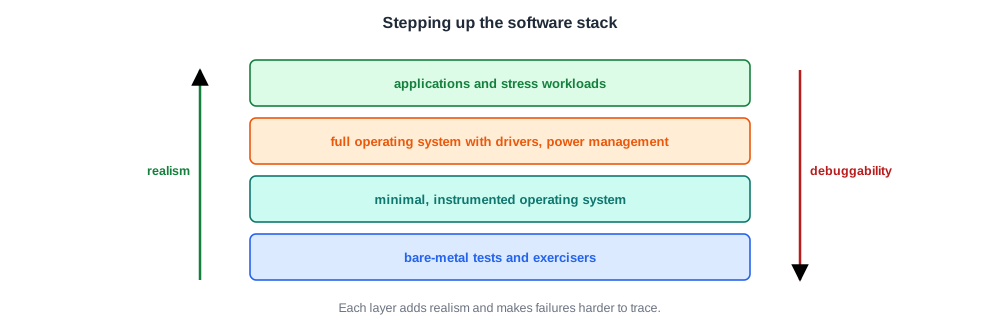
Software is added in layers, each one more realistic and harder to debug:
- Bare-metal tests and exercisers, with full control and no operating system.
- A minimal, instrumented operating system: a reduced kernel with debug hooks, fewer features and more logging.
- A full operating system with drivers, power management and security turned on.
- Applications and stress workloads, run for long periods.
Modern operating systems are highly optimized and complex. Debugging hardware under them is hard, which is why teams often build or adapt a reduced system just for silicon debug.
Stress Workloads
Some workloads are chosen because they stress particular parts of the chip:
| Workload | Targets |
|---|---|
| memory and cache stress | coherency, memory controller, DRAM interface |
| multithreaded and multiprocess loads | synchronization, interconnect, interrupts |
| power and thermal loads | maximum current, supply droop, thermal limits |
| power-state cycling | sleep and wake paths, state save and restore |
| I/O-heavy loads | DMA, high-speed interfaces, drivers |
| real applications and benchmarks | everything together, and performance |
Long runs matter. A bug that appears once per day of operating system activity is found only by running that long, many times, on many parts.
Quick Check
Q: A chip passes every exerciser and focused test, then hangs after six hours of a video application. What makes this failure harder to debug than an exerciser failure?
Show Answer
The software is large and not designed to check hardware, the failure may have been caused millions of cycles earlier, the run is long and may not repeat exactly, and drivers, power management and the operating system all interact. An exerciser fails close to the problem with a known test case; a hang in an application gives few clues.
Why Software Failures Are Hard
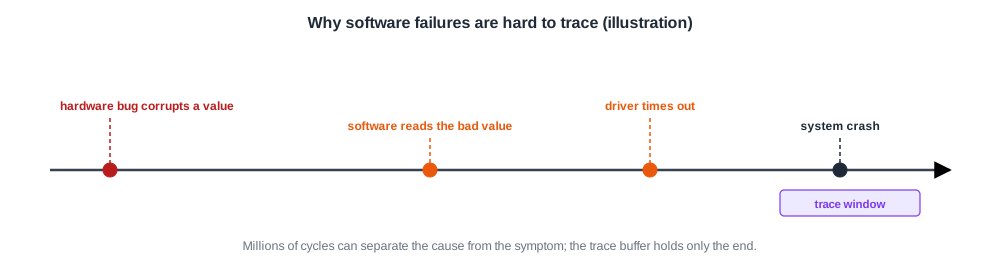
- Distance. The cause may be millions or billions of cycles before the crash.
- No checking. Applications do not check hardware results; a wrong value travels until something breaks.
- Non-determinism. Interrupts, timers and multiple cores make each run different.
- Blame. Many software failures are software bugs. The first question is always whether the hardware is involved at all.
Keeping Software Debuggable
Teams use several techniques to make software runs more useful for hardware validation:
- Instrumented system software that logs hardware events, power-state changes and error reports, and preserves a crash record.
- Debug-friendly data paths: drivers that send debug data out through a port such as USB without disturbing the function being tested.
- Watchdogs and triggers that freeze trace and state when software notices something wrong, as in On-Chip Trace.
- Defeature experiments: rerun with a feature disabled to see whether the failure depends on it.
- Reduction: shrink the workload until the failure appears quickly and repeatably, then move it to a bare-metal test, as in Reproducing and Isolating a Failure.
Quick Check
Q: A crash happens only when power management is enabled. Why should the team still keep power management on for most validation?
Show Answer
Products run with power management on, so its paths must be validated. Turning it off hides exactly the bugs that appear in sleep and wake transitions. It is turned off only as an experiment, to locate a failure, and then turned back on.
In Practice
Software runs fill the lab at night and on weekends, on every free system board. Each run logs the part identity, board, software versions, voltages and temperatures, so that a rare failure can be compared across hundreds of runs. A failure that appears on only one part is suspected to be a marginal part first; one that appears on many parts is suspected to be a design or software bug.
Common Mistakes
Mistake #1: Jumping straight to the full operating system
Debugging hardware under a full system is slow. Step up through bare-metal and reduced systems first.
Mistake #2: Assuming a crash is a hardware bug
Many are software bugs. Establish hardware involvement before deep hardware debug.
Mistake #3: Short software runs only
Rare bugs need long runs on many parts. Plan the board time for them.
Practice Exercise
Challenge: How Many Board-Hours?
A bug appears on average once every 300 hours of a workload on one board. The team wants to see it at least about three times to study it.
With 25 system boards running the workload around the clock, roughly how many days will that take? Assume failures occur at a steady average rate.
Hint
Three occurrences need about 900 board-hours.
Solution
900 board-hours / 25 boards = 36 hours, about a day and a half. On a single board it would take 900 hours, over five weeks. Rare software bugs are found by parallel runs on many boards.
Summary
- Software is added in layers: bare metal, reduced instrumented system, full operating system, applications.
- Stress workloads target memory, concurrency, power, power states and I/O; long runs find rare bugs.
- Software failures are hard: far from the cause, unchecked, non-deterministic, and often not hardware.
- Instrumentation, triggers, defeature experiments and reduction make them debuggable.
