
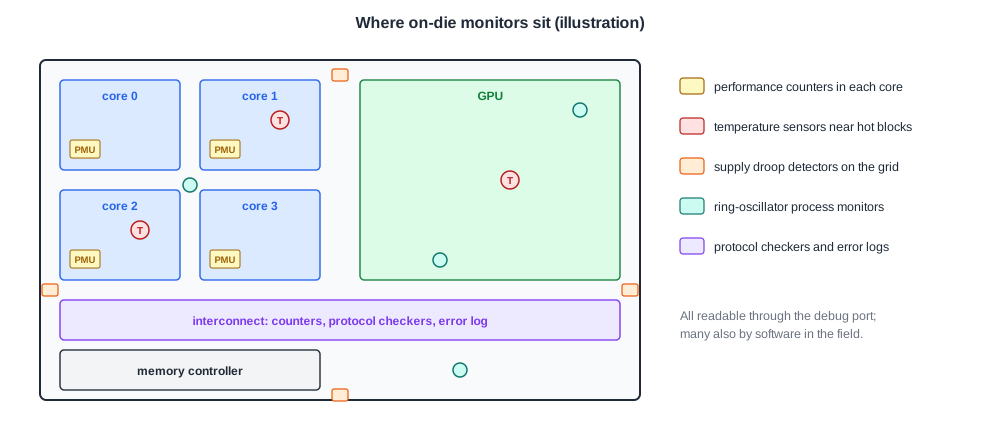
Besides debug ports, scan and trace, chips carry small monitors that watch them continuously while they run: performance counters that count events, sensors that measure temperature, voltage and transistor speed, and hardware checkers that flag protocol violations and record errors. They cost little area, they work in every chip, including production parts in the field, and they often give the first hint of where a problem is. This article describes the three kinds of on-die monitor and how post-silicon validation uses them.
7 min read | Intermediate
What You'll Learn
- Describe performance counters and how validation uses them
- List the common on-die sensors and what each measures
- Explain silicon assertion checkers and error logging
- Choose a monitor for a given validation question
Performance Counters
A performance counter is a register that increments whenever a selected event happens: a clock cycle, an instruction completed, a cache miss, a branch mispredicted, a bus transaction, a stall. A performance monitoring unit groups several counters with registers to choose the event for each, start and stop them, and raise an interrupt on overflow. A widely used ARM application core, for example, provides six event counters of 32 bits each plus a cycle counter, and each event counter can count any of the core's events.
Validation uses counters in several ways:
- Performance validation. Do instructions per cycle, cache hit rates and memory bandwidth match the performance model? A large gap points to a bug that does not break function, only speed, which no functional test catches.
- Checking that a test does what it should. A test meant to stress cache evictions should show many evictions; if the counter stays low, the test is not exercising the feature.
- Coverage on silicon. Counts of rare events, such as a particular buffer becoming full, show which corners a long test actually reached.
- Narrowing a failure. Comparing counts between passing and failing runs, or reading them just before a hang, shows which unit behaved differently.
Quick Check
Q: A 32-bit counter counts clock cycles at 1 GHz. How long until it overflows, and why does that matter for long tests?
Show Answer
232 is about 4.29 billion, so it wraps after about 4.3 seconds. A test that runs for minutes must either read the counter often, count overflow interrupts, or use a 64-bit counter; otherwise the final count is meaningless.
Sensors
On-die sensors measure the physical conditions the chip runs in:
- Temperature sensors. Usually built on the temperature dependence of a diode or bipolar transistor's forward voltage. Several are placed near the hottest blocks, because temperature varies across a large die. Products use them to throttle the clock or voltage before the chip overheats; validation uses them to know the actual junction temperature during a test rather than the temperature of the air around the board.
- Voltage and droop monitors. Circuits that measure the local supply voltage or detect fast droops, for example by watching a delay line slow down when the supply dips. They show what the cells actually see, which external probes on the board cannot, and they are central to the power integrity work of the electrical validation chapter.
- Process monitors. Ring oscillators spread across the die, whose frequency shows how fast the transistors are in that spot. They tell whether a part is from the slow or fast side of the process, and they correlate silicon speed with the timing models.
- Clock monitors. Counters that measure an internal clock against a reference, to check that PLLs lock at the right frequency.
The same ring oscillators also appear in the scribe lines between dies for the foundry's own wafer tests; on-die copies let every packaged part be measured.
Silicon Assertions and Error Logging
Pre-silicon verification uses assertions to check that protocols and invariants hold. A few of them can be built into the silicon as small hardware checkers:
- Protocol checkers at block interfaces, watching for requests without responses, illegal transitions or responses to the wrong requester.
- Invariant checkers on queues and credits: never more entries than the queue holds, never negative credits.
- Timeout watchdogs on transactions that must complete within a known time.
When a checker fires, it sets a sticky bit in an error log register, records information such as the address or transaction identifier, and can trigger trace capture or halt the cores through cross-triggering. The first error is the important one, because later errors are often consequences of it, so error logs usually record the first event and count the rest. Processors and memory controllers have similar logs for corrected and uncorrected memory errors, machine check events and parity errors, which also serve products in the field.
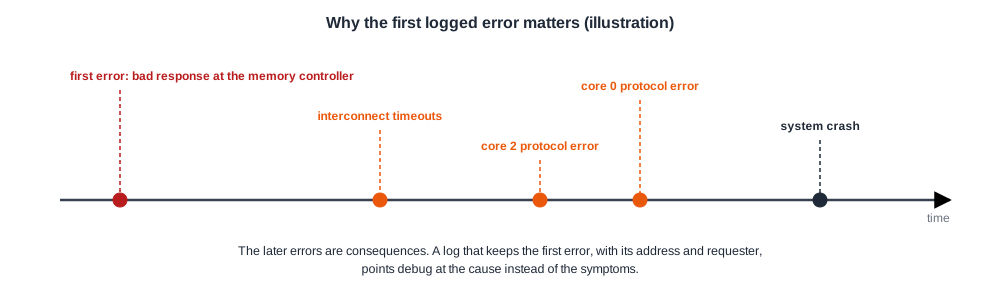
Hardware checkers cost area and must not fire falsely, so only a small number of the most valuable assertions are built in. They pay off because they check every cycle of every test for free, and because they catch the problem close to its cause.
Quick Check
Q: A system crashes, and the error log shows 47 errors in three different blocks. Which entry deserves attention first, and why?
Show Answer
The first one recorded. Errors cascade: one bad transaction can cause timeouts and protocol violations in every block that depends on it. The first logged error is closest to the cause; the others are usually consequences.
Choosing the Right Monitor
| Question | Monitor |
|---|---|
| Is the chip as fast as the model predicts? | performance counters |
| Did the test reach the corner it was written for? | event counters |
| How hot was the die during the failure? | temperature sensors |
| Did the supply droop when the failure happened? | droop monitors, with a trigger |
| Is this part from the slow side of the process? | ring-oscillator process monitors |
| Where did the first protocol violation occur? | protocol checkers and the error log |
In Practice
Many validation teams read all counters, sensors and error logs automatically at the end of every test and store them with the result. Over thousands of runs this builds a database that shows trends no single test reveals: a counter that is always slightly higher on failing runs, failures that only occur above a certain die temperature, or parts whose process monitors read slow failing more often. The cost is almost nothing, because the monitors are already in the chip.
Common Mistakes
Mistake #1: Trusting the board temperature
The die can be tens of degrees hotter than the air or the package. Use the on-die sensors.
Mistake #2: Reading only the last error
The first logged error is closest to the cause. Design error logs to keep it.
Mistake #3: Ignoring counter overflow
A 32-bit cycle counter wraps in seconds at gigahertz clocks. Read counters often or use 64-bit ones.
Practice Exercise
Challenge: Diagnose With Counters
A benchmark runs 15 % slower on silicon than the performance model predicted. Counters show instructions per cycle 15 % lower, the same number of cache misses, and twice as many cycles stalled waiting for memory responses. Which block would you investigate first, and what would you check next?
Hint
Same misses, but longer waits.
Solution
The cache behaves as expected, since the misses match the model, but each miss takes longer to serve. The memory path is the suspect: the interconnect or the memory controller. Next, read the interconnect and memory controller counters for queue occupancy, retries and latency, and check the memory controller configuration, such as timing parameters or a scheduling mode, which may be set more conservatively than the model assumes.
Summary
- On-die monitors watch the chip continuously at low cost, in validation and in the field.
- Performance counters count events for performance validation, test checking, silicon coverage and failure narrowing.
- Sensors measure die temperature, local supply voltage and droop, transistor speed and clock frequency.
- Silicon assertion checkers and error logs catch protocol and invariant violations close to their cause; the first logged error matters most.
- Reading every monitor after every test builds a database that reveals trends.
