
Design for debug (DfD) is the hardware a chip contains purely to make it possible to see, stop and steer it once it is real silicon. None of it is needed for the chip's function, yet without it a failing chip is a black box: the only things visible are its pins.
DfD features are designed in before tapeout, at the same time as the logic they observe, and they decide how quickly the first chips can be brought up and how deep a debug engineer can look into a failure. This article describes what a debug architecture must provide and the main building blocks used to provide it.
7 min read | Intermediate
What You'll Learn
- List what a chip's debug architecture must let an engineer do
- Describe the main DfD building blocks and what each provides
- Explain the role of controllability features such as defeature bits
- Describe the cost of DfD and its conflicts with power management and security
What Debug Needs From the Chip
A debug architecture has to serve very different users over the chip's life: bring-up engineers with the first chips, validation engineers chasing logic bugs, software developers debugging their code on the product, and engineers analysing parts returned from the field. Across all of them, the requirements are much the same:
- See and change state: read processor registers, system registers and memory, and change them, outside the normal program flow.
- Halt and run: stop processors on request or on an event, step them, and let them run again.
- Record history: capture what happened over a period of time, not just a snapshot, triggered by a chosen event.
- Steer the chip: disable features, force modes and override configurations, to isolate a failure or work around a bug.
- Stay secure: all of this must be impossible for an unauthorized user of the final product.
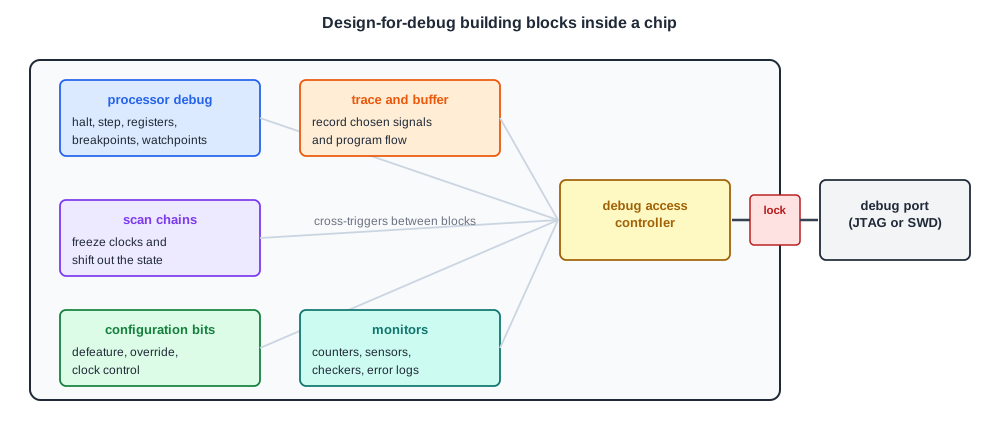
The Building Blocks
A debug port and access controller
Everything starts with a way in: a small set of pins through which an external debugger talks to the chip, usually JTAG or a two-wire serial debug port, and a controller inside that turns debugger commands into accesses to the chip's internals. Debug Access: JTAG, Debug Ports and Scan Dump covers it.
Processor debug units
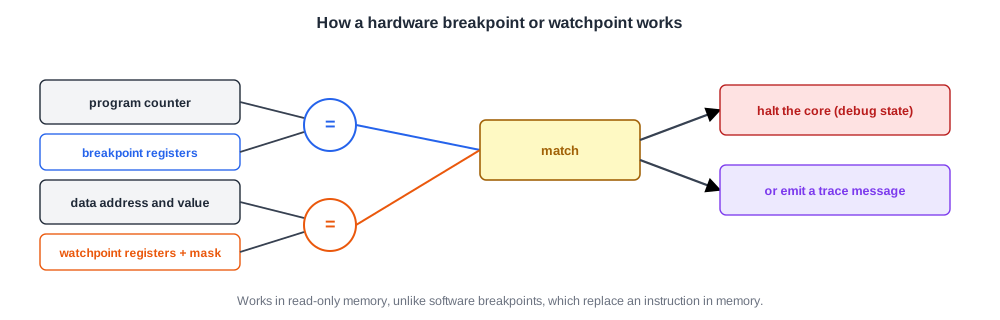
Each processor core has debug logic that can halt it, step it and give the debugger access to its registers. Hardware breakpoints and watchpoints are registers that compare the program counter, or a data address and value, against programmed values and halt the core or emit a trace message on a match.
Software breakpoints, which replace an instruction in memory, cannot work in read-only memory, so hardware breakpoints are essential for debugging boot code. The numbers are small: a widely used ARM application core, for example, has six hardware breakpoints and four watchpoints.
Scan chains
Scan chains were invented for manufacturing test: the chip's flip-flops can be connected into long shift registers and their contents shifted in and out. For debug, the same chains give a complete snapshot of the chip's internal state: stop the clocks at the right moment and shift everything out. This is the scan dump, also covered in the debug access article.
Trace
A snapshot shows one instant. For problems that develop over time, a trace records chosen signals or processor activity cycle by cycle into an on-chip buffer, or streams it out through a trace port. On-Chip Trace: Trace Buffers, Signal Selection and Triggers describes how.
Monitors
Performance counters, temperature and voltage sensors, and hardware checkers that watch for protocol violations give a continuous, low-cost view of what the chip is doing, described in Monitors on the Die.
Controllability: defeature and override
The least glamorous DfD features are among the most valuable: configuration bits that switch off or change individual features. They make bring-up possible, by starting from a minimal configuration and enabling features one at a time, and they are the first tool for isolating a failure: if the failure disappears when the prefetcher is switched off, the prefetcher is involved.
They also become workarounds for bugs that ship, as the chapter on living with bugs explains. Other control features include overriding clock frequencies or stretching individual clock cycles, forcing particular arbitration orders, and on processors with microcode, patching it at run time.
Quick Check
Q: A hang disappears whenever a particular cache feature is disabled. What has the team learned, and what has it not learned?
Show Answer
The feature is involved in the failure, and disabling it is a candidate workaround so other validation can continue. It does not prove the feature contains the bug: disabling it changes timing and traffic, which may only hide a bug elsewhere. Root-causing still needs trace or state dumps of the failure itself.
Standard Debug Architectures
Building all of this from scratch for every chip would be slow, so the industry uses standard debug architectures with reusable components and standard buses. ARM's CoreSight is the most widely used for ARM-based chips: a debug access port that bridges the external debug pins to the chip's buses, per-core debug and trace units, cross-trigger interfaces that pass events between cores, a trace interconnect with funnels and replicators, and trace sinks that store or export the trace.
A ROM table inside lists all debug components and their addresses, so a debugger can discover them. Other architectures, such as the Nexus standard and vendor-specific trace hubs, follow the same pattern.
The Price of DfD
DfD costs area, power, design effort and verification effort: the debug logic must itself be verified, or it will fail exactly when needed. In large chips the observation hardware alone can take a significant fraction of the area, in some cases estimated at 20 percent or more.
It also conflicts with two other features:
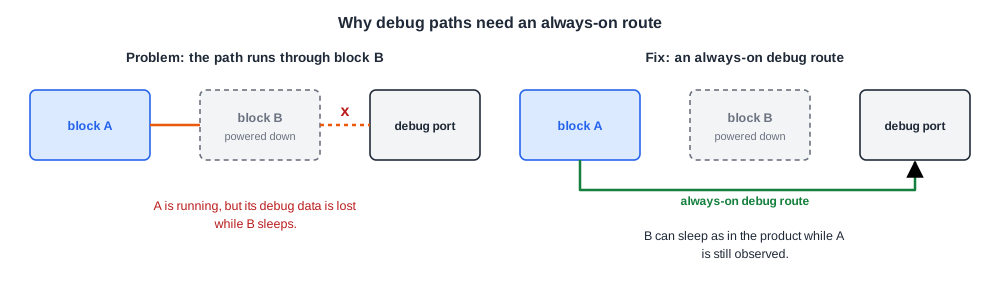
- Power management. If the debug path from a block to the debug port runs through another block that powers down when idle, the observation is lost exactly when that block sleeps. Debug paths therefore need their own always-on routing or an override that keeps them powered, without disturbing the power behaviour under test.
- Security. Every feature that exposes or changes internal state is also a tool for an attacker. Scan chains can reveal cryptographic keys, and debug ports can be used to load modified firmware. Debug access must be locked or authenticated in production parts, which the security chapter covers.
Quick Check
Q: Why must the debug logic itself be verified before tapeout as carefully as the functional logic?
Show Answer
Because it is used precisely when something has gone wrong and nothing else can be seen. A broken trace trigger or a scan chain with a wrong order can make a silicon failure impossible to debug, and fixing the debug logic needs a new silicon revision, which is exactly what it was supposed to help avoid.
In Practice
Experienced teams decide what to make observable by asking where the hardest bugs of previous chips were found and what information was missing at the time. Interfaces between blocks, arbitration points, queues that can fill, power-state controllers and clock-domain crossings are common choices, because bugs often live at boundaries between teams and features. Each block's designers are asked to name the few internal signals they would most want to see when their block misbehaves.
Common Mistakes
Mistake #1: Adding debug features after the design is done
Late additions get the leftover area and routing, and are often the first to be cut. Plan them with the logic they observe.
Mistake #2: Forgetting the defeature bits
Without switches to disable features, bring-up has no minimal configuration to start from and failures cannot be isolated.
Mistake #3: Routing debug signals through blocks that power down
The observation disappears when it is needed. Give debug paths an always-on route or a power override.
Practice Exercise
Challenge: Choose the Debug Features
A new interconnect connects four processor cores, a GPU and a memory controller. Propose five DfD features for it and say what each helps with.
Hint
Think about seeing traffic, stopping on an event, isolating a requester and changing arbitration.
Solution
(1) Trace of request and response headers at each port into a trace buffer, to see the transactions around a failure. (2) A trigger on a programmable address or transaction type, connected to cross-triggering, to stop the cores and capture trace when it occurs.
(3) Per-requester disable or throttle bits, to isolate which agent is involved. (4) Configuration bits to change arbitration priority or force a fixed order, to test whether a bug is timing-dependent and as a workaround. (5) Counters for queue occupancy, retries and timeouts, plus a sticky error register recording the first protocol violation.
Summary
- Design for debug is hardware added to see, stop and steer silicon; it must be planned before tapeout.
- The main blocks are a debug port and access controller, processor debug units, scan chains, trace, monitors and configuration overrides.
- Defeature and override bits enable bring-up, failure isolation and workarounds.
- Standard architectures such as CoreSight provide reusable debug, trace and cross-trigger components.
- DfD costs area and effort, must be verified itself, and must coexist with power management and security.
