
Every debug feature on a chip is reached through a debug port: a handful of pins through which an external debugger sends commands and reads results. The most common is the JTAG test access port, originally designed for testing boards and now used on almost every chip for debug as well.
Behind the port, a debug access controller turns those commands into reads and writes of registers, memory and debug units, and can switch the chip into a mode where its whole internal state is shifted out through the scan chains. This article explains the common debug interfaces, how JTAG works, how a debugger reaches the inside of a modern chip, and what a scan dump is.
8 min read | Intermediate
What You'll Learn
- Compare the JTAG, serial wire and single-wire debug interfaces
- Describe the parts of a JTAG test access port
- Explain how a debug access port reaches buses and debug units
- Explain what a scan dump captures and what it costs
Three Kinds of Debug Interface
| Interface | Pins | Typical use |
|---|---|---|
| JTAG test access port | 4 required (TCK, TMS, TDI, TDO) plus optional reset TRST | almost all chips; board test and debug; can chain many chips on one port |
| Serial wire debug (SWD) | 2 (clock and bidirectional data) | ARM-based chips with few pins to spare; packet-based, with parity checking |
| Single-wire background debug | 1 | small microcontrollers with very few pins |
All of them carry the same kind of traffic: commands to halt and run, read and write registers and memory, set breakpoints, and configure trace. They differ in pin count and speed. Many chips offer both JTAG and SWD on shared pins and let the debugger choose.
How JTAG Works
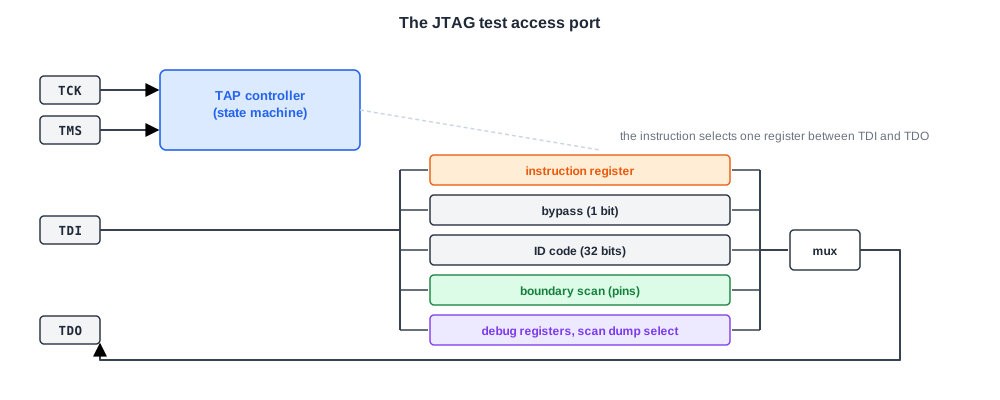
JTAG is the common name of the IEEE 1149.1 standard for a test access port and boundary-scan architecture. Its parts:
- Four pins: test clock (TCK), test mode select (TMS), test data in (TDI) and test data out (TDO), plus an optional asynchronous reset (TRST).
- A TAP controller: a small state machine stepped by TMS on each rising edge of TCK, with states for shifting an instruction or data, capturing values and updating registers.
- An instruction register of at least two bits, holding the current instruction.
- Data registers, of which exactly one is connected between TDI and TDO at a time, chosen by the instruction: a one-bit bypass register, an optional 32-bit identification code register, the boundary-scan register formed by cells on the chip's pins, and any number of chip-specific registers.
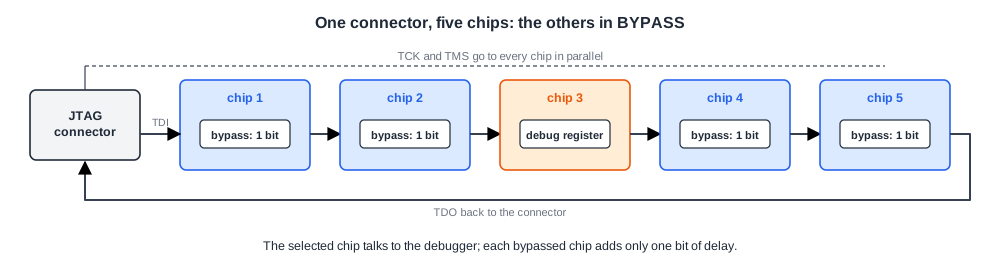
The standard defines mandatory instructions such as BYPASS, EXTEST and SAMPLE for board test, and allows designers to add their own. That openness is what made JTAG the universal debug port: designers add instructions to load a breakpoint counter, capture key registers into a shadow copy, override registers, or switch the chip into scan dump mode. Because every chip on a board can be chained TDI to TDO, one connector can reach all of them.
JTAG is slow compared with the chip: TCK typically runs at a few to a few tens of megahertz while the chip runs at hundreds of megahertz or gigahertz, and every bit passes serially. It is ideal for control and for reading small amounts of data, not for streaming what the chip is doing in real time. That is the job of trace.
Quick Check
Q: A board has five chips with their JTAG ports chained. The debugger wants to talk to the third chip only. What do the other four chips do?
Show Answer
They are put into BYPASS, which connects their one-bit bypass register between TDI and TDO. Each adds a single bit of delay to the chain, so data passes through them to and from the third chip with almost no overhead.
Reaching the Inside of a Modern Chip
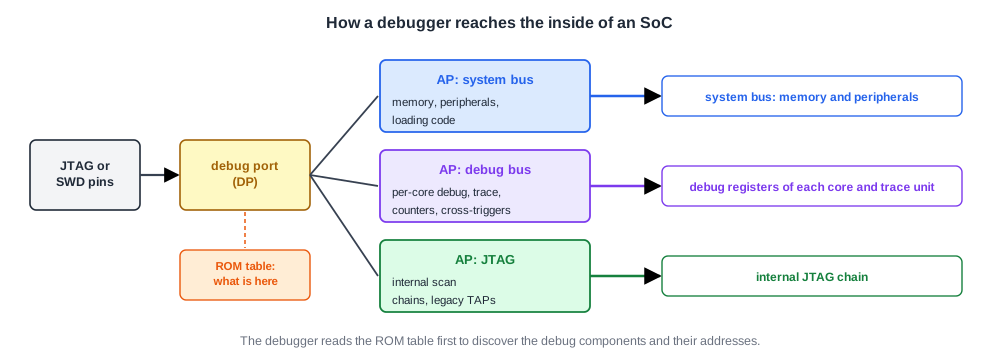
A system-on-chip has many processor cores, buses and debug components. Connecting each to its own JTAG register would be unwieldy, so modern debug architectures put a debug access port behind the pins. In ARM's CoreSight architecture, for example:
- A debug port receives commands from JTAG or SWD.
- It turns them into transactions on an internal debug bus, addressed to access ports.
- Access ports act as bus masters on the chip's buses: one reaches the system bus and therefore memory and peripherals, another the debug bus with each core's debug registers, another can drive an internal JTAG chain.
- A ROM table lists the addresses of all debug components, so a debugger can discover what the chip contains without being told.
With this arrangement, a debugger reads a core's registers or a memory location as ordinary bus accesses, at the speed of the debug link. A widely used ARM application core describes the two classic ways of using its debug logic: external debug, where the core is halted with breakpoints and watchpoints and examined through the debug connection, and self-hosted debug, where a debug monitor running on the core itself does the work while the core keeps running.
Scan Dump
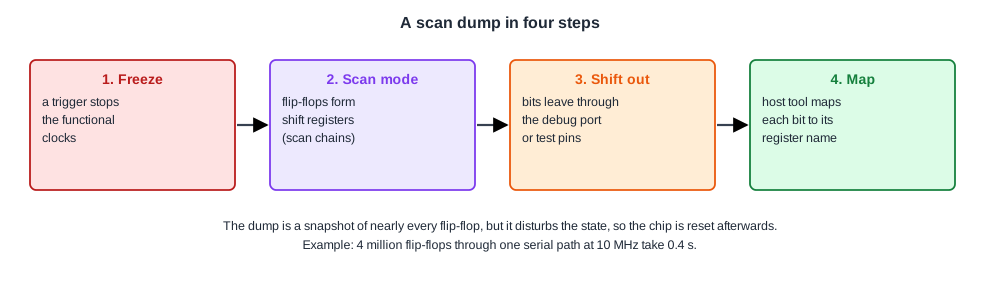
Breakpoints and register reads show the state the designers chose to make visible. A scan dump shows nearly all of it. The chip's flip-flops are already connected into scan chains for manufacturing test, so for debug:
- A trigger stops the functional clocks at a chosen moment, freezing every flip-flop.
- The flip-flops are switched into scan mode, forming shift registers.
- Their contents are shifted out, through the debug port or test pins, and stored on the host.
- A tool maps every bit back to its flip-flop name in the netlist, so engineers can read the complete state of the chip, register by register, as if it were a simulation waveform at one instant.
A scan dump is usually destructive: shifting moves every value, so the chip cannot simply continue afterwards and is reset. It also takes time.
Assume a chip with 4 million scanned flip-flops shifted out through one serial path at 10 MHz: the dump takes 4,000,000 / 10,000,000 = 0.4 seconds. That is fine for a one-time snapshot of a hang, and far too slow to record activity, so dumps and trace complement each other.
Memories are not in the scan chains. Some chips add array dump features that read out caches and other memories through the debug port after the clocks stop, because the contents of a cache are often exactly what a debug engineer needs.
Quick Check
Q: A chip hangs after hours of running. Breakpoints cannot be used because nobody knows which code is involved. Why is a scan dump a good first step?
Show Answer
A hang is a stable state: everything has stopped moving, so freezing the clocks loses nothing. The dump shows the state of every flip-flop, including queues, state machines and pending requests, which often reveals who is waiting for whom. It needs no advance knowledge of where the problem is.
In Practice
Bring-up often begins with the debug port alone. Before any software runs, engineers check that the JTAG identification register reads back the expected code, which proves that power, the test clock and the TAP controller work.
Then they use the debug access port to read and write internal registers and memory, load code into on-chip memory and start a core. If the debug port does not respond, very little else can be learned, which is why its pins, clock and power are among the most carefully checked parts of a design.
Common Mistakes
Mistake #1: Expecting JTAG to stream live activity
JTAG runs at megahertz and shifts bits serially. Use it for control and snapshots, and trace for activity over time.
Mistake #2: Dumping scan without a mapping file
Millions of bits are useless without the map from chain position to flip-flop name. Generate and keep it for every netlist revision.
Mistake #3: Putting the debug port in a power domain that can switch off
The debugger loses the chip exactly when a power-state bug happens. Keep the debug port and its access controller always on.
Practice Exercise
Challenge: How Long Is a Dump?
A chip has 6 million scanned flip-flops. In debug mode they are joined into 8 chains of equal length that are read out in parallel through dedicated debug pins at 25 MHz.
How long does a scan dump take? How long would it take through a single JTAG chain at 10 MHz? The clock rates and chain arrangement are assumptions for the exercise.
Hint
The time is set by the length of one chain divided by the shift rate.
Solution
Each of the 8 chains has 750,000 flip-flops, so at 25 MHz the dump takes 750,000 / 25,000,000 = 0.03 s. Through one JTAG chain at 10 MHz, 6,000,000 / 10,000,000 = 0.6 s. Parallel chains through dedicated pins are 20 times faster here, which matters when hundreds of dumps are collected to compare a passing and a failing run.
Summary
- Debug ports include JTAG (four pins plus optional reset), two-pin serial wire debug and single-wire interfaces.
- JTAG has a TAP controller, an instruction register and data registers, one connected between TDI and TDO at a time; custom instructions make it a general debug port.
- A debug access port turns debugger commands into bus accesses to memory, peripherals and debug units; a ROM table lets debuggers discover the components.
- A scan dump stops the clocks and shifts out nearly every flip-flop, giving a full snapshot at the cost of time and of the chip's state.
- JTAG is for control and snapshots; trace is for activity over time.
