
First power-on is the moment a new chip receives power for the first time. The goal sounds modest: the supplies come up without excessive current, the clocks run, reset releases, and the debug port answers.
It is done slowly and in a fixed order, because a short or a wrong sequence can destroy one of the few parts available. This article walks through the steps, the measurements at each one, and what to do when the chip does not respond.
7 min read | Beginner
What You'll Learn
- List the steps of first power-on in order
- Explain current limits and supply sequencing
- Check clocks, reset and the debug port
- Narrow down a chip that does not respond
The Steps
1. Before power
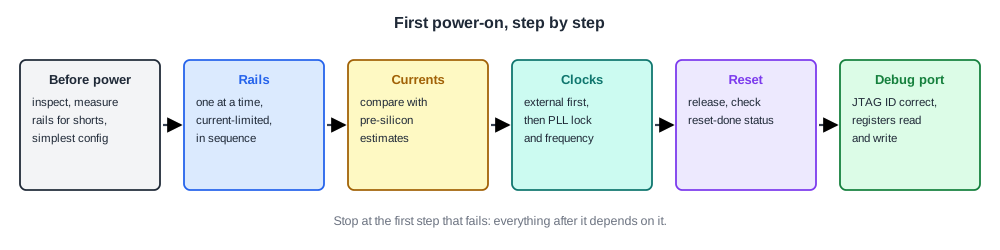
The board is inspected and each supply rail is measured for resistance to ground with the power off. A rail that reads near zero ohms is shorted, on the board, in the socket or in the part. The configuration switches are set for the simplest mode: power management, security and the normal boot flow off, as described in The Post-Silicon Timeline.
2. Power each rail with a current limit
Each supply is set to its nominal voltage with a current limit a little above the expected current. If the chip draws far more, the supply limits the current instead of letting the part overheat.
Rails are brought up one at a time in the order the chip's specification requires, measuring the current after each. Expected currents come from pre-silicon power estimates: mostly leakage, since nothing is switching yet.
3. Clocks
A clock is applied, often from an external source with the internal PLLs bypassed. Many chips can bring an internal clock out to a pin or measure it with an on-chip clock monitor. Once the basic clock works, the PLLs are enabled and their lock signal and frequency are checked.
4. Reset
Reset is released and the chip's reset sequence runs. A status pin or register showing that reset completed, if the design has one, is the first sign of internal logic working.
5. The debug port
The debugger reads the JTAG identification code. A correct code proves that power, the test clock, the TAP controller and the debug pins work. From there the debugger reads and writes internal registers, the step before running code, covered in First Code: Boot ROM, Debugger Access and Basic Tests.
Why the Order Matters
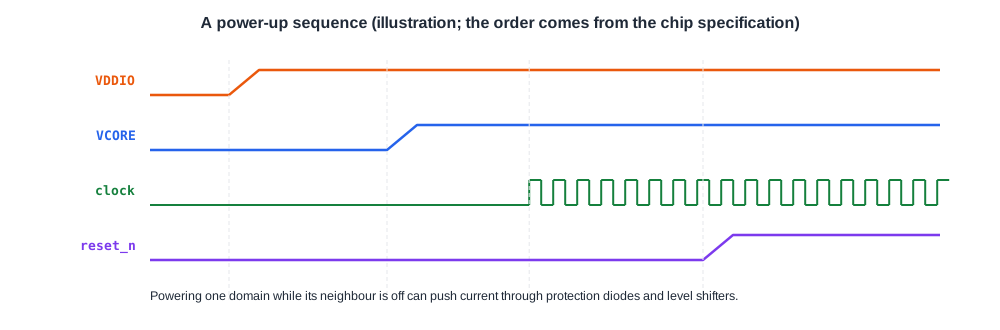
Chips with several supplies usually specify a power-up order, for example I/O supply before core supply, or the reverse. If one domain is powered while its neighbour is not, current can flow through the ESD diodes and level shifters between them.
That current can corrupt internal state or, in the worst case, trigger latch-up and damage the part. Debug boards therefore use programmable supplies that follow the specified order, and the order is checked against the chip's specification before the first part is inserted.
Quick Check
Q: The core rail of a new chip draws 1.2 A at power-on, where the estimate was 40 mA, but the supply's current limit holds it there. What should the engineer do?
Show Answer
Turn the rail off and investigate before anything else: a current thirty times too high usually means a short or a domain powered in the wrong order. Check the rail with power off, try another part and another board to locate the problem, and check the sequencing. Leaving it on risks destroying the part.
When Nothing Works
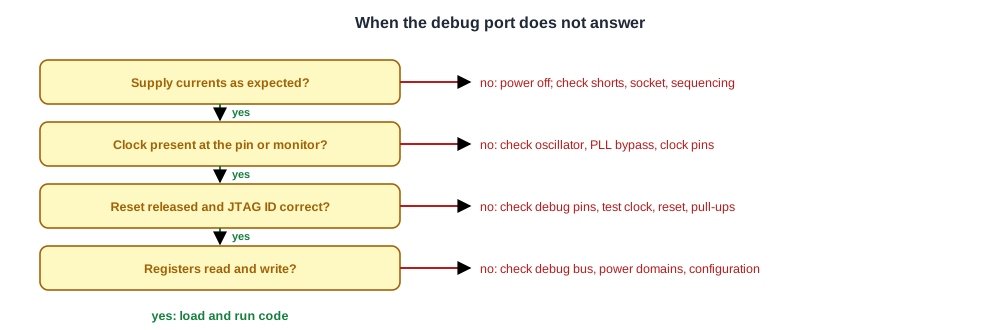
If the debug port does not answer, almost no on-chip debug is available, so the search uses what can be measured from outside:
- Currents on each rail, compared with the estimates.
- Signals at the pins: is the clock there, does reset release, do any outputs toggle?
- Other parts and boards: a problem that follows the part is the part; one that stays with the board is the board.
- Variations: different voltages, slower clocks, other configuration settings.
This stage involves a lot of reasoning from little data. Teams prepare for it by putting a few simple, independent status outputs on the chip that work even if most of the logic does not.
Quick Check
Q: Three parts on board A all fail to answer JTAG. The same three parts answer correctly on board B. Where is the problem most likely?
Show Answer
On board A, since the parts work elsewhere. Typical causes are a wrong connection or level on a debug pin, a missing pull-up, a wrong supply setting or a clock problem on that board. Comparing the two boards' schematics and measurements narrows it down.
In Practice
First power-on is usually scripted: the script ramps supplies in order, logs currents and stops if any exceeds its limit. Running the same script on every new part and board makes results comparable. The first few parts are often powered at a slightly lower voltage and slower clock, then brought up to nominal once the basics work.
Common Mistakes
Mistake #1: Powering up without current limits
A short can destroy a scarce part in milliseconds. Always set limits close to the expected current.
Mistake #2: Ignoring the power-up sequence
Wrong sequencing can forward-bias protection diodes or cause latch-up. Follow the specification, and script it.
Mistake #3: Testing only one part and one board
Without a second part and a second board, it is impossible to tell where a problem lives.
Practice Exercise
Challenge: Set the Limits
Pre-silicon estimates give an idle current of 60 mA on the core rail and 15 mA on the I/O rail. The team decides to set current limits at twice the estimate during first power-on.
What limits should be set, and why not use the supply's maximum of 3 A? The factor of two is an assumption for the exercise.
Hint
The limit must allow normal current but stop a fault quickly.
Solution
Core rail 120 mA, I/O rail 30 mA. These allow for estimation error while catching a short or a wrong sequence, which typically draws many times the expected current. A 3 A limit would let a shorted part draw enough power to overheat before anyone noticed.
Summary
- First power-on checks supplies, clocks, reset and the debug port, in that order.
- Each rail is powered with a current limit near the expected current, in the specified sequence.
- Wrong sequencing can push current through protection diodes and cause latch-up.
- A correct JTAG identification code proves power, test clock and debug pins work.
- When nothing responds, currents, pin signals and swapping parts and boards locate the problem.
