
Once a chip powers on and its debug port answers, the next goal is to run code. The first programs are tiny: write a register and read it back, toggle a pin, print a character on a serial port.
Each step proves one more part of the chip works and becomes the base for the next. This article follows that ladder from the boot ROM and debugger-loaded code to memories, peripherals and finally an operating system.
7 min read | Beginner
What You'll Learn
- Describe the two ways first code reaches a new chip
- Explain why the boot ROM is a special risk
- Order the first tests from simple to complex
- Bring up memories and peripherals one at a time
Two Ways to Start Code
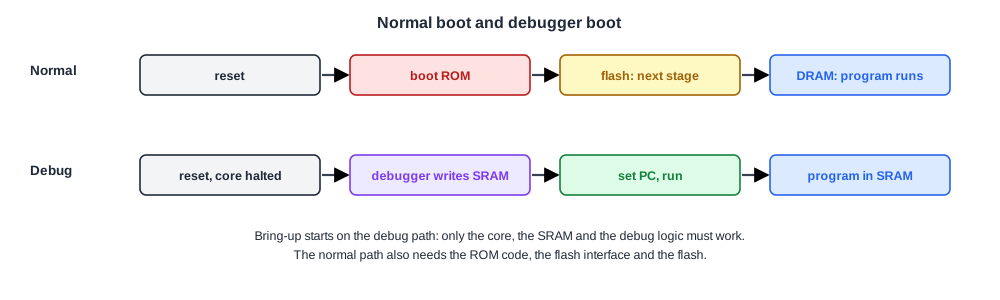
In a finished product, a processor starts by running code in its boot ROM, a small read-only memory built into the chip. The boot ROM sets up the chip, finds the next program in flash memory or another device, checks it and starts it.
During bring-up, that path depends on too much at once: the ROM code, the flash interface and the flash itself. So engineers usually start with the debug path instead.
The debugger halts the core right after reset, writes a small program into on-chip SRAM through the debug access port, sets the program counter and lets the core run. Only the core, the SRAM and the debug logic need to work.
The Boot ROM Risk
The boot ROM is fixed in the silicon. A bug in it cannot be patched like flash code; it needs a new mask, as described in Metal Fix or Full Respin.
Designers protect against this in several ways. They verify ROM code heavily before tapeout, often on an emulator with the real ROM image.
They add a way to bypass the ROM, through a boot-mode pin or the debugger. Many add a small patch mechanism that lets later code replace parts of the ROM routine.
Quick Check
Q: The boot ROM on first silicon fails to read the flash. How can bring-up continue without new silicon?
Show Answer
Use the debug path: halt the core after reset, load code into SRAM through the debugger and run it. Bring-up of the rest of the chip continues. The boot problem is then debugged separately, and a boot-mode setting or patch may avoid it until a later revision fixes the ROM.
The Ladder of First Tests
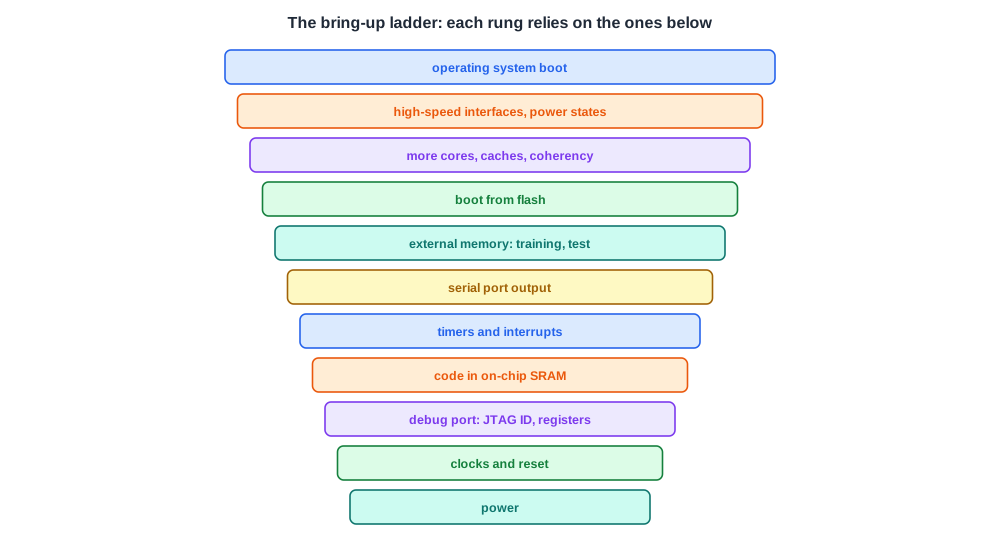
First tests climb from the simplest to the most complex, each relying on the ones below:
- Registers. Write and read back registers through the debugger. This checks the debug path and the bus.
- SRAM code. Run a loop from on-chip SRAM, then a memory test across the SRAM.
- Timers and interrupts. Make a timer fire an interrupt and handle it.
- A serial port. Print text on a UART. From here on, test programs can report their own results.
- External memory. Configure and train the memory interface, then test DRAM. Memory interfaces are complex and often need tuning on the first boards.
- Boot from flash. Switch to the normal boot path.
- More cores, caches and coherency. Start the other processors and turn on caches.
- High-speed interfaces and power management. Bring up PCIe, USB and similar links, and power states.
- An operating system. First a minimal one, then the full system.
Each rung uses a defeature-first approach: turn a feature on, test it, and only then add the next. When something breaks, the last change is the first suspect.
Memory Tests
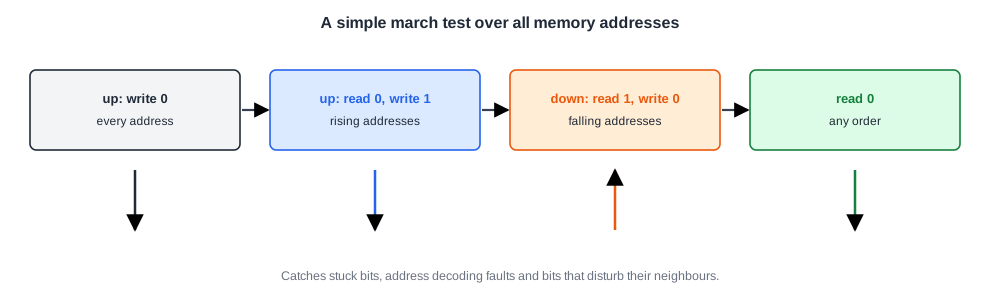
Memory tests deserve a word, because so much depends on memory working. A simple test writes a pattern and reads it back.
Better tests, such as march tests, walk through every address several times, writing and reading 0s and 1s in rising and falling address order. They catch stuck bits, addressing faults and bits that disturb their neighbours.
For external DRAM, the interface must first be trained: the controller adjusts the delays of each data line until it samples in the middle of the valid window. Training results are logged, because they also show how much timing margin the board and chip have.
Quick Check
Q: Why does bring-up print text on a serial port so early, before memories and high-speed interfaces?
Show Answer
A serial port is simple, needs few resources and gives programs a way to report what they are doing without the debugger. Every later test can print its progress and results, which makes the rest of bring-up much faster to run and to diagnose.
In Practice
Bring-up code is kept small, independent and well logged. Teams prepare it on an emulator or FPGA prototype before silicon, so that on the first day it is debugged code running on new hardware, not new code on new hardware. The same tests become the start of the smoke test suite in The Bring-Up Checklist and Smoke Tests.
Common Mistakes
Mistake #1: Starting with the full boot flow
The full flow depends on the ROM, flash and many blocks at once. Start from debugger-loaded code in SRAM.
Mistake #2: Enabling several features at once
When something breaks, nobody knows which change caused it. Add one feature at a time.
Mistake #3: No way around the boot ROM
A ROM bug without a bypass can stop bring-up. Provide a boot-mode pin, debugger boot and a patch mechanism.
Practice Exercise
Challenge: Order the Steps
Put these bring-up steps in a sensible order: boot Linux; print "hello" on the UART; read the JTAG ID; run a march test on DRAM; run a loop from on-chip SRAM; train the DRAM interface; enable the second core.
Hint
Each step should only need things already shown to work.
Solution
Read the JTAG ID; run a loop from on-chip SRAM; print "hello" on the UART; train the DRAM interface; run a march test on DRAM; enable the second core; boot Linux. The second core could also come before DRAM if its code runs from SRAM, but Linux needs DRAM and normally all cores working.
Summary
- First code is usually loaded by the debugger into on-chip SRAM, bypassing the boot ROM.
- The boot ROM is fixed in silicon; teams verify it heavily and provide bypass and patch paths.
- First tests climb a ladder: registers, SRAM code, timers, serial output, memory, flash boot, more cores, interfaces, operating system.
- March tests and DRAM training check memories and their timing margins.
- One feature at a time keeps the last change the first suspect.
