
I/O characterization measures how well a chip's interfaces drive and receive signals: whether outputs switch with the right timing and shape, whether inputs sample correctly with margin, and, for high-speed links, how much jitter and noise they can tolerate. The tools are eye diagrams, jitter measurements, bit error rate tests and margin scans. This article explains each and what they reveal.
7 min read | Intermediate
What You'll Learn
- Read an eye diagram and its height and width
- Distinguish random and deterministic jitter
- Explain bit error rate testing and bathtub curves
- Use margin scans to see a link's timing and voltage margin
Timing at the Pins
For slower parallel interfaces, the main checks are setup and hold at the inputs and output delay at the outputs, across voltage and temperature. A tester skews input edges against the clock until sampling fails, which shows the real setup and hold window of the pins. Signal quality matters too: rise and fall times, overshoot and ringing, and the noise caused when many outputs switch together.
Eye Diagrams
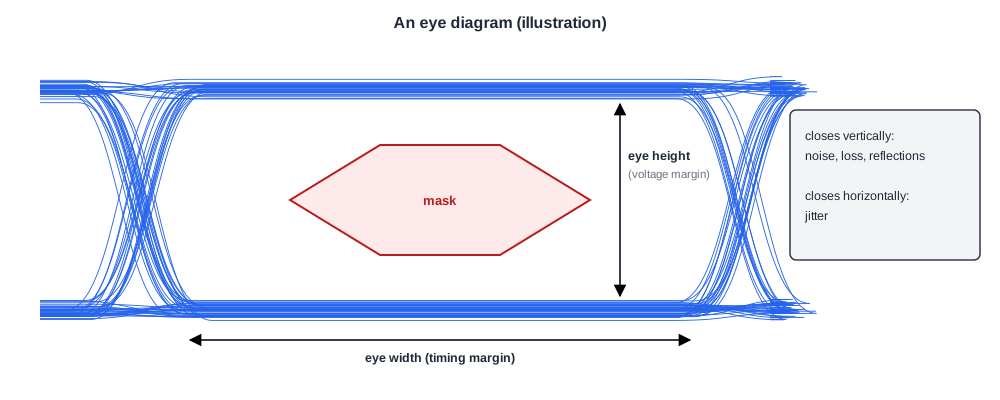
An eye diagram overlays many bit periods of a signal on top of each other. A good link shows a wide open "eye" in the middle, where the receiver samples.
- Eye height is the vertical opening: the voltage margin between a 1 and a 0.
- Eye width is the horizontal opening: the timing margin around the sampling point.
- A mask, defined by the interface standard, marks a region the signal must never enter.
Noise, reflections and losses close the eye vertically; jitter closes it horizontally. Many high-speed receivers have built-in eye-scan logic that measures the eye at the receiver, after equalization, where an external probe cannot reach.
Jitter
Jitter is the variation of edge timing from where it should be. It comes in two kinds:
- Random jitter, from noise, which follows a roughly Gaussian distribution and has no hard limit, so very rare large deviations happen.
- Deterministic jitter, from causes such as data patterns, crosstalk and supply noise, which is bounded.
Because random jitter is unbounded, the eye's opening depends on how rare an error is acceptable. That leads to bit error rates.
Quick Check
Q: Why does measuring the eye for a few seconds not prove the link will meet a very low error rate?
Show Answer
Random jitter has rare large excursions. A few seconds at high speed sees billions of bits, but the target error rate may be one in a trillion or less, so the rare edges that cause errors may simply not have appeared yet. Low error rates need long tests or extrapolation from the measured jitter distribution.
Bit Error Rate and Bathtub Curves

A bit error rate tester sends a known pattern and counts errors. Moving the receiver's sampling point across the bit period and measuring the error rate at each position gives a bathtub curve: high error rates near the bit edges, dropping steeply toward the centre.
The width of the bathtub at the target error rate is the real timing margin. Extrapolating the curve's slopes lets teams estimate margins at error rates too low to measure directly.
A useful statistical fact: to show an error rate below a target with about 95 % confidence when no errors are seen, roughly 3 divided by the target bits must be sent. For one error in 1012 bits that is 3 x 1012 bits.
Margin Scans
Memory interfaces and links that train their timing can also scan their own margin. The controller moves the sampling delay and reference voltage step by step and records where data still passes.

The result is an eye-shaped passing region per data line. A small region means a weak lane; a trained point far from the centre means the training settled poorly. Scans across parts, boards and temperatures show which lanes and which conditions limit the interface.
Quick Check
Q: A memory margin scan shows one data lane with a passing window half as wide as the others on every board. What does that suggest?
Show Answer
A consistent weakness tied to that lane, either in the chip, such as a routing or I/O circuit difference, or in the package or the common board design. Since it appears on every board, the chip or package is the first suspect, and the lane's signal path is compared with the others.
In Practice
I/O characterization results become settings and specifications: drive strengths, equalization values and timing parameters that products should use, and the electrical limits in the datasheet. They also feed the compliance testing of Interfaces, Compliance and Interoperability, where the standard's own electrical tests must be passed.
Common Mistakes
Mistake #1: Short error rate tests for very low targets
Rare errors need many bits. Plan test length from the target error rate.
Mistake #2: Probing only outside the receiver
After equalization the eye differs. Use on-chip eye scans where available.
Mistake #3: Characterizing one lane or one board
Margins differ by lane, board and temperature. Scan them all.
Practice Exercise
Challenge: Test Length
A link runs at 10 Gb/s and must show an error rate below 10-12 with about 95 % confidence. How many bits must be sent without error, and how long does that take? How long for 10-15?
Hint
About 3 / target bits.
Solution
3 x 1012 bits at 1010 bits per second take 300 seconds, five minutes. For 10-15 it is 3 x 1015 bits, 300,000 seconds, about 3.5 days, which is why very low error rates are estimated by extrapolating bathtub curves instead of measured directly.
Summary
- I/O characterization checks pin timing, signal quality, eyes, jitter and error rates.
- Eye height and width show voltage and timing margin; masks define forbidden regions.
- Random jitter is unbounded, so margins depend on the target error rate.
- Bathtub curves and the 3 / target rule size error rate tests; margin scans show per-lane margins.
