
A workaround avoids a silicon bug without changing the silicon: software stays away from the failing sequence, firmware changes a setting, microcode replaces a broken instruction flow, or a chicken bit turns off the feature that misbehaves. Most bugs found after tapeout ship with a workaround rather than waiting for a new stepping. This article describes the layers where workarounds live, how chicken bits are designed in, and how teams judge whether a workaround is good enough.
6 min read | Intermediate
What You'll Learn
- List the layers where a workaround can be applied
- Explain how chicken bits and configuration overrides work
- Judge a workaround by completeness, cost and deployment
- Explain why workaround hooks must be planned before tapeout
Layers of Workarounds
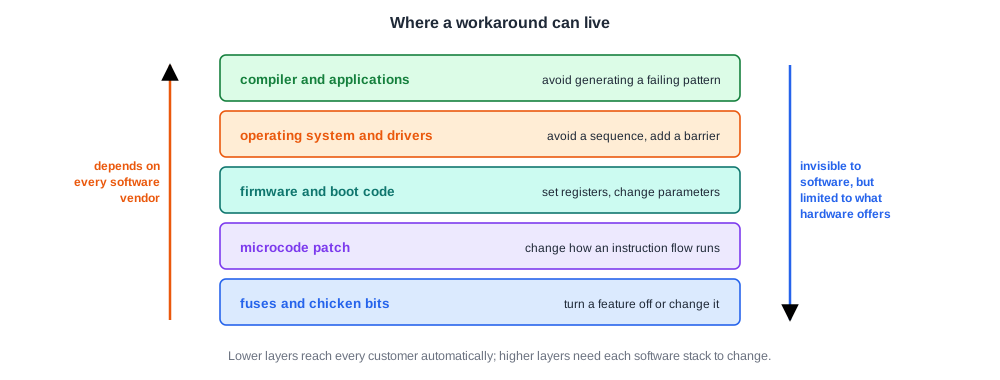
- Chicken bits and fuses: configuration bits that turn a feature off or change its behaviour.
- Microcode: processors with microcode can load a patch that changes how some instructions or flows execute.
- Firmware and boot code: set registers at start-up, change timing parameters, or avoid a configuration.
- Operating system and drivers: avoid a sequence, add a delay, or insert a barrier.
- Compiler and applications: avoid generating a failing instruction pattern.
The lower the layer, the more transparent the workaround is to software. The higher the layer, the more it depends on every software vendor applying it.
Chicken Bits
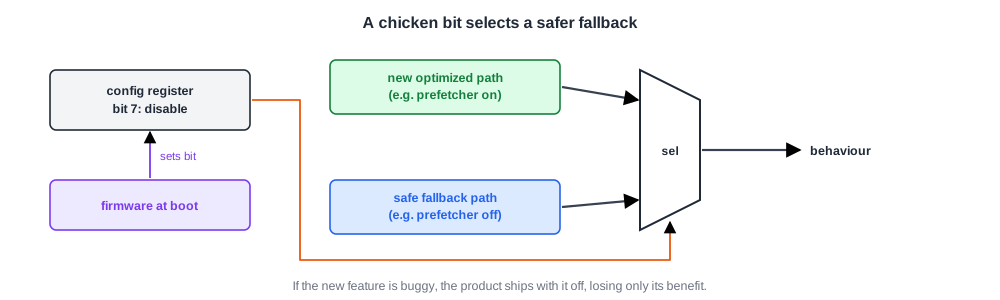
Designers add a disable or fallback control to new and risky features: a new prefetcher, a speculative shortcut, a power-saving mode. The bit selects between the new behaviour and a simpler, safer one.
If the feature turns out to be buggy, firmware sets the bit at boot and the product ships without that feature, losing only its benefit. The name reflects the purpose: a way to back out of a risky decision.
Chicken bits must be designed in before tapeout. A feature with no off switch has no hardware workaround, which is why planning them belongs in the validation plan.
Quick Check
Q: A new branch predictor feature causes rare wrong results. It has a chicken bit. What is the cost of using it?
Show Answer
The feature is turned off, so its performance gain is lost, perhaps a few percent on some workloads. The results become correct and no software change is needed. The fixed version can return in a later stepping.
Judging a Workaround
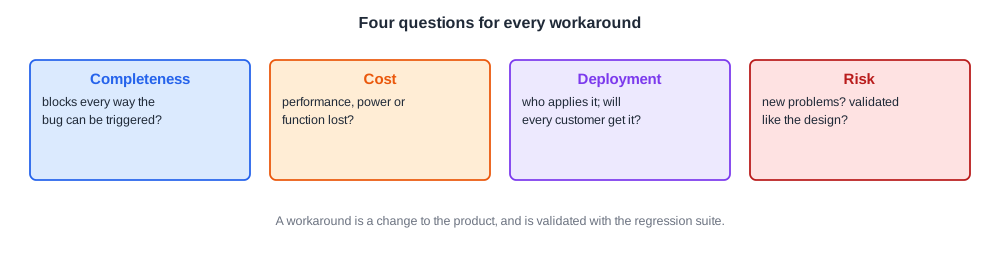
- Completeness: does it block every way the bug can be triggered, or only the one seen?
- Cost: how much performance, power or functionality is lost?
- Deployment: who has to apply it? A firmware setting from the chip vendor reaches every product; a compiler change depends on every user rebuilding.
- Risk: does it change behaviour elsewhere, and has it been validated as carefully as the original design?
A workaround is itself a change to the product and is validated like one: the failing test must pass, and the regression suite must show nothing else broke.
Quick Check
Q: A bug can be avoided either by a driver change or by a firmware setting with the same performance cost. Which is usually preferred, and why?
Show Answer
The firmware setting. It is applied by the platform for every operating system and driver, while a driver change must be made and shipped separately for each operating system, and older drivers would remain exposed.
In Practice
Each workaround is recorded with its bug, its layer and its cost, and becomes part of the erratum published for that stepping, as described in Errata. When no acceptable workaround exists, for example when the only option costs too much performance or relies on every application changing, the bug moves toward a silicon fix, discussed in Metal Fix or Full Respin.
Common Mistakes
Mistake #1: Shipping a new feature without an off switch
Add a chicken bit to risky features before tapeout.
Mistake #2: Blocking only the observed trigger
Analyse every path to the bug; a partial workaround leaves customers exposed.
Mistake #3: Not validating the workaround
Run the regression suite with the workaround applied.
Practice Exercise
Challenge: Choose a Workaround
A cache bug can be avoided three ways: a chicken bit that disables a prefetcher (3 % average performance loss), a microcode patch that adds a fence in one rare instruction flow (0.1 % loss), or a compiler change that avoids one instruction sequence (no loss). All three are complete. Which should be chosen, and why?
Hint
Weigh cost against deployment.
Solution
The microcode patch. It costs almost nothing and is delivered by the platform to every customer.
The compiler change costs nothing but only protects code rebuilt with the new compiler; existing binaries stay exposed. The chicken bit is the fallback if the patch cannot be made safe.
Summary
- Workarounds avoid a bug without new silicon, through hardware bits, microcode, firmware or software.
- Chicken bits turn risky features off and must be planned before tapeout.
- Workarounds are judged by completeness, cost, deployment and risk.
- Each workaround is validated and documented in the erratum.
