
Timers give an SoC its sense of time: the tick that lets an operating system share the processor between tasks, the delays that protocols depend on, and the alarms that wake a sleeping device. Watchdogs use a timer for a different purpose: to notice when software has stopped working, and to reset the chip before the product stays stuck. This article looks at the kinds of timer an SoC provides, how a system time base is built and kept consistent across cores and power states, how watchdogs work and how to design one that is hard to defeat by accident.
12 min read | Intermediate
What You'll Learn
- Describe the common kinds of timer in an SoC and what each is for
- Explain how a system time base is shared and kept running in sleep
- Explain how a watchdog detects a hung system and resets it
- Design a watchdog that cannot be disabled or fed by mistake
Timers in an SoC
Peripherals: UART, Timers and GPIO introduced the basic timer: a counter that increases every tick, and a compare register that raises an interrupt when the counter reaches it. An SoC has several kinds, each for a different job:
| Kind | What it does | Typical use |
|---|---|---|
| System timer | one shared, always-increasing time base, with a compare per hart | operating system tick, timeouts, timestamps |
| General-purpose timers | count up or down, reload, raise interrupts | delays, periodic tasks |
| Capture and compare channels | record when an input changes, or change an output at a set time | measuring pulses, generating precise signals |
| PWM | drive an output high for a set part of each period | motors, LED brightness, power supplies |
| Real-time clock | counts seconds from a 32.768 kHz crystal, stays on in sleep | date and time, alarms |
| Watchdog | resets the chip if software does not respond | recovering from hangs |
The System Time Base
Operating systems need one notion of time that every core agrees on. In RISC-V systems this is the mtime counter, a 64-bit value that increases at a constant rate. Each hart has its own compare register, mtimecmp, and gets a timer interrupt when mtime passes it. The privileged specification requires that mtime keep counting at a constant rate, which is what makes it usable as a clock. Software reads it directly as the time CSR, which is fast, so that programs can timestamp events cheaply.
Making that work in an SoC raises some practical problems.
A Constant Rate
The processor clock changes all the time, as frequency scaling raises and lowers it to save power, as Dynamic Voltage and Frequency Scaling explains. If the time base counted processor cycles, its rate would change too. So the system timer runs from a fixed reference clock, typically a crystal of tens of megahertz, independent of the processor's frequency. Reads from a core then cross from that clock domain into the core's domain, which needs a safe way to transfer a 64-bit value, such as a Gray-coded counter or a synchronizing handshake, as Clock Architecture and Clock Domain Crossings describes.
Agreement Between Cores
If each core had its own counter, they would drift apart, and a timestamp taken on one core could be later than one taken on another, after it. Systems therefore broadcast one counter value to all cores, or keep local copies that are periodically synchronized, so that all cores see the same time to within a few ticks.
Counting Through Sleep
When the chip sleeps, the main reference clock is often turned off to save power. The time base must keep counting anyway, or the system loses track of time. Common designs keep a counter running from the slow, always-on 32.768 kHz clock during sleep, and correct the fast counter on wake-up. The real-time clock keeps the date the same way, from a coin cell if necessary.
Quick Check
Q: A system timer counts at 24 MHz. How long does a 32-bit counter take to wrap around? And a 64-bit one?
Show Answer
32 bits: 232 / 24,000,000 = about 179 seconds, or 3 minutes. 64 bits: 264 / 24,000,000 = about 7.7 x 10¹¹ seconds, roughly 24,000 years. A 64-bit counter never wraps in practice, which removes a whole class of bugs.
The Operating System Tick
An operating system needs regular interrupts to share the processor fairly: every few milliseconds, the scheduler checks whether another task should run. Older systems used a fixed periodic tick, for example 1,000 interrupts per second. Each one wakes the processor, even when there is nothing to do, which wastes power. Modern systems are tickless: they program the compare register for the next event actually due, and the processor can stay asleep until then. That is one reason a 64-bit compare value is useful: the next event can be far in the future.
Watchdogs
Software can hang: an infinite loop, a deadlock between tasks, a corrupted stack, a peripheral that never answers. In a phone, the user can restart it. In a car's control unit, a pacemaker or a satellite, nobody can, and the product must recover by itself. A watchdog timer provides that recovery.
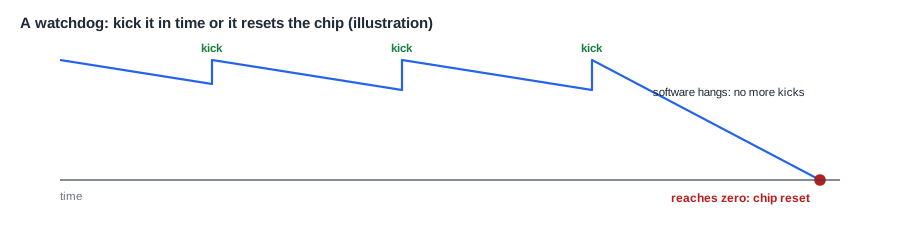
A watchdog is a counter that counts down from a set value. Software must kick it, also called feeding or servicing it, by writing to a register, before it reaches zero. Each kick reloads the counter. If software hangs, the kicks stop, the counter reaches zero, and the watchdog resets the chip. The system restarts in a known state, and records the reason, so that it can report the problem.
The timeout is chosen from how long the system can safely be unresponsive, and how long the normal work between kicks takes. A timeout that is too short resets a healthy system under load. One that is too long leaves a hung system stuck for too long.
Kicking in the Right Place
Where software kicks the watchdog decides what it can detect. A kick from a timer interrupt only proves that the interrupt handler runs, while the main task could be stuck forever. A better design kicks from the main loop, only after checking that every important task has made progress since the last kick. Each task sets a flag when it completes its work, and the main loop kicks only if all the flags are set, then clears them.
Designing a Watchdog That Can't Be Defeated by Accident
Software bugs can defeat a watchdog: a runaway loop that happens to contain the kick, or a stray write that disables it. Good watchdogs defend against this:
- Unlock sequences. A kick must write a specific value, or two values in order, such as 0x5555 then 0xAAAA, which random code is unlikely to produce.
- Lock after enable. Once enabled, the watchdog cannot be turned off until the next reset.
- Window mode. A kick is accepted only within a time window: too early is also an error. A runaway loop that kicks constantly is caught.
- Independent clock. The watchdog runs from its own oscillator, so a failed main clock doesn't stop it.
- Early warning interrupt. An interrupt shortly before the reset lets software save diagnostic information.
Where Is This Used?
Watchdogs are required in safety-critical products. Automotive control units often have an internal watchdog plus an external one in a separate chip, so that a fault in the SoC can't disable both. Servers have watchdogs managed by a separate management controller, which can reset a hung server remotely. Even consumer devices use them: a smart speaker that freezes reboots itself rather than waiting for the user to unplug it. Safety and Reliability puts watchdogs in the context of other safety mechanisms.
Reset Behavior
A watchdog reset is one of several reset causes, along with power-on, the reset pin and software requests. The reset controller records which one happened, in a register that survives the reset, so that boot code can tell a normal start from a recovery, as Reset Architecture and Reset Domain Crossings explains. After a watchdog reset, firmware may log the event, report it, and enter a safe mode. A system that keeps being reset by its watchdog has a real problem, and should not just reset forever; counting recent resets and taking a different path after several is common.
Quick Check
Q: A watchdog is kicked from a periodic timer interrupt every 10 ms, with a 100 ms timeout. The main control task deadlocks. What happens?
Show Answer
Nothing: the timer interrupt still runs and keeps kicking, so the watchdog never fires, and the deadlocked system stays stuck. The kick should depend on proof that the main task is still making progress.
Time Versus Cycles
RISC-V keeps two different counters for two different questions. The time counter answers "how much real time has passed", at a constant rate, and the RISC-V manual explicitly calls it a wall-clock time base rather than a cycle counter. The cycle counter answers "how many clock cycles has this core run", and its rate changes with the core's frequency, or stops while the core sleeps. Performance measurements usually want cycles, because they show how much work the core did. Timeouts and scheduling want time, because the outside world runs on seconds. Confusing the two is a common bug: a delay loop calibrated in cycles takes a different time whenever the frequency changes.
Precise timing for external signals is another case where the counter's source matters. A PWM output for a motor, or a capture timer measuring a sensor's pulse, needs a stable clock, so these timers are often fed from a dedicated peripheral clock, and their accuracy is set by its crystal.
Those clocks are listed in the spec for every timer, along with their accuracy, so the drivers and the hardware agree on every rate.
Checking Timers
Timer bugs tend to appear at boundaries, so tests aim there. They write a compare value just behind the current time and check that the interrupt fires at once, set values far in the future, and cross the point where the low 32 bits wrap into the high 32 bits, while another core reads the time. They change the processor's frequency during a long delay and check that real time stays correct. Watchdogs get their own tests: a kick in each part of the window, a kick with the wrong unlock value, an attempt to disable it after locking, and a deliberate hang, with a check that the reset cause register reports a watchdog reset afterwards. Each of these is cheap in simulation and expensive to discover in the field.
Common Mistakes
Mistake #1: Counting the time base in processor cycles
If the processor clock changes with frequency scaling, a cycle-based time base changes rate too. Run the system timer from a fixed reference clock.
Mistake #2: Kicking the watchdog from an interrupt alone
An interrupt can keep running while the real work is stuck. Kick only after confirming that every critical task has made progress.
Mistake #3: Letting software disable the watchdog
A bug that can turn the watchdog off defeats its purpose. Lock it once enabled, and use an unlock sequence for kicks.
Practice Exercise
Challenge: Choose a Watchdog Timeout
A motor controller's main loop normally takes 2 ms, and up to 15 ms under the heaviest load. These numbers are assumptions for this exercise. The motor must be stopped within 100 ms of a software failure, and the reset and restart take 30 ms. The watchdog runs from a 32 kHz clock. (a) What range of timeouts would work? (b) Choose a value, and give the counter's reload value. (c) Would you use window mode, and with what window?
Hint
The timeout must be longer than the slowest normal loop, and short enough that timeout plus restart is within 100 ms.
Solution
(a) Longer than 15 ms, with a margin, and at most 100 - 30 = 70 ms. (b) For example 50 ms: 0.05 x 32,000 = 1,600 counts. (c) Yes: a loop that kicks faster than 2 ms is suspicious, so reject kicks earlier than about 1 ms after the last one, which catches a runaway loop that kicks constantly.
Summary
- An SoC has several kinds of timer: a system time base, general timers, capture and compare, PWM, a real-time clock and a watchdog.
- The system time base must count at a constant rate, agree across cores and keep counting through sleep.
- Tickless operating systems program the next deadline instead of waking on every tick.
- A watchdog resets the chip if software stops kicking it, and records the cause.
- Good watchdogs use unlock sequences, locking, windows and an independent clock, and are kicked only on proof of progress.
