
A memory bandwidth budget adds up how much data every block of an SoC needs to move to and from DRAM in a given use case, and compares the total with what the memory system can really deliver. It is one of the first calculations an architect makes, because DRAM bandwidth is expensive, shared by everyone, and very hard to add once the chip is built. This article shows how to build a budget step by step, from the requirements of each block, through the efficiency of the memory, to the margin and the worst case, with a complete worked example.
11 min read | Intermediate
What You'll Learn
- Calculate the bandwidth of display, camera, video and processor traffic
- Convert a DRAM's peak bandwidth into a realistic sustained figure
- Build a budget for a use case and judge its margin
- Identify ways to reduce bandwidth when the budget does not close
Why a Budget
Latency and Bandwidth showed how to calculate the bandwidth a display needs. A real SoC has many such clients at once: the display reading frames, the camera writing them, a video encoder reading and writing, the GPU drawing, and the CPUs running software. All of them share a few DRAM channels. If together they ask for more than the memory can deliver, something must wait, and for real-time clients, waiting means visible or audible failure.
The budget answers three questions early, when the answers are cheap to act on: how many DRAM channels, at what speed? Is there enough margin for the worst case? And which clients need priority, as Arbitration and Quality of Service describes?
Step 1: List the Use Cases
Bandwidth depends on what the product is doing, so the budget is built per use case, from From Use Cases to Requirements. A phone might have: video playback, video recording, gaming, a video call, and standby. Each has different clients active at different rates. The budget must close for every one of them, and the hardest one, often recording 4K video while showing a preview and running the camera's processing, sets the requirement.
Step 2: Calculate Each Client
Most real-time clients are simple to calculate from their format:
display read     = width x height x bytes per pixel x frames per second
camera write     = width x height x bytes per pixel x frames per second
A 1,920 x 1,080 display at 4 bytes per pixel and 60 frames per second reads about 0.5 GB/s. A camera writing frames of the same size at the same rate also needs about 0.5 GB/s. These numbers rise quickly: a 4K display (3,840 x 2,160) at 120 frames per second needs about 4 GB/s on its own.
Other clients need more thought:
- Video encoders and decoders read reference frames, often several times each, and write the output. Their traffic is usually a few times the raw frame rate, and depends on the codec and its settings. Vendors provide figures for their IP.
- GPUs read textures and geometry and write rendered images. Their need depends on the content, and they will use as much as they get, so they are budgeted as what's left, with a floor for acceptable frame rates.
- CPUs are measured by running real software on a model, or estimated from their cache misses: misses per second times the line size.
- DMA and I/O, such as storage or network transfers, are set by their interface rates.
Write traffic often costs more than its byte count suggests, because a partial write to a line may force a read first, and DRAM pays a penalty for switching between reads and writes, as Memory Controllers and Scheduling explains.
Quick Check
Q: A display is 2,560 x 1,440 pixels at 4 bytes per pixel and 90 frames per second. How much bandwidth does it read?
Show Answer
2,560 x 1,440 x 4 x 90 = 1,327,104,000 bytes per second, about 1.33 GB/s.
Step 3: Find the Real Supply
The memory's peak bandwidth comes from its width and data rate. A 32-bit interface at 4,266 million transfers per second gives 4,266,000,000 x 4 bytes, about 17 GB/s. But as DRAM Organization explains, peak is reached only if the data bus is busy every cycle. Refresh, row conflicts, bank conflicts and read-write turnarounds leave gaps. A realistic efficiency on mixed traffic is often 60 to 80 percent, and much lower for random access. In a model of one DRAM channel, a single sequential stream reached about 84 percent, random accesses about 39 percent, and two interleaved streams between 13 and 76 percent depending on the scheduler. These numbers show why the efficiency must be estimated from the real traffic mix, not assumed.
For a budget, architects use a sustained figure, such as 70 percent of peak, checked with simulations of the actual traffic. In the example above, that is about 12 GB/s.
Step 4: Add It Up
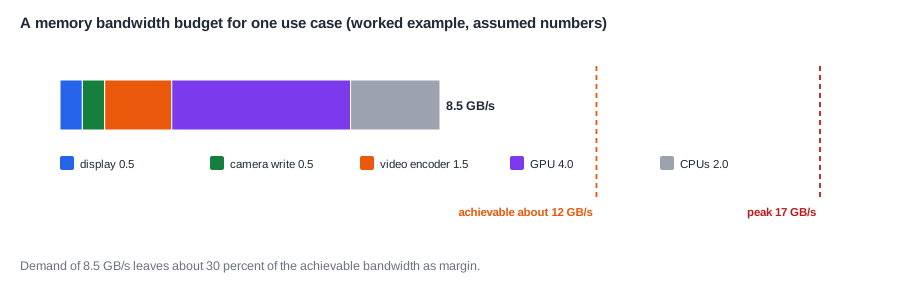
Here is a worked budget for one use case, video recording with a live preview, on that 17 GB/s memory. The client figures are assumptions for this example:
| Client | Bandwidth | Kind |
|---|---|---|
| display (preview) | 0.5 GB/s | real-time |
| camera write | 0.5 GB/s | real-time |
| video encoder | 1.5 GB/s | real-time, with buffers |
| GPU (user interface) | 4.0 GB/s | flexible |
| CPUs | 2.0 GB/s | latency-sensitive |
| total | 8.5 GB/s |
Demand is 8.5 GB/s against a sustained supply of about 12, so the budget closes with about 30 percent margin. That margin isn't waste. It absorbs the bursts, the variation in traffic, and the effects that the simple numbers leave out, such as the extra traffic when a cache thrashes. Many teams want at least 20 to 30 percent margin at this stage, since the numbers tend to grow as the design firms up.
Step 5: Check the Peaks
Averages hide moments. A display reads continuously, but a GPU may need its whole frame's work in a fraction of each frame period, and a camera may deliver a frame in a burst. If several bursts coincide, the instantaneous demand may exceed the supply for a while. Real-time clients survive that only if their buffers cover the gap. So the budget is checked with a time-based simulation of the traffic, and the buffer sizes of real-time clients are chosen to cover the longest expected delay.
Where Does This Matter?
A bandwidth budget is often the main reason a phone chip has a particular number of DRAM channels. Each channel adds pins, package size, power and cost, so architects add exactly as many as the hardest use case needs, plus a margin. If a late feature, such as a higher camera frame rate, breaks the budget, the team must reduce traffic elsewhere, because adding channels after the package is designed is rarely possible.
When the Budget Doesn't Close
If demand exceeds supply, there are two directions: more supply, or less demand.
More supply means more channels, a faster DRAM type, or wider interfaces. Each costs pins, power and money.
Less demand is often cheaper, and there are several well-known ways to get it:
- Compression. Frame buffers are compressed losslessly by the blocks that write them and decompressed by the blocks that read them. Display and GPU traffic can often be cut substantially this way.
- On-chip memory. A system cache, or a dedicated buffer, keeps data that is used again near the blocks, so it never goes to DRAM, as On-Chip SRAM, Scratchpads and System Caches explains.
- Direct paths. Blocks pass data to each other directly, rather than writing it to DRAM and reading it back, such as a camera pipeline feeding the encoder.
- Lower resolution or rate where the user won't notice, such as a preview at lower resolution than the recording.
- Better locality, through tiled data layouts that make DRAM accesses more efficient.
Power Follows Bandwidth
Every byte moved to and from DRAM costs energy, in the controller, the PHY, the wires and the DRAM itself, and moving data off chip costs far more energy per bit than moving it on chip. In a phone, DRAM traffic can be a significant part of the power when the screen and camera are active. So a bandwidth budget is also a power budget. Reducing traffic for performance reasons usually saves power too, which is why compression and on-chip buffers appear even on chips with spare bandwidth.
Quick Check
Q: In the worked example, the camera is upgraded to write 4K frames at 60 frames per second, at 2 bytes per pixel. What is its new bandwidth, and does the budget still close with 20 percent margin?
Show Answer
3,840 x 2,160 x 2 x 60 = about 1.0 GB/s, up from 0.5. Total demand becomes about 9.0 GB/s. Against 12 GB/s sustained, that is 75 percent use, with 25 percent margin: it still closes, but the encoder's traffic would also rise for 4K, which needs checking.
Keeping the Budget Alive
A budget isn't done once. It starts as a spreadsheet early in the project, with estimates for every client. As IP is chosen, the vendors' figures replace the estimates. As the design matures, a performance model of the interconnect and memory controller replaces the spreadsheet's simple efficiency factor, as System Performance Modeling describes. Finally, the real chip is measured, with hardware counters in the memory controller that report the traffic of each client. Each stage catches errors in the one before it.
Real chips also have hardware that helps check the budget in the field: counters in the interconnect and memory controller that count bytes per client, which firmware can read while the product runs a real use case. Those measurements often reveal clients that use more bandwidth than anyone expected.
The budget should be owned by one person, reviewed whenever a feature changes, and kept with the reasons for each number. A frame rate raised by marketing, or a GPU workload that turns out heavier than expected, should show up in the budget the same day, not in a failed test months later. Treated this way, the budget is one of the most useful documents an SoC team keeps.
Common Mistakes
Mistake #1: Comparing demand with peak bandwidth
Peak is never reached on real traffic. Compare with a sustained figure based on the traffic mix, typically well below peak.
Mistake #2: Budgeting only one use case
The use case you checked may not be the hardest. Build the budget for every major use case, and find the worst one.
Mistake #3: Ignoring peaks within a frame
An average that fits can still fail when bursts coincide. Simulate the traffic over time, and size real-time buffers to cover the longest delay.
Practice Exercise
Challenge: Close the Budget
A tablet has a 2,560 x 1,600 display at 4 bytes per pixel and 120 frames per second, a GPU needing 6 GB/s, CPUs needing 3 GB/s and a video decoder needing 1 GB/s. These numbers are assumptions for this exercise. The memory is 64 bits wide at 3,200 million transfers per second, with 70 percent efficiency. (a) What is the display's bandwidth? (b) What is the total demand? (c) What is the sustained supply? (d) Does it close with 20 percent margin? (e) If display compression saves 40 percent of the display and GPU traffic, does it close then?
Hint
Peak = 3,200 million x 8 bytes. A 20 percent margin means demand at most 80 percent of the sustained supply.
Solution
(a) 2,560 x 1,600 x 4 x 120 = about 1.97 GB/s. (b) 1.97 + 6 + 3 + 1 = 11.97 GB/s. (c) 25.6 GB/s peak x 0.7 = 17.9 GB/s. (d) 11.97 / 17.9 = 67 percent use: it closes, with 33 percent margin. (e) Display and GPU fall by 40 percent, from 7.97 to 4.78 GB/s, so the total becomes 8.78 GB/s, 49 percent use. That leaves room for a larger GPU workload or saves power.
Summary
- A bandwidth budget adds up every client's DRAM traffic for each use case and compares it with realistic supply.
- Display and camera traffic follow from resolution, bytes per pixel and frame rate.
- Sustained supply is well below peak; in one model it ranged from 13 to 84 percent depending on the traffic.
- Keep a margin, check peaks within a frame, and size real-time buffers to cover delays.
- If the budget doesn't close, reduce traffic with compression, on-chip memory and direct paths, before adding channels.
