
Most SoCs today have several processor cores, and often several different kinds: a cluster of fast application cores, a group of efficient cores, a real-time core for control, and small cores inside accelerators. Integrating them means deciding how they share memory, how their caches stay consistent with each other and with devices, how they communicate, and how they are started and powered. This article explains coherent clusters, how coherence extends to the rest of the chip, the alternative of non-coherent sharing, inter-processor communication, and heterogeneous designs.
11 min read | Intermediate
What You'll Learn
- Describe a coherent CPU cluster and how it connects to an SoC
- Explain I/O coherence and when devices need it
- Compare coherent and non-coherent ways of sharing data between cores
- Describe mailboxes, boot sequencing and heterogeneous core arrangements
Why Several Cores
Multicore Processors and Shared Memory explained why chips moved to many cores: power limits stopped single cores from getting much faster, so extra transistors went into more cores. For an SoC designer, multicore brings practical questions that the architecture articles left aside: how the cores are packaged into clusters, how the cluster plugs into the rest of the chip, and how cores of different kinds work together.
The Coherent Cluster
Application cores usually come as a cluster: several cores, each with private L1 caches, and often a private L2, plus a shared cache and the logic that keeps all those caches consistent:
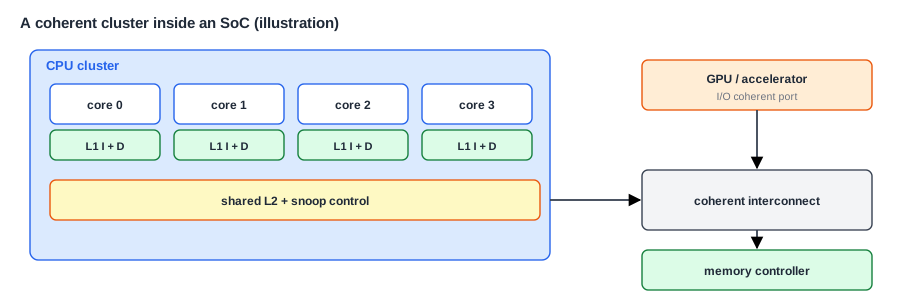
Within the cluster, a coherence protocol such as MESI keeps every core's view of memory consistent, as Cache Coherence Protocols describes. A snoop control unit or a directory tracks which caches hold which lines. Software sees one shared memory, and threads can run on any core. A cluster is usually bought from a processor vendor as one block, configured for the number of cores and cache sizes, as Buy, Reuse or Build: Choosing IP discusses.
The cluster connects to the rest of the SoC through one or more ports. If nothing else on the chip caches shared data, a simple port is enough. If other blocks do, the port must take part in a coherent protocol on the SoC's interconnect, such as Arm's ACE or CHI, or TileLink with its coherence messages in RISC-V systems.
Coherence Beyond the Cluster
Devices also read and write memory, through DMA. That creates the cache problem of DMA Engines: the newest data may be in a core's cache, where the device can't see it. There are three ways for a device to relate to the cores' caches:
- Non-coherent. The device ignores the caches, and drivers clean and invalidate caches by hand. This is the cheapest in hardware and the most error-prone in software.
- I/O coherent, also called one-way coherent. The device's reads and writes snoop the cores' caches, so it always sees the newest data, and its writes invalidate stale cached copies. The device has no cache of its own that the cores must snoop. This suits DMA engines, network and storage controllers.
- Fully coherent. The device has its own caches, and takes full part in the protocol, so the cores can snoop it too. GPUs and some accelerators that share complex data structures with the CPU use this, at a significant cost in hardware.
An I/O coherent device is the common middle ground: it removes most of the driver bugs, at modest cost. The snoops it causes add traffic to the cores' caches, so a very busy DMA engine can slow the cores down, and some data, such as a large video buffer the CPU never touches, is better left non-coherent.
Quick Check
Q: A network controller writes received packets into memory. With an I/O coherent port, does the driver need to invalidate its cache before reading the packet?
Show Answer
No. The controller's writes snoop the cores' caches and invalidate any stale copies, so the core's next read misses and fetches the new data from memory or the system cache. Without coherence, the driver would need to invalidate those lines itself.
Sharing Without Coherence
Not every core needs to be coherent with the others. A real-time core controlling a motor, and an application cluster running Linux, may share only a few buffers and messages. Making them coherent would add hardware and make the real-time core's timing less predictable. So they often share memory non-coherently, following simple rules: the sender writes the data, cleans it out of its cache or uses uncached memory, then tells the receiver, which invalidates its copy before reading. These rules are easy to get wrong, so they are usually wrapped in a small library both sides use.
Communicating Between Cores
Cores need a way to signal each other. The basic hardware for this is:
- Software interrupts: one core writes a register that raises an interrupt on another, as Interrupt Controllers describes.
- Mailboxes: a small block with message registers or FIFOs, and an interrupt to the receiving core. One core writes a message, the other is interrupted and reads it.
- Hardware semaphores or atomic operations, to protect shared resources between cores that are not coherent.
- Shared memory for bulk data, with a message saying where it is.
A common pattern combines them: a ring buffer in shared memory holds the messages, and a mailbox interrupt announces that new ones have arrived. Frameworks such as OpenAMP and RPMsg standardize this between Linux and a real-time core.
Heterogeneous Cores
Many SoCs mix kinds of cores:
- Big and little cores with the same instruction set, so that the operating system can move a task from a fast core to an efficient one and back, depending on load. They are coherent with each other, and the scheduler decides where each task runs.
- Application and real-time cores, often with different instruction sets or configurations, running different software, connected through mailboxes.
- Controller cores inside other blocks: a power manager, a security processor, a core inside a modem or an image processor. Each runs its own firmware.
A phone chip may contain more than a dozen cores in total, of which the user only knows about the application ones. Each of the others has firmware that must be built, loaded and updated.
Where Is This Used?
Big and little cores are standard in phones and laptops, with operating systems that learn which tasks need speed. Automotive chips combine application clusters for the dashboard with lockstep real-time cores for safety-critical control, isolated from each other by firewalls. RISC-V has made it easy to add small control cores everywhere, and many SoCs now contain several RISC-V management cores alongside their main processors.
What Sharing Costs
Coherence makes sharing correct, but every shared line still has to travel. When one core writes a line that another core holds, the protocol must invalidate the other copy, and when the second core reads it again, the line must come back across the cluster or across the chip. Within a cluster, that takes tens of cycles. Between clusters, or between dies in a multi-die package, it can take hundreds. Software that passes data between cores constantly, such as a lock that many threads fight over, spends much of its time waiting for these transfers.
The layout of the chip therefore shapes how software should be written. Threads that share a lot of data run best on cores in the same cluster, which share an L2 cache. Operating systems learn the topology at boot, from firmware tables, and use it when they place threads. On large chips, memory may also be closer to some cores than others, which is called non-uniform memory access, or NUMA, and the operating system tries to keep each thread's data in the memory near its core.
For the SoC architect, the lesson is that cluster size and the interconnect between clusters are performance decisions. A design with one large cluster shares data cheaply but is harder to build and to power down in pieces. A design with several small clusters saves power and scales more easily, but makes sharing between them slower. The right choice depends on the software the product will run, which is why architects study real workloads, and how their threads share data, before choosing a cluster layout.
Booting and Powering Several Cores
At reset, usually only one core starts: the boot core. It runs the boot code in Boot ROM and the Boot Flow, sets up memory, and then releases the other cores. They may wait in a loop for a signal, or be held in reset until the boot core lets them go, with a start address. Each core's ID, mhartid in RISC-V, lets shared boot code take a different path on each core.
Each core, and each cluster, is usually in its own power domain, so idle cores can be switched off. A core being powered down must first clean its caches, so that no modified data is lost, and leave the coherence protocol. A core being powered up must rejoin it with empty caches. This sequence involves the core, the cluster logic and the power controller, and it is a classic source of hard bugs, as Power Domains and Power Management explains.
Debugging Several Cores
A multicore system needs debug support that can see all cores. A debug network lets a debugger halt cores together, so that one core stopping at a breakpoint stops the others before the state changes, and a trace system records what each core did, with timestamps from a common time base. Without that, bugs that come from the interaction between cores are very hard to find.
Quick Check
Q: A core in a coherent cluster is to be powered off. Why must it clean its caches first?
Show Answer
Its caches may hold modified lines that exist nowhere else. Switching off the power would destroy them, so they must be written back to the shared cache or memory first, and the core must leave the coherence protocol so that no one sends it snoops while it is off.
Common Mistakes
Mistake #1: Assuming every core is coherent
A real-time core or an accelerator's core may not be. Know which cores and devices are coherent with which, and use cache maintenance or uncached memory for the rest.
Mistake #2: Making everything coherent
Coherence costs hardware, snoop traffic and predictability. Large buffers that only one side uses, and real-time cores, are often better left out.
Mistake #3: Powering off a core without cleaning it
Modified data in its caches is lost, and other cores may wait forever for snoop responses. Follow the full power-down sequence.
Practice Exercise
Challenge: Plan the Sharing
An SoC has a 4-core application cluster running Linux, a real-time core running a motor loop, a camera image processor that writes frames, and a network controller. Decide for each pairing how they should share data, and why: (a) the cores within the cluster; (b) the cluster and the network controller; (c) the cluster and the image processor's 30 MB frames, which the cluster only passes to the display; (d) the cluster and the real-time core, which exchange 100-byte commands 1,000 times per second.
Hint
Consider how much data, how often, and whether timing must be predictable.
Solution
(a) Fully coherent within the cluster: threads share everything. (b) I/O coherent: packets are small and frequent, and coherence removes driver bugs. (c) Non-coherent: the frames are huge, the CPU never reads them, and snooping them would only add traffic. (d) Non-coherent shared memory with a mailbox interrupt: a small amount of data, and the real-time core's timing stays predictable.
Summary
- Application cores come as coherent clusters with private caches and a shared level, joined to the SoC by a coherent or simple port.
- Devices can be non-coherent, I/O coherent or fully coherent; I/O coherence removes most DMA cache bugs at modest cost.
- Real-time cores often share memory non-coherently, with clear cache rules.
- Cores communicate through software interrupts, mailboxes, semaphores and shared memory.
- One core boots first and releases the others; cores powering down must clean their caches and leave coherence.
