
The interconnect is the part of an SoC that carries every transaction between the blocks that start them and the blocks that answer them. Its structure decides how many transfers can happen at once, how far data must travel, and how well the chip scales as blocks are added. There are three basic structures: a shared bus, a crossbar, and a network-on-chip. This article explains each, measures how a bus and a crossbar compare under load, works through what each costs, and explains how real chips combine them into a hierarchy.
12 min read | Intermediate
What You'll Learn
- Describe how a shared bus, a crossbar and a network-on-chip work
- Compare their throughput under load
- Explain how their cost in area and wiring grows with size
- Describe how real SoCs build an interconnect hierarchy
The Job of an Interconnect
Buses and Transactions introduced the roles: managers (also called masters) start transactions, and subordinates (also called slaves) answer them. A processor, a DMA engine and a display controller are managers. Memories and device registers are subordinates. The interconnect connects them: it looks at each transaction's address, routes it to the right subordinate, carries the data, and returns the response.
Two numbers describe how good an interconnect is: how many transfers it can carry per cycle, its throughput, and how long each one takes, its latency. Latency and Bandwidth defines both. The three structures below trade these against area, wiring and complexity.
The Shared Bus
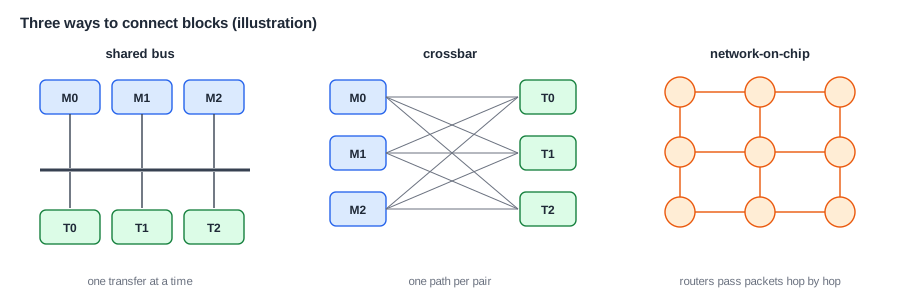
In a shared bus, all managers and subordinates connect to one set of wires. Only one transfer can use the bus at a time, so an arbiter decides which manager goes next, as Arbitration and Quality of Service explains. The bus is simple and small: one set of wires, one arbiter, and a decoder for the addresses.
Its limit is obvious: the whole chip shares one transfer per cycle. As more managers join, each gets a smaller share, and each waits longer. Long shared wires that reach every block are also slow and power-hungry, which limits the clock frequency. Shared buses were the norm in early SoCs, and they are still used for slow peripherals, where a simple bus such as APB serves many registers that are accessed rarely.
The Crossbar
A crossbar gives every manager its own path to every subordinate. Several transfers can happen at once, as long as they go to different subordinates. If two managers want the same one, an arbiter for that subordinate picks one, and the other waits. A crossbar is like a set of multiplexers: in front of each subordinate, a multiplexer chooses among the managers.
A model shows the difference. Four managers each sent requests to four subordinates chosen at random, and both structures were simulated for 100,000 cycles:
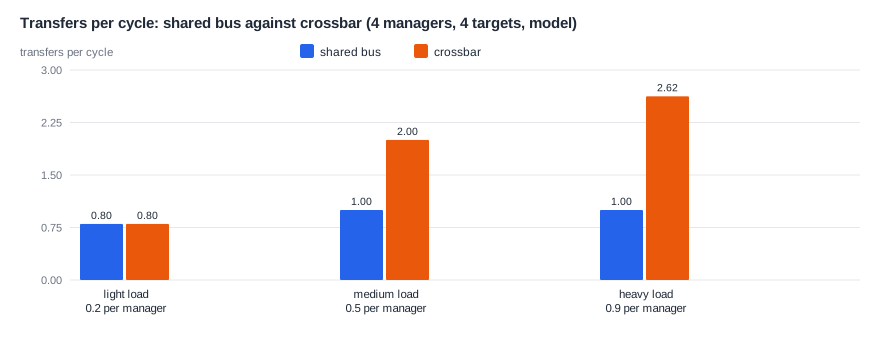
At light load, both carry everything that is offered. As the load rises, the bus saturates at its limit of one transfer per cycle, and requests pile up. The crossbar carries 2 per cycle at medium load, and about 2.6 at heavy load. It doesn't reach 4, because random requests sometimes collide on the same subordinate, and then one must wait. Real traffic is less random, often concentrated on one memory, which narrows the gap.
What a Crossbar Costs
The cost grows quickly. A crossbar with M managers and S subordinates has M x S paths, and each subordinate has an M-input multiplexer. Doubling both multiplies the logic by about four. Worse, the wires must reach across the whole crossbar, which becomes hard to lay out and hard to run at high clock speed. Crossbars therefore work well up to roughly ten or twenty ports, and many SoCs use several small crossbars rather than one large one. In practice, a crossbar is usually sparse: not every manager needs every subordinate, and leaving out unneeded paths saves area.
Quick Check
Q: A crossbar has 4 managers and 4 subordinates, and each transfer carries 64 bits. How many manager-to-subordinate paths does it have? What happens if it grows to 8 by 8?
Show Answer
4 x 4 = 16 paths. At 8 x 8 it has 64, four times as many, each 64 bits wide plus control. That growth is why large chips stop using a single crossbar.
The Network-on-Chip
A network-on-chip (NoC) borrows ideas from computer networks. Each block connects to a network interface, which turns its transactions into packets: a header with the destination and the request type, followed by the data. The packets travel through routers connected by short links, hop by hop, to the destination, where the response is packed and sent back.
The common layouts, or topologies, include a ring, where each router links to two neighbors, and a mesh, a grid in which each router links to up to four. Each link is short and runs at a high clock. Many packets can travel at once in different parts of the network, so total bandwidth grows as the network grows. The same design of router is reused, so adding a block means adding a router, not redesigning everything.
The costs are latency and complexity. Each hop adds a cycle or more, so a request across a large mesh may take 10 to 20 cycles before it reaches memory. Routers need buffers and logic to choose paths. And the network must avoid deadlock, a situation where packets wait for each other in a circle and nothing moves. NoCs prevent this with routing rules, such as always going in the X direction first and then Y, and with separate virtual channels for requests and responses.
Comparing the Three
| Property | Shared bus | Crossbar | Network-on-chip |
|---|---|---|---|
| Transfers at once | one | one per subordinate | many, across the network |
| Latency | low, if not busy | low | grows with distance in hops |
| Area growth | small | about managers x subordinates | about the number of routers |
| Long wires | yes, across the chip | yes, across the crossbar | no, only short links |
| Good for | slow peripherals | a cluster of up to about 10 to 20 ports | large chips with many blocks |
A Real Hierarchy
A real SoC uses all three, in layers. The CPU cluster has its own internal interconnect to its caches. A high-bandwidth fabric, often a crossbar or a NoC, connects the cluster, the GPU, accelerators and the memory controllers. A lower-speed fabric connects medium-speed devices, such as USB and storage. And a simple peripheral bus connects many small registers through a bridge, as Buses and Transactions shows. A small example SoC used in this tutorial has a crossbar with one manager and two subordinates, and an APB bus behind a bridge for its peripherals. A large phone chip might have a dozen fabrics, joined by bridges.
Each layer runs at the speed and width it needs. The fast fabric may be 256 bits wide at a high clock, and the peripheral bus 32 bits at a fraction of it. Bridges between them convert protocols, widths and clock domains, which adds latency, so a block's place in the hierarchy decides how fast the CPU can reach it.
Where Is This Used?
Interconnects are a market of their own. Companies sell configurable NoC IP, and processor vendors provide standard interconnects for their cores. Large server chips use mesh networks of dozens of stops, with a slice of the shared cache at each stop, as Snooping vs Directory Coherence describes. Chips built from several dies extend the network across them, with die-to-die links, as Chiplets, Packaging and System Partitioning explains.
Protocols on Top
The structure carries a protocol: the rules for how a transaction is expressed. AXI, from Arm's AMBA family, is the most common in SoCs. It has separate channels for read addresses, read data, write addresses, write data and write responses, which lets reads and writes proceed independently, and it supports bursts and multiple outstanding transactions. Simpler protocols such as AXI4-Lite and APB serve simple devices, and coherent protocols add messages to keep caches consistent. Open alternatives, such as TileLink in the RISC-V world, serve the same roles. The Bus Protocols tutorial explains them in detail.
A NoC usually carries these protocols inside its packets. Blocks still speak AXI at their edges, and the network interface translates. So a team can change the network's structure without changing any block.
Quick Check
Q: A CPU and a DMA engine both use the same DRAM controller heavily. Would replacing a shared bus with a crossbar help them much? Why or why not?
Show Answer
Not much. A crossbar helps when managers use different subordinates at the same time. If both use the same one, they still take turns at that port. Help would come from a faster memory controller, more memory channels, or reducing the traffic.
Designing the Interconnect
Architects size the interconnect from the use cases, as From Use Cases to Requirements describes. They list the traffic between each pair of blocks in each use case, find the peaks, and choose widths and clocks with a margin. They check latency for the paths that matter most, such as CPU to memory. They decide which paths need quality-of-service guarantees, such as a display that must never be starved. And they simulate the result with realistic traffic, because averages hide the worst moments. The floorplan matters as well: blocks that talk a lot should sit close together, and the interconnect is often split to follow the layout.
Physical design shapes these choices strongly. On a large chip, a wire across the die can take several clock cycles, so long paths need pipeline stages. A design that looks good on a block diagram may not fit in the floorplan, which is why interconnect architects work closely with the physical design team from the start.
Power is the third concern. Moving a bit across a chip costs energy in proportion to the wire's length, and in a large chip, moving data can use more energy than computing on it. A good interconnect design keeps the busiest flows short, and lets idle parts of the fabric be clock-gated when there is no traffic.
Common Mistakes
Mistake #1: Sizing for the average load
Traffic comes in bursts, such as a display refresh or a camera frame arriving all at once. An interconnect sized for the average stalls at the peaks. Size for the worst realistic use case, with a margin.
Mistake #2: Building one huge crossbar
A crossbar's area and wiring grow with the product of its ports. Past a modest size, split it into a hierarchy, or use a NoC.
Mistake #3: Forgetting bridge latency
Every bridge between fabrics adds cycles. A frequently used device placed behind two bridges can slow the processor more than expected. Place blocks by how often they are used.
Practice Exercise
Challenge: Bus or Crossbar?
An SoC has three managers: a CPU making 0.3 transfers per cycle, a DMA engine making 0.4, and a display controller making 0.3. These numbers are assumptions for this exercise. The CPU uses an SRAM, the DMA engine moves data from a peripheral to DRAM, and the display reads DRAM. (a) Can a shared bus that carries 1 transfer per cycle keep up, and what is its utilization? (b) With a crossbar, which subordinates are shared, and what is the load on each? (c) Which structure gives more headroom, and where is the remaining bottleneck?
Hint
Add the loads on each subordinate. A shared resource near 100 percent use causes long waits.
Solution
(a) The total is 1.0 transfer per cycle, exactly the bus limit. Utilization 100 percent, so queues grow without limit; it cannot keep up in practice. (b) The SRAM gets 0.3, the peripheral 0.4, and DRAM gets 0.4 + 0.3 = 0.7, counting the DMA writes and the display reads. (c) The crossbar: its busiest port is DRAM at 70 percent. The DRAM controller is the remaining bottleneck, and the display's share of it may need priority to avoid glitches.
Summary
- A shared bus is small and simple, but carries one transfer at a time.
- A crossbar carries one transfer per subordinate at once; in one model it carried about 2.6 per cycle where a bus saturated at 1.
- A crossbar's cost grows with managers times subordinates, which limits its size.
- A network-on-chip uses routers and short links, scaling to large chips at the cost of latency per hop.
- Real SoCs combine all three in a hierarchy joined by bridges, sized from the use cases.
