
A packed array refers to any dimension declared before the variable name. Unlike an Unpacked Array, a packed array is guaranteed to be represented as one contiguous set of bits — there's no gap or padding between elements.
bit [3:0] 	data; 			// Packed array or vector
logic 		queue [9:0]; 	// Unpacked array
Because a packed array must map onto a contiguous bit vector, it can only be built from the single-bit data types (bit, logic, reg), enumerated types, and — recursively — other packed arrays and packed structs. You can't pack an int, a string, or a class handle.
7 min read | Intermediate Level
What You'll Learn
- What makes a packed array different from an unpacked array
- Declare and index a single-dimensional packed array (vector)
- Work with multidimensional packed arrays and understand segment slicing
- Know which dimension varies fastest inside a packed array
Syntax
A packed dimension is any [msb:lsb] that appears before the variable name.
data_type [msb:lsb] array_name;                       // single-dimensional packed (vector)
data_type [msb1:lsb1] [msb2:lsb2] array_name;          // multidimensional packed array
data_type– must be a single-bit type (bit,logic,reg), anenumtype, or another packed array/structarray_name– the identifier for the array[msb:lsb]– each pair of brackets before the name adds one more packed dimension
A dimension written before the name (e.g. bit [7:0] data;) is packed — the bits are stored contiguously as a single vector. A dimension written after the name (e.g. bit data [7:0];) is unpacked — it creates 8 separate elements instead. Mixing these up changes the meaning of the variable entirely.
Single Dimensional Packed Arrays
A one-dimensional packed array is also called a vector. Since [7:0] is written before m_data, every bracket is a packed dimension, and m_data[i] selects a single bit.
module tb;
	bit [7:0] 	m_data; 	// A vector or 1D packed array

	initial begin
		// 1. Assign a value to the vector
		m_data = 8'hA2;

		// 2. Iterate through each bit of the vector and print value
		for (int i = 0; i < $size(m_data); i++) begin
			$display ("m_data[%0d] = %b", i, m_data[i]);
		end
	end
endmodule
Output
ncsim> run
m_data[0] = 0
m_data[1] = 1
m_data[2] = 0
m_data[3] = 0
m_data[4] = 0
m_data[5] = 1
m_data[6] = 0
m_data[7] = 1
ncsim: *W,RNQUIE: Simulation is complete.
$size(m_data) returns 8 here — the number of bits in the packed vector — and each m_data[i] access returns exactly one bit, not a byte or a sub-word.
Packed vectors are the everyday building block for RTL: bus widths, register fields, ALU operands, and address/data signals are almost always modeled as packed bit or logic vectors so they map cleanly onto real hardware wires.
Quick Check
Q: For bit [7:0] m_data;, what does m_data[3] return — a single bit or a byte?
Show Answer
A single bit (bit position 3). This is a 1D packed vector, so every index selects one bit of the 8-bit contiguous vector, not a byte-sized chunk.
Multidimensional Packed Arrays
A multidimensional packed array is still one contiguous set of bits, but the declaration segments it into smaller, individually addressable groups.
Example #1
The code below declares a 2D packed array that occupies 32 bits (4 bytes) and walks through each byte-sized segment.
module tb;
  bit [3:0][7:0] 	m_data; 	// A MDA, 4 bytes

	initial begin
		// 1. Assign a value to the MDA
		m_data = 32'hface_cafe;

      $display ("m_data = 0x%0h", m_data);

		// 2. Iterate through each segment of the MDA and print value
      for (int i = 0; i < $size(m_data); i++) begin
        $display ("m_data[%0d] = %b (0x%0h)", i, m_data[i], m_data[i]);
		end
	end
endmodule
Output
ncsim> run
m_data = 0xfacecafe
m_data[0] = 11111110 (0xfe)
m_data[1] = 11001010 (0xca)
m_data[2] = 11001110 (0xce)
m_data[3] = 11111010 (0xfa)
ncsim: *W,RNQUIE: Simulation is complete.
Here, [3:0] is the outer packed dimension and [7:0] is the inner one, written right next to the name. Since [7:0] is closer to m_data, indexing with m_data[i] now returns a full byte (the [7:0] segment) instead of a single bit like in the vector example.
Example #2
A 3D packed array works the same way, just with one more level of segmentation.
module tb;
  bit [2:0][3:0][7:0] 	m_data; 	// An MDA, 12 bytes

	initial begin
		// 1. Assign a value to the MDA
      m_data[0] = 32'hface_cafe;
      m_data[1] = 32'h1234_5678;
      m_data[2] = 32'hc0de_fade;

      // m_data gets a packed value
      $display ("m_data = 0x%0h", m_data);

		// 2. Iterate through each segment of the MDA and print value
      foreach (m_data[i]) begin
        $display ("m_data[%0d] = 0x%0h", i, m_data[i]);
        foreach (m_data[i][j]) begin
          $display ("m_data[%0d][%0d] = 0x%0h", i, j, m_data[i][j]);
        end
      end
	end
endmodule
Output
ncsim> run
m_data = 0xc0defade12345678facecafe
m_data[2] = 0xc0defade
m_data[2][3] = 0xc0
m_data[2][2] = 0xde
m_data[2][1] = 0xfa
m_data[2][0] = 0xde
m_data[1] = 0x12345678
m_data[1][3] = 0x12
m_data[1][2] = 0x34
m_data[1][1] = 0x56
m_data[1][0] = 0x78
m_data[0] = 0xfacecafe
m_data[0][3] = 0xfa
m_data[0][2] = 0xce
m_data[0][1] = 0xca
m_data[0][0] = 0xfe
ncsim: *W,RNQUIE: Simulation is complete.
m_data here is bit [2:0][3:0][7:0] — three packed dimensions totaling 3 × 4 × 8 = 96 bits. m_data[2] selects the outermost segment (a 32-bit chunk), and m_data[2][3] narrows further into a single byte within it. Reading left to right, m_data[2] is the most-significant 32 bits and m_data[0] is the least-significant, which is why the full value prints as m_data[2] concatenated with m_data[1] concatenated with m_data[0].
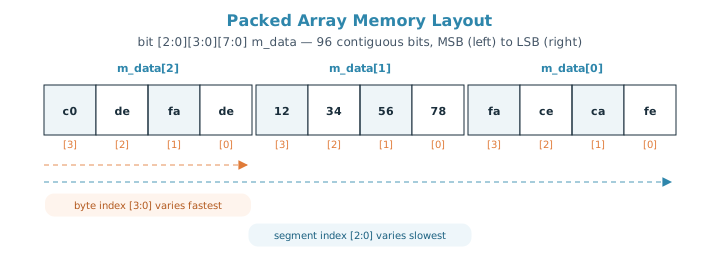
This is the same rule that governs any packed declaration: the dimension written closest to the variable name varies fastest, and the one written farthest away (the outermost, leftmost bracket) varies slowest. In bit [2:0][3:0][7:0] m_data, that means [7:0] (individual bits) changes fastest, [3:0] (bytes within a segment) changes next, and [2:0] (the outer segment) changes slowest.
This same "closest to the name varies fastest" rule also applies to unpacked arrays, though for unpacked dimensions it works in the opposite direction — the dimension farthest from the name is the fastest-varying one there.
Quick Check
Q: In bit [2:0][3:0][7:0] m_data;, which named dimension changes faster as you walk through the array — [3:0] or [2:0]?
Show Answer
[3:0] changes faster. It's written closer to the variable name than [2:0], so per the packed-dimension rule, it varies faster. [2:0], being the outermost/leftmost dimension, varies slowest of the three.
Multidimensional packed arrays show up naturally when modeling things like a register file made of fixed-width words, a memory model where each entry is further split into byte lanes, or bus data that needs both word-level and byte-level access in the same variable.
Common Mistakes
Mistake #1: Trying to pack a multi-bit or non-bit type
Wrong: int [3:0] data; or string [3:0] data;
Right: bit [3:0][31:0] data; using bit as the base type
Why? A packed array must resolve to a contiguous bit vector, so every level has to bottom out in a single-bit type like bit or logic (enum types and packed structs are allowed too, since they ultimately resolve to bit/logic) — types like int, string, or class handles can't be packed.
Mistake #2: Assuming array[i] always returns a single bit
For a plain vector like bit [7:0] m_data;, m_data[i] returns one bit. But for a multidimensional packed array like bit [3:0][7:0] m_data;, m_data[i] returns the entire inner segment (a full byte here), not a single bit. Always check how many packed dimensions are declared before assuming what an index returns.
Mistake #3: Treating a packed array as resizable
Just like a fixed-size unpacked array, the size of every packed dimension is fixed at compile time. If the number of bits needs to change at runtime, packed arrays are not the right tool — that's a job for a dynamic array built from packed elements.
Mistake #4: Misreading which end is the MSB
In bit [3:0] data;, the leftmost number in [msb:lsb] is the most-significant bit, so data[3] is the MSB and data[0] is the LSB. Writing the range backwards, like [0:3], is legal SystemVerilog but flips this convention and is a common source of off-by-one bugs when connecting to other signals.
Practice Exercise
Challenge: Model a 2-Channel Data Bus
Declare a packed array named channel_data that represents 2 channels, each 8 bits wide, using a single packed variable. Assign it a 16-bit value, print each channel with %b and %0h, and print just bit 3 of channel 0.
Hint
You need two packed dimensions: an outer one for the channel index and an inner one for the 8 bits of each channel, e.g. bit [1:0][7:0] channel_data;.
Solution
module tb;
  bit [1:0][7:0] channel_data;   // 2 channels, 8 bits each

  initial begin
    channel_data = 16'hA53C;

    for (int i = 0; i < $size(channel_data); i++) begin
      $display("channel_data[%0d] = %b (0x%0h)", i, channel_data[i], channel_data[i]);
    end

    $display("channel_data[0] bit 3 = %b", channel_data[0][3]);
  end
endmodule
Summary
In this tutorial, you learned:
- A packed dimension is any
[msb:lsb]declared before the variable name, and it's guaranteed to be a contiguous set of bits - A single-dimensional packed array (a vector) indexes down to a single bit
- A multidimensional packed array segments the same contiguous bits into smaller addressable groups, like bytes within a word
- The packed dimension closest to the variable name varies fastest, while the outermost one varies slowest
- Packed arrays can only be built from single-bit types (
bit,logic,reg), enum types, and other packed arrays/structs, and their size is fixed at compile time
