
Imagine you're writing a testbench to verify a simple design. You drive an input signal and then want to read back an output. The problem is: when exactly do you sample it? In simulation, a clock edge and your testbench code can both execute in the same time step. If your testbench reads a signal at the exact same moment the design is updating it, you can get unpredictable — or just plain wrong — values. This is called a race condition.
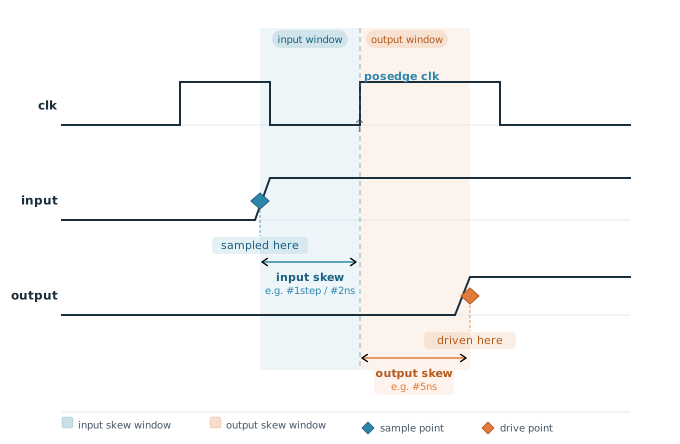
A clocking block solves this by acting as a timing contract between your testbench and the design. It tells the simulator: "read these signals a little before the clock edge, and drive them a little after the clock edge." This way your testbench never races with the design logic. It also lets you think in terms of transactions and cycles, rather than worrying about nanosecond-level timing every time you write stimulus.
8 min read | Intermediate Level
What You'll Learn
- Why clocking blocks exist, and the race condition they're designed to eliminate
- Why signal directions inside a clocking block are from the testbench's point of view, not the design's
- How input and output skew control exactly when a signal is sampled or driven relative to a clock edge
- What SystemVerilog does by default when no skew is specified at all
What Is a Clocking Block?
A clocking block is a named group of signals that all share the same clock. It's declared using the clocking and endclocking keywords. Once declared, any signal inside the block is sampled (read) or driven (written) relative to that clock edge, automatically applying the timing rules you set.
A few important rules to know upfront:
- A testbench can have multiple clocking blocks, and more than one of them can share the same clock event — each one still keeps its own independent skew settings, which is exactly how Part 2 of this series demonstrates several different skews on the same clock side by side
- Signal directions inside a clocking block are from the testbench's point of view, not the design's —
inputmeans the testbench is reading it (the design drives it), andoutputmeans the testbench is driving it (the design reads it) - A clocking block is most commonly declared inside an interface, so the timing rules are bundled together with the signals
Direction Convention: A Common Source of Confusion
Before looking at syntax, let's make the direction rule very clear. Suppose your design has a grant output and a request input:
- grant comes out of the design → the testbench reads it → declare as
inputin the clocking block - request goes into the design → the testbench drives it → declare as
outputin the clocking block
Think of the clocking block as sitting inside the testbench, looking at the design. What comes toward you is an input; what you send out is an output.
Basic Syntax
Here's the simplest possible clocking block — one clock, two signals, no custom skew:
clocking cb @(posedge clk);
  input  gnt;   // testbench reads this (design drives it)
  output req;   // testbench drives this (design reads it)
endclocking
That's it. When the simulator hits a positive edge of clk, gnt is sampled and req can be driven, according to the default timing rules covered later in this article.
Adding Default Skew
You can tell the clocking block how far before the clock edge to sample inputs, and how far after to drive outputs. This offset is called a skew:
clocking cb @(posedge clk);
  default input #1step output #2ns;
  input  gnt;
  output req;
endclocking
default input #1step— samples all inputs in the Preponed region, just before the clock edge. This is the safest and most common choice for inputs.default output #2ns— drives all outputs 2ns after the positive edge of clk.
You can also override the skew for individual signals. In the example below, req gets its own output skew of negedge, meaning it's driven at the negative edge of the clock instead of using the default:
clocking ck1 @(posedge clk);
  default input #1step output #2ns;
  input  gnt;
  output negedge req;
endclocking
Full Syntax Reference
[default] clocking [block_name] @ [clock_event];
  default input #[skew] output #[skew];
  input  [signal_list];
  output [signal_list];
endclocking
The default keyword before clocking marks this as the default clocking block for the scope — useful when you have multiple clocking blocks and want one used by default for cycle-delay operators.
Signal Aliasing
You can also bring in a signal from elsewhere in the design hierarchy by giving it a local name inside the clocking block:
clocking ck1 @(posedge clk);
  input data, valid, ready = top.dut.ready;
endclocking
Here ready = top.dut.ready creates an alias — inside this clocking block, you refer to top.dut.ready simply as ready. This is handy for signals buried deep in the hierarchy.
Declaring a Clocking Block Inside an Interface
The most practical place to put a clocking block is inside a SystemVerilog interface. This way the timing rules travel with the signals — you connect the interface to your testbench once, and everything is taken care of.
Here's a minimal but complete example. The design is a simple request-grant block: it asserts gnt one clock after it sees req:
// Design under test
module des (input logic clk, req, output logic gnt);
  always @(posedge clk)
    gnt <= req;
endmodule
// Interface with a clocking block
interface req_gnt_if (input logic clk);
  logic req;
  logic gnt;

  clocking cb @(posedge clk);
    default input #1step output #1ns;
    input  gnt;   // testbench reads: comes from design
    output req;   // testbench drives: goes into design
  endclocking
endinterface
// Testbench
module tb;
  logic clk;

  // Generate a 10ns clock (posedge at 5, 15, 25 ...)
  initial clk = 0;
  always #5 clk = ~clk;

  // Instantiate the interface and the design
  req_gnt_if vif (.clk(clk));
  des dut (.clk(clk), .req(vif.req), .gnt(vif.gnt));

  initial begin
    // Drive req through the clocking block
    vif.cb.req <= 0;

    @(vif.cb);          // wait for one clock edge
    vif.cb.req <= 1;    // assert request

    @(vif.cb);          // the DUT samples req=1 on this edge, gnt becomes 1 after it

    @(vif.cb);          // gnt is sampled #1step before this edge, so wait one more clock
    $display("gnt = %b", vif.cb.gnt);  // read grant

    @(vif.cb);
    vif.cb.req <= 0;

    #20 $finish;
  end
endmodule
Notice how the testbench drives and samples signals using vif.cb.req and vif.cb.gnt — always going through the clocking block. This ensures the timing rules are applied every time.
@(vif.cb) is how you wait for the clocking block's clock event — it's cleaner than writing @(posedge clk) directly, and keeps your testbench independent of the clock definition.
Quick Check
Q: In the testbench above, why does it write vif.cb.req instead of just vif.req?
Show Answer
Accessing a signal through the clocking block handle (vif.cb.req) applies the timing rules defined in that clocking block — in this case, driving req 1ns after the clock edge. Writing vif.req directly would bypass the clocking block entirely and reintroduce the exact race condition it exists to prevent.
Default Skew Behavior When Not Specified
If you declare a clocking block without any skew at all, the simulator applies these defaults:
- Inputs are sampled with
#1step— in the Preponed region, just before the clock edge, so they capture the stable value from the previous cycle. - Outputs with no skew (or explicit
#0) are driven in the Re-NBA region of the same time step as the clock edge. This is a special simulation scheduling region that runs after all the design's non-blocking assignments have settled, preventing the testbench from interfering with the design's own updates. It isn't the same as literally "zero nanoseconds of delay" — it's a guaranteed ordering point in the simulation scheduler.
The Preponed and Re-NBA regions are part of SystemVerilog's stratified event scheduling model — they exist specifically so that testbench-side sampling and driving never race against the design's own combinational and sequential updates in the same time step, even with no explicit skew written anywhere.
Where Are Clocking Blocks Used?
Clocking blocks are standard practice anywhere a testbench needs to reliably sample or drive DUT signals on a clock edge — protocol driver and monitor classes almost always access interface signals exclusively through a clocking block, so the same timing-safe behavior is guaranteed no matter which component or which test is using the interface.
Common Beginner Mistakes
Mistake #1: Getting the direction backwards
A signal the design drives (like gnt) is an input in the clocking block, not an output. Why? Clocking block directions are always from the testbench's point of view — it's easy to instinctively match the direction to how the signal is labeled at the DUT's own port instead, which is exactly backwards.
Mistake #2: Accessing DUT signals directly instead of through the clocking block
Writing vif.req or reading vif.gnt directly, bypassing vif.cb, works syntactically but throws away every timing guarantee the clocking block provides. Why? This reintroduces the very race condition clocking blocks exist to solve — always drive and sample through the clocking block handle once one is declared.
Mistake #3: Assuming #1step samples the current cycle's value
The default input skew, #1step, samples in the Preponed region — effectively the stable value left over from the previous time step, before anything in the current cycle has changed. Why? It's easy to assume this means "sample right at the edge," but it specifically means "sample the value as it stood just before this edge," which is what makes it race-free in the first place.
Practice Exercise
Challenge: Calculate the Drive Time
A design has a 20ns clock period. Your interface declares output #3ns req in the clocking block. If the positive clock edge occurs at simulation time 100ns, at what simulation time will req actually be driven after your testbench executes vif.cb.req <= 1?
Hint
Output skew is always measured as a delay after the clocking event it's attached to — add the skew value directly to the clock edge time.
Solution
103ns. The output skew of #3ns means the drive happens 3ns after the clocking event, and the clocking event (the positive clock edge) occurs at 100ns: 100ns + 3ns = 103ns.
Summary
In this tutorial, you learned:
- A clocking block groups signals that share a clock and gives them consistent timing rules, eliminating race conditions between testbench and design
- Signal directions are always from the testbench's point of view:
inputmeans the testbench reads it,outputmeans the testbench drives it - Input and output skew control exactly when a signal is sampled or driven relative to the clocking event, and can be set as a default or overridden per signal
- Always access signals through the clocking block handle (like
vif.cb.req) in your testbench — never drive clocking block signals directly - With no skew specified, the default input skew is
#1step(Preponed region), and the default output skew (#0) is driven in the Re-NBA region — both chosen specifically to avoid simulation race conditions
Continuing the Interfaces & Modports Chapter
Continue with SystemVerilog Clocking Blocks Part II and SystemVerilog Modport.
