
Reassembling a struct's fields into a flat byte stream for a serial link, or splitting a received byte stream back into a struct's fields, normally means writing the shifting and masking by hand, field by field. SystemVerilog's streaming operators, {>>{...}} and {<<{...}}, do this packing and unpacking in a single expression instead.
8 min read | Intermediate Level
What You'll Learn
- How
{>>{...}}and{<<{...}}pack a group of values into a single bit stream - What the optional slice size actually reorders, and why
>>ignores it entirely - How the same operators run in reverse to unpack a stream back into variables
- A realistic design and verification use: converting a struct to and from a byte queue
Packing Values Into a Stream
A streaming concatenation looks like an ordinary concatenation, but with a stream operator and an optional slice size right after the opening brace:
module tb;
  initial begin
    int j = { "A", "B", "C", "D" };   // packs to 32'h41424344

    bit [31:0] s1 = { >>      { j } };  // same bit order, unchanged
    bit [31:0] s2 = { << byte { j } };  // byte order reversed
    bit [31:0] s3 = { << 16   { j } };  // 16-bit halves swapped

    $display("j  = 0x%0h", j);
    $display("s1 = 0x%0h", s1);
    $display("s2 = 0x%0h", s2);
    $display("s3 = 0x%0h", s3);
  end
endmodule
Output
j  = 0x41424344
s1 = 0x41424344
s2 = 0x44434241
s3 = 0x43444142
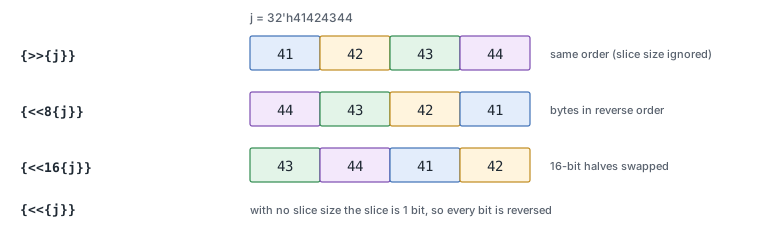
The stream operator, >> or <<, controls the direction blocks are streamed in. >> streams left to right, which is the same order the bits already have - so it simply ignores whatever slice size is given.
<< streams right to left instead. It slices the value into blocks of the given size, starting from the right-most bit, and then reverses the order of those blocks - without reversing the bits inside each block.
That is exactly what s2 and s3 show. { << byte {j} } slices j into four 8-bit (one-byte) blocks and reverses their order, which is the standard way to flip between big-endian and little-endian byte order. { << 16 {j} } instead slices it into two 16-bit blocks and swaps those.
If no slice size is given at all, it defaults to 1 bit - so a bare {<<{expr}} reverses the individual bits of expr, not whole bytes or words.
Unpacking a Stream Back Into Variables
Putting a streaming concatenation on the left-hand side of an assignment runs the same operation in reverse - it unpacks a stream into one or more variables:
module tb;
  initial begin
    bit [31:0] stream = 32'h41424344;
    byte a, b, c, d;

    { >> { a, b, c, d } } = stream;

    $display("a = 0x%0h  b = 0x%0h  c = 0x%0h  d = 0x%0h", a, b, c, d);
  end
endmodule
Output
a = 0x41 b = 0x42 c = 0x43 d = 0x44
The source on the right supplies the bits, consumed from its most significant end first, and the variables on the left are filled in the order they are listed. If the source has more bits than the targets need, the extra low-order bits are simply left unread. If it has fewer bits than the targets need, that is an error - there is nothing left to fill the remaining variable with.
Packing a Struct Into a Byte Queue
Streaming operators work on more than just integers. A struct, array, or queue can be streamed too, which is what makes them useful for modeling a packet on a byte-wide channel:
module tb;
  typedef struct packed {
    byte addr;
    byte code;
    byte payload;
  } pkt_t;

  initial begin
    byte channel [$];   // the byte-wide channel, modeled as a queue
    byte pkt_bytes [$];
    pkt_t p, rx;
    byte rx_bytes [$];

    // Send: pack the struct's 3 bytes into a queue, then append that to the channel
    p = '{addr: 8'hA0, code: 8'h3C, payload: 8'hFF};
    pkt_bytes = { >> byte { p } };
    channel   = { channel, pkt_bytes };

    $display("p        = 0x%0h", p);
    $display("channel  = 0x%0h 0x%0h 0x%0h", channel[0], channel[1], channel[2]);

    // Receive: pop 3 bytes back off the channel and unpack them into a struct
    rx_bytes = { channel[0], channel[1], channel[2] };
    { >> byte { rx } } = rx_bytes;

    $display("rx.addr    = 0x%0h", rx.addr);
    $display("rx.code    = 0x%0h", rx.code);
    $display("rx.payload = 0x%0h", rx.payload);
  end
endmodule
Output
p        = 0xa03cff
channel  = 0xa0 0x3c 0xff
rx.addr    = 0xa0
rx.code    = 0x3c
rx.payload = 0xff
The sender's struct fields are streamed out byte by byte, in declaration order, without the sender ever writing out the individual shifts and masks for addr, code, and payload separately. The receiver does the same operation in reverse, reconstructing the struct's fields directly from the raw bytes pulled off the channel.
The same conversion is equally useful on the design side, for a serializer or deserializer that packs a wide internal bus into one byte at a time for a narrow external interface, and on the verification side, for a driver or monitor that converts between a readable transaction struct and the raw bytes actually seen on a pin-level bus.
Common Beginner Mistakes
Mistake #1: Assuming >> reorders data the same way << does
{ >> N {expr} } and { >> {expr} } produce the exact same result for any slice size N, because left-to-right streaming never reorders anything.
Only << actually uses the slice size to reorder blocks. Reaching for >> out of habit and expecting a reordering effect produces silently unchanged data instead of an error.
Mistake #2: Forgetting the default slice size is 1 bit, not 1 byte
{ << {expr} } with no slice size reverses individual bits, which is rarely what's intended when the goal is byte or word reordering.
Write { << byte {expr} } or an explicit bit count like { << 8 {expr} } whenever the reordering should happen at byte or word granularity instead of bit granularity.
Mistake #3: Unpacking into a target with too few bits available
If the right-hand stream supplies fewer bits than the left-hand variables need, unpacking is an error, not a zero-fill.
Zero-filling only happens the other way around, when a streaming concatenation is packed into a fixed-size target that is wider than the stream: the stream is left-aligned and the remaining low-order bits are zero-filled.
Quick Check
Q: For int j = 32'h11_22_33_44;, what does { << 16 {j} } produce?
Show Answer
32'h3344_1122. j splits into two 16-bit blocks, 'h1122 and 'h3344, and << reverses their order - giving 'h3344 followed by 'h1122 - without touching the bit order inside either block.
Practice Exercise
Challenge: Byte-Swap a 32-bit Value
Write a one-line expression that reverses the byte order of a 32-bit variable data, so that 32'h12_34_56_78 becomes 32'h78_56_34_12.
Hint
This is exactly the big-endian/little-endian conversion shown earlier - it just needs the right slice size for a byte.
Solution
module tb;
  initial begin
    bit [31:0] data    = 32'h12345678;
    bit [31:0] swapped = { << byte { data } };

    $display("data    = 0x%0h", data);
    $display("swapped = 0x%0h", swapped);
  end
endmodule
Output
data    = 0x12345678
swapped = 0x78563412
Slicing into byte-sized blocks and streaming them right to left reverses the four bytes while leaving the bits inside each byte untouched - exactly a byte-swap.
Summary
In this tutorial, you learned:
{>>{...}}and{<<{...}}pack their contents into a single bit stream, with an optional slice size controlling how it gets reordered>>always streams left to right and ignores the slice size; only<<reorders blocks, right to left- The default slice size is 1 bit, so byte or word reordering needs an explicit slice size like
byteor16 - The same operators on the left-hand side of an assignment unpack a stream back into one or more variables
- Structs, arrays, and queues can all be streamed, which makes these operators a natural fit for converting a struct-typed packet to and from a raw byte channel
