
A dynamic array is an unpacked array whose size can be set or changed at runtime, unlike a static array where the size is fixed at declaration. A dynamic array's default size is zero until it's explicitly set by the new[] constructor.
7 min read | Intermediate Level
What You'll Learn
- How to declare and size a dynamic array with
new[] - The built-in
size()anddelete()methods - How to grow a dynamic array while keeping its existing contents
- Why copying a dynamic array to another variable doesn't create a shared reference
Syntax
A dynamic array's dimension is specified with empty square brackets [ ].
[data_type] [identifier_name]  [];

bit [7:0] 	stack []; 		// A dynamic array of 8-bit vector
string 		names []; 		// A dynamic array that can contain strings
The new[] function allocates a size for the array and can initialize its elements at the same time.
An empty [ ] is what distinguishes a dynamic array from a static one at a glance — there's no size or range inside the brackets, since the size isn't known until new[] runs.
Dynamic Array Example
module tb;
	// Create a dynamic array that can hold elements of type int
	int 	array [];

	initial begin
		// Create a size for the dynamic array -> size here is 5
		// so that it can hold 5 values
		array = new [5];

		// Initialize the array with five values
		array = '{31, 67, 10, 4, 99};

		// Loop through the array and print their values
		foreach (array[i])
			$display ("array[%0d] = %0d", i, array[i]);
	end
endmodule
Output
ncsim> run
array[0] = 31
array[1] = 67
array[2] = 10
array[3] = 4
array[4] = 99
ncsim: *W,RNQUIE: Simulation is complete.
array = new [5]; allocates 5 elements, each initialized to the type's default value (0 for int). The next line then overwrites all 5 slots with the given values — sizing and initializing are two separate steps here, though new[] can also take an initializer directly, as shown further down.
Quick Check
Q: What is array.size() immediately after int array []; is declared, before any new[] call?
Show Answer
0. A dynamic array has no elements until it's explicitly sized with new[]; declaring it alone only creates the handle, not the storage.
Dynamic Array Methods
| Method | Description |
|---|---|
function int size (); | Returns the current size of the array, 0 if the array has not been created |
function void delete (); | Empties the array, resulting in a zero-sized array |
module tb;
	// Create a dynamic array that can hold elements of type string
	string 	fruits [];

	initial begin
		// Create a size for the dynamic array -> size here is 3
		// so that it can hold 3 values
      	fruits = new [3];

		// Initialize the array with three values
      	fruits = '{"apple", "orange", "mango"};

      	// Print size of the dynamic array
		$display ("fruits.size() = %0d", fruits.size());

		// Empty the dynamic array by deleting all items
		fruits.delete();
		$display ("fruits.size() = %0d", fruits.size());
	end
endmodule
Output
ncsim> run
fruits.size() = 3
fruits.size() = 0
ncsim: *W,RNQUIE: Simulation is complete.
delete() on a dynamic array is different from delete() on a queue — a dynamic array's delete() takes no arguments and always clears the whole array, while a queue's version can optionally target a single index.
How to Add New Items to a Dynamic Array?
Since new[] allocates a fresh block of storage, adding elements to an existing dynamic array without losing its current contents means copying the old contents into the newly sized array as part of the same call.
int array [];
array = new [10];

// This creates one more slot in the array, while keeping old contents
array = new [array.size() + 1] (array);
Passing (array) as the second argument to new[] tells it to copy the existing elements into the newly allocated storage before the assignment completes. Without that argument, new [array.size() + 1] would still resize the array, but every element would come back at its default value.
Quick Check
Q: What would array = new [array.size() + 1]; (without the trailing (array)) do to the existing elements?
Show Answer
It would discard them. Without passing the old array as the copy argument, new[] allocates a fresh block where every element starts at its default value — the previous contents are lost, even though the size still grows by one.
Copying Dynamic Array Example
module tb;
	// Create two dynamic arrays of type int
	int array [];
	int id [];

	initial begin
		// Allocate 5 memory locations to "array" and initialize with values
		array = new [5];
		array = '{1, 2, 3, 4, 5};

		// Copy "array" to "id"
		id = array;

		// Display contents of "id"
		$display ("id = %p", id);

		// Grow size by 1 and copy existing elements to the new dyn.Array "id"
		id = new [id.size() + 1] (id);

		// Assign value 6 to the newly added location [index 5]
		id [id.size() - 1] = 6;

		// Display contents of new "id"
		$display ("New id = %p", id);

		// Display size of both arrays
		$display ("array.size() = %0d, id.size() = %0d", array.size(), id.size());
	end
endmodule
Output
run -all;
ncsim> run
id = '{1, 2, 3, 4, 5}
New id = '{1, 2, 3, 4, 5, 6}
array.size() = 5, id.size() = 6
ncsim: *W,RNQUIE: Simulation is complete.
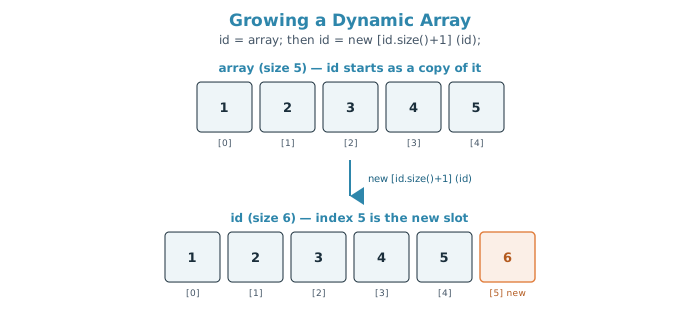
id = array; copies every element into id's own separate storage, which is exactly why array is still size 5 at the end while id has grown to size 6: the two variables never shared any memory to begin with.
This copy-then-grow pattern is common in testbenches for building up a results array one entry at a time when the final count isn't known in advance — though a queue with push_back() is usually a simpler choice for that exact job.
Common Mistakes
Mistake #1: Assuming new[] is required before every assignment
Actually, assigning an array literal or another array directly to an unsized dynamic array — array = '{1, 2, 3}; — works fine without calling new[] first: per IEEE 1800-2012 §7.6, assigning an array (or array literal) to a dynamic array automatically resizes it to match. new[] is only required when you want to pre-allocate a specific size before assigning values, or when growing an existing array while preserving its contents (the pattern shown above).
Mistake #2: Forgetting the copy argument when resizing
array = new [array.size() + 1]; grows the array but resets every element to its default value, since no old array was passed in to copy from. Use array = new [array.size() + 1] (array); to keep the existing contents.
Mistake #3: Assuming array-to-array assignment shares storage
id = array; performs an element-wise copy, not an alias. Changing id afterward, including resizing it, has no effect on array — unlike assigning one class handle to another, which does share the same underlying object.
Mistake #4: Calling delete() expecting a single-index removal
A dynamic array's delete() takes no index and clears the entire array. If you need to remove just one element while keeping the rest, a dynamic array isn't the right tool — use a queue and its indexed delete() instead.
Practice Exercise
Challenge: Grow an Array of Scores
Declare a dynamic array of int named scores, size it to hold 3 values (10, 20, 30), then grow it by one element while keeping the existing values, and set the new last element to 40. Print the final array and its size.
Hint
Use new [scores.size() + 1] (scores) to grow while preserving contents, then assign the new element using scores[scores.size() - 1].
Solution
module tb;
  int scores [];

  initial begin
    scores = new [3];
    scores = '{10, 20, 30};

    scores = new [scores.size() + 1] (scores);
    scores [scores.size() - 1] = 40;

    $display ("scores = %p, size = %0d", scores, scores.size());
  end
endmodule
Summary
In this tutorial, you learned:
- A dynamic array is an unpacked array declared with empty
[ ], with a default size of 0 until sized bynew[] size()returns the current element count, anddelete()clears the entire array (no index argument)- Growing a dynamic array while preserving its contents requires passing the old array into
new[], likenew [size+1] (old_array) - Assigning one dynamic array to another copies the elements — it does not create a shared reference, so resizing one never affects the other
