
When the size of a collection is unknown up front, or the data space is sparse, an associative array is a better fit than a fixed-size or dynamic array. Associative arrays don't allocate any storage until you actually use an index, and that index isn't restricted to integers — it can be of any type.
An associative array works like a look-up table: the type used as the index becomes the lookup key, and that key type also determines the ordering used when you iterate the array.
9 min read | Intermediate Level
What You'll Learn
- How to declare an associative array with any key type, not just integers
- The built-in methods for checking, counting, and deleting entries
- How
first(),last(),next(), andprev()traverse the array in sorted key order - How to nest associative arrays with dynamic arrays in either direction
Syntax
// Value     Array_Name          [ key ];
data_type    array_identifier    [ index_type ];
data_type– the type of value stored at each keyarray_identifier– the variable nameindex_type– the key's data type; commonlyintorstring, but any type is allowed
An associative array is recognized by a data type sitting inside the square brackets, e.g. int m_data [string];. Compare that to a dynamic array's empty [ ] or a queue's [$] — all three are unpacked arrays, but each is written differently.
Initialization Example
module tb;

	int   	array1 [int]; 			// An integer array with integer index
	int   	array2 [string]; 		// An integer array with string index
	string  array3 [string]; 		// A string array with string index

  	initial begin
      	// Initialize each dynamic array with some values
    	array1 = '{ 1 : 22,
	            	6 : 34 };

		array2 = '{ "Ross" : 100,
	            	"Joey" : 60 };

		array3 = '{ "Apples" : "Oranges",
	            	"Pears" : "44" };

      	// Print each array
      $display ("array1 = %p", array1);
      $display ("array2 = %p", array2);
      $display ("array3 = %p", array3);
    end
endmodule
Output
ncsim> run
array1 = '{1:22, 6:34}
array2 = '{"Joey":60, "Ross":100}
array3 = '{"Apples":"Oranges", "Pears":"44"}
ncsim: *W,RNQUIE: Simulation is complete.
Notice that array2 prints "Joey" before "Ross" even though "Ross" was assigned first in the source — string keys are displayed in alphabetical order, not insertion order. array1's integer keys likewise print numerically ascending (1 before 6), regardless of assignment order.
Quick Check
Q: If you assign array1[6] before array1[1], does $display("%p", array1) print 6 first?
Show Answer
No. Associative arrays with integer keys always print in ascending numeric order regardless of the order the entries were assigned in.
Associative Array Methods
| Method | Description |
|---|---|
function int num (); | Returns the number of entries in the associative array |
function int size (); | Also returns the number of entries; 0 if empty |
function void delete ( [input index] ); | index, when specified, deletes the entry at that index; otherwise the whole array is deleted |
function int exists (input index); | Checks whether an element exists at the specified index; returns 1 if it does, else 0 |
function int first (ref index); | Assigns the value of the first index to the given variable; returns 0 for an empty array |
function int last (ref index); | Assigns the value of the last index to the given variable; returns 0 for an empty array |
function int next (ref index); | Finds the smallest index whose value is greater than the given index |
function int prev (ref index); | Finds the largest index whose value is smaller than the given index |
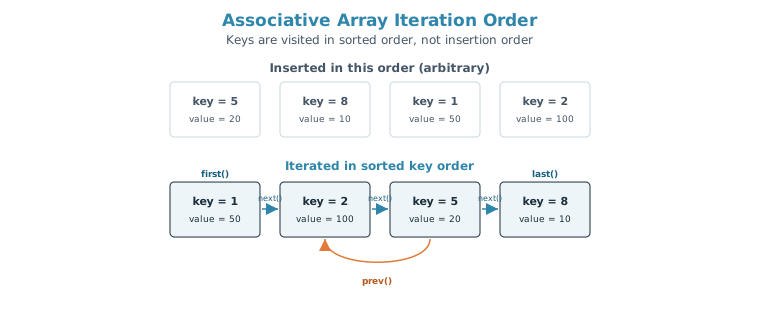
Associative arrays can have non-consecutive or arbitrary index values, and next()/prev() always walk through them in sorted key order.
module tb;
  int aa_array [int];

  initial begin
    int idx;

    // Initialized indices in a mixed order, not 1,2,5,8
    aa_array[5] = 20;
    aa_array[8] = 10;
    aa_array[1] = 50;
    aa_array[2] = 100;

    // Finds the smallest index whose value is greater than the given index
    // Current index is 0, the next smallest value out of 1,2,5,8 is 1
    aa_array.next(idx);
    $display("aa_array[%0d]=%0d", idx, aa_array[idx]);

    // Current index is 1, the next smallest value out of 2,5,8 is 2
    aa_array.next(idx);
    $display("aa_array[%0d]=%0d", idx, aa_array[idx]);

    // Finds the largest index whose value is smaller than the given index
    // Current index is 5, the next largest value out of 1,2 is 2
    idx = 5;
    aa_array.prev(idx);
    $display("aa_array[%0d]=%0d", idx, aa_array[idx]);
  end
endmodule
Output
xcelium> run
aa_array[1]=50
aa_array[2]=100
aa_array[2]=100
xmsim: *W,RNQUIE: Simulation is complete.
idx starts at its default value of 0, and each call to next() updates idx in place, so the second call continues from wherever the first one left off. That's why the two next() calls step 0→1 and then 1→2, walking the sorted keys one at a time.
This sorted-order guarantee is exactly why associative arrays are convenient for building a sorted report from sparse data — iterating with first()/next() visits every populated address, ID, or name in order, without you having to sort anything yourself.
Associative Array Methods Example
module tb;
    int      fruits_l0 [string];

    initial begin
      fruits_l0 = '{ "apple"  : 4,
                     "orange" : 10,
                     "plum"   : 9,
                     "guava"  : 1 };


      // size() : Print the number of items in the given associative array
      $display ("fruits_l0.size() = %0d", fruits_l0.size());


      // num() : Another function to print number of items in given array
      $display ("fruits_l0.num() = %0d", fruits_l0.num());


      // exists() : Check if a particular key exists in this dynamic array
      if (fruits_l0.exists ("orange"))
        $display ("Found %0d orange !", fruits_l0["orange"]);

      if (!fruits_l0.exists ("apricots"))
        $display ("Sorry, season for apricots is over ...");

      // Note: String indices are taken in alphabetical order
      // Correct order: apple, guava, orange, plum
      // first() : Get the first element in the array
      begin
      	string f;
        // This function returns true if it succeeded and first key is stored
        // in the provided string "f"
        if (fruits_l0.first (f))
          $display ("fruits_l0.first [%s] = %0d", f, fruits_l0[f]);
      end

      // last() : Get the last element in the array
      begin
        string f;
        if (fruits_l0.last (f))
          $display ("fruits_l0.last [%s] = %0d", f, fruits_l0[f]);
      end

      // prev() : Get the previous element in the array
      begin
        string f = "orange";
        if (fruits_l0.prev (f))
          $display ("fruits_l0.prev [%s] = %0d", f, fruits_l0[f]);
      end

      // next() : Get the next item in the array
      begin
        string f = "orange";
        if (fruits_l0.next (f))
          $display ("fruits_l0.next [%s] = %0d", f, fruits_l0[f]);
      end
    end
endmodule
Output
ncsim> run
fruits_l0.size() = 4
fruits_l0.num() = 4
Found 10 orange !
Sorry, season for apricots is over ...
fruits_l0.first [apple] = 4
fruits_l0.last [plum] = 9
fruits_l0.prev [guava] = 1
fruits_l0.next [plum] = 9
ncsim: *W,RNQUIE: Simulation is complete.
With keys apple, guava, orange, plum in alphabetical order, prev("orange") lands on guava (the key right before it alphabetically) and next("orange") lands on plum (the key right after it) — each begin...end block resets f to "orange" independently, so the two calls don't interfere with each other.
Quick Check
Q: first() and last() both return an int. What does that return value mean?
Show Answer
Whether the call succeeded. It returns 0 if the array is empty (so there's no first/last element to find) and a non-zero value otherwise — which is why the example wraps each call in an if statement before using the result.
Dynamic Array of Associative Arrays
You can nest these unpacked array types inside one another. Here, each index of a dynamic array holds its own associative array.
module tb;
  // Create an associative array with key of type string and value of type int
  // for each index in a dynamic array
  int fruits [] [string];

  initial begin
    // Create a dynamic array with size 2
    fruits = new [2];

    // Initialize the associative array inside each dynamic array index
    fruits [0] = '{ "apple" : 1, "grape" : 2 };
    fruits [1] = '{ "melon" : 3, "cherry" : 4 };

    // Iterate through each index of dynamic array
    foreach (fruits[i])
      // Iterate through each key of the current index in dynamic array
      foreach (fruits[i][fruit])
        $display ("fruits[%0d][%s] = %0d", i, fruit, fruits[i][fruit]);

  end
endmodule
Output
ncsim> run
fruits[0][apple] = 1
fruits[0][grape] = 2
fruits[1][cherry] = 4
fruits[1][melon] = 3
ncsim: *W,RNQUIE: Simulation is complete.
The outer foreach walks the dynamic array's numeric indices in order (0, then 1), while each inner foreach walks that entry's string keys alphabetically — which is why cherry prints before melon even though melon was assigned first.
Dynamic Array Within Each Index of an Associative Array
The nesting also works the other way around: an associative array whose values are dynamic arrays.
// Create a new typedef that represents a dynamic array
typedef int int_da [];

module tb;
  // Create an associative array where key is a string
  // and value is a dynamic array
  int_da fruits [string];

  initial begin
    // For key "apple", create a dynamic array that can hold 2 items
    fruits ["apple"] = new [2];

    // Initialize the dynamic array with some values
    fruits ["apple"] = '{ 4, 5};

    // Iterate through each key, where key represented by str1
    foreach (fruits[str1])
      // Iterate through each item inside the current dynamic array ie.fruits[str1]
      foreach (fruits[str1][i])
        $display ("fruits[%s][%0d] = %0d", str1, i, fruits[str1][i]);

  end
endmodule
Output
ncsim> run
fruits[apple][0] = 4
fruits[apple][1] = 5
ncsim: *W,RNQUIE: Simulation is complete.
The typedef int int_da []; line is what makes this declaration possible — a dynamic array's dimension has to be given a name via typedef before it can be used as the value type of another array.
An associative array of dynamic arrays is a natural model for something like per-address memory content in a sparse memory model, where each populated address holds a variable-length burst of data.
Common Mistakes
Mistake #1: Assuming iteration follows insertion order
As shown throughout this article, foreach, first()/next(), and direct %p printing all visit associative array entries in sorted key order — numeric ascending for integer keys, alphabetical for string keys — never in the order the entries were assigned.
Mistake #2: Indexing a key that doesn't exist without checking first
Reading fruits_l0["kiwi"] when "kiwi" was never assigned returns the type's default value and issues a warning — but a plain read does not add a new entry to the array; only a write (or passing the key by reference) actually allocates one. Use exists() first if you need to distinguish "not present" from "present with a default value," and don't assume a read alone grows the array.
Mistake #3: Forgetting that first()/last()/next()/prev() return success, not the key
The key or index is written into the ref argument, not the return value. if (fruits_l0.first(f)) checks whether the call succeeded; f itself holds the actual first key afterward.
Mistake #4: Using an associative array where a queue would fit better
If you need strict insertion order preserved, or need to push/pop from either end, an associative array is the wrong tool even though it can technically store the same data — reach for a queue instead.
Practice Exercise
Challenge: Build a Register Name Lookup
Declare an associative array named reg_addr that maps register names (strings) to their addresses (int). Add entries for "CTRL" (0x10), "STATUS" (0x14), and "DATA" (0x18). Check whether "CTRL" exists before printing its address, then print every entry using first()/next().
Hint
Use string as the key type: int reg_addr [string];. Remember that first()/next() return 0 when there's nothing left to visit, which makes them a natural fit for a while loop.
Solution
module tb;
  int reg_addr [string];

  initial begin
    reg_addr["CTRL"]   = 'h10;
    reg_addr["STATUS"] = 'h14;
    reg_addr["DATA"]   = 'h18;

    if (reg_addr.exists("CTRL"))
      $display("CTRL is at 0x%0h", reg_addr["CTRL"]);

    begin
      string name;
      if (reg_addr.first(name)) begin
        $display("%s = 0x%0h", name, reg_addr[name]);
        while (reg_addr.next(name))
          $display("%s = 0x%0h", name, reg_addr[name]);
      end
    end
  end
endmodule
Summary
In this tutorial, you learned:
- An associative array is recognized by a data type inside the square brackets, and allocates no storage until an index is actually used
size()/num()count entries,exists()checks for a key, anddelete()removes one entry or the whole arrayfirst(),last(),next(), andprev()traverse the array in sorted key order — numeric ascending for integer keys, alphabetical for string keys — not insertion orderfirst()/last()/next()/prev()return success/failure; the actual key comes back through therefargument- Associative arrays can nest with dynamic arrays in either direction, useful for sparse, variable-length data
