
An unpacked array refers to any dimension declared after the variable name. This is the opposite of a packed array, where dimensions are declared before the name and the bits are stored as one contiguous vector. Unpacked dimensions, by contrast, create separate, individually-addressable elements — each element can be a different memory word, a struct, or even another array.
Unpacked arrays cover fixed-size arrays as well as dynamic arrays, associative arrays, and queues — this article focuses on the fixed-size form, which is the most common starting point.
8 min read | Intermediate Level
What You'll Learn
- The difference between packed and unpacked array declarations
- How to declare and index single and multidimensional unpacked arrays
- How to combine packed and unpacked dimensions in one variable
- Which dimension "varies fastest" when an array is printed or flattened
Syntax
An unpacked dimension is any [size] or [msb:lsb] that appears after the variable name.
data_type array_name [size];                 // single-dimensional unpacked
data_type array_name [size1] [size2];         // multidimensional unpacked
packed_type array_name [size];                // packed element, unpacked array
data_type– the element type (byte,bit,int, astruct, etc.)array_name– the identifier for the array[size]or[msb:lsb]– each pair of brackets after the name adds one more unpacked dimension
A dimension written before the name (e.g. bit [7:0] data;) is packed — it describes the bit-width of a single element. A dimension written after the name (e.g. bit data [7:0];) is unpacked — it describes how many separate elements exist. Swapping the two changes the meaning of the variable entirely.
Single Dimensional Unpacked Array
The example below declares an 8-entry stack, where each entry is one byte wide. Since [8] is written after stack, it is an unpacked dimension — SystemVerilog allocates 8 separate byte-wide elements rather than a single 8-byte packed vector.
module tb;
	byte 	stack [8]; 		// depth = 8, 1 byte wide variable

	initial begin
		// Assign random values to each slot of the stack
		foreach (stack[i]) begin
			stack[i] = $random;
			$display ("Assign 0x%0h to index %0d", stack[i], i);
		end

		// Print contents of the stack
		$display ("stack = %p", stack);
	end
endmodule
Output
Assign 0x24 to index 0
Assign 0x81 to index 1
Assign 0x9 to index 2
Assign 0x63 to index 3
Assign 0xd to index 4
Assign 0x8d to index 5
Assign 0x65 to index 6
Assign 0x12 to index 7
stack = '{'h24, 'h81, 'h9, 'h63, 'hd, 'h8d, 'h65, 'h12}
The foreach (stack[i]) construct walks every index of the unpacked dimension automatically, so you never have to hardcode the loop bound — useful if the array size changes later.
Unpacked arrays like this one are the natural fit for register files, FIFO/scoreboard storage in a testbench, or any structure where each entry needs to be read, written, and compared independently rather than treated as one wide bit vector.
Quick Check
Q: Is stack[0] in the example above a single bit or a full byte?
Show Answer
A full byte. The [8] is an unpacked dimension that creates 8 separate byte elements — the element type itself (byte) is what's stored at each index.
Multidimensional Unpacked Array
Adding a second set of brackets after the name creates a second unpacked dimension, effectively giving you rows and columns. The example below models a 2 × 4 array (2 rows, 4 columns), where every entry is still one byte wide.
module tb;
  byte 	stack [2][4]; 		// 2 rows, 4 cols

	initial begin
		// Assign random values to each slot of the stack
		foreach (stack[i])
          foreach (stack[i][j]) begin
            stack[i][j] = $random;
            $display ("stack[%0d][%0d] = 0x%0h", i, j, stack[i][j]);
			end

		// Print contents of the stack
		$display ("stack = %p", stack);
	end
endmodule
Output
ncsim> run
stack[0][0] = 0x24
stack[0][1] = 0x81
stack[0][2] = 0x9
stack[0][3] = 0x63
stack[1][0] = 0xd
stack[1][1] = 0x8d
stack[1][2] = 0x65
stack[1][3] = 0x12
stack = '{'{'h24, 'h81, 'h9, 'h63}, '{'hd, 'h8d, 'h65, 'h12}}
ncsim: *W,RNQUIE: Simulation is complete.
Notice the nested foreach: the outer loop walks the first unpacked dimension (i, the rows), and the inner loop walks the second (j, the columns). This nesting order matters — see the dimension-ordering rule further down.
Packed + Unpacked Array
A single variable can mix both worlds: a packed dimension for the element's bit-width, and unpacked dimensions for how many elements exist. Here, bit [3:0][7:0] is packed (each element is a 32-bit value organized as four 8-bit bytes), and [2][4] is unpacked (2 rows of 4 such elements).
module tb;
  bit [3:0][7:0] 	stack [2][4]; 		// 2 rows, 4 cols

	initial begin
		// Assign random values to each slot of the stack
		foreach (stack[i])
          foreach (stack[i][j]) begin
            stack[i][j] = $random;
            $display ("stack[%0d][%0d] = 0x%0h", i, j, stack[i][j]);
			end

		// Print contents of the stack
		$display ("stack = %p", stack);

		// Print content of a given index
        $display("stack[0][0][2] = 0x%0h", stack[0][0][2]);
	end
endmodule
Output
ncsim> run
stack[0][0] = 0x12153524
stack[0][1] = 0xc0895e81
stack[0][2] = 0x8484d609
stack[0][3] = 0xb1f05663
stack[1][0] = 0x6b97b0d
stack[1][1] = 0x46df998d
stack[1][2] = 0xb2c28465
stack[1][3] = 0x89375212
stack = '{'{'h12153524, 'hc0895e81, 'h8484d609, 'hb1f05663}, '{'h6b97b0d, 'h46df998d, 'hb2c28465, 'h89375212}}
stack[0][0][2] = 0x15
ncsim: *W,RNQUIE: Simulation is complete.
The last line, stack[0][0][2], mixes an unpacked index ([0][0] selects an element) with a packed index ([2] selects byte 2 within that 32-bit element). This is why the packed dimension is often called the "bit-select" part — it slices into an already-selected element.
Dimension Ordering: Which Index Varies Fastest?
Packed dimensions (written before the name) always vary faster than unpacked dimensions (written after the name). Within the packed group, the dimension written right next to the name varies fastest, and dimensions further away vary slower. Within the unpacked group it works the other way around: the dimension written farthest from the name (the last one declared) varies fastest, while the one immediately after the name varies slowest.
bit 	[1:4] 		m_var 	[1:5]			// 1:4 varies faster than 1:5
bit 				m_var2 	[1:5] [1:3]  	// 1:3 varies faster than 1:5
bit 	[1:3] [1:7] m_var3; 				// 1:7 varies faster than 1:3

bit 	[1:3] [1:2] m_var4 [1:7] [0:2] 		// 1:2 varies most rapidly, followed by 1:3, then 0:2 and then 1:7
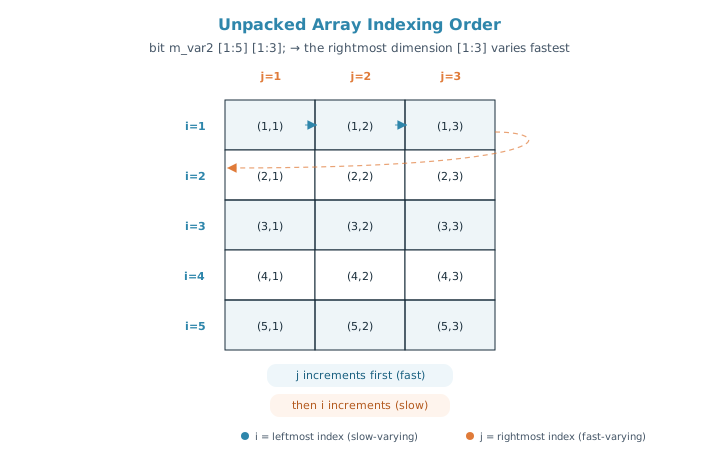
This ordering is exactly why the nested foreach loops in the earlier examples were written with i (the leftmost/outer index) in the outer loop and j (the rightmost/inner index) in the inner loop — matching the loop nesting to the dimension order keeps the traversal sequential and matches how %p prints the array.
Quick Check
Q: For bit [1:3][1:2] m_var4 [1:7][0:2];, which index changes on every single iteration of a fully nested loop — the [1:7] one or the [1:2] one?
Show Answer
The [1:2] index. It's a packed dimension written right next to the variable name, so it's the fastest-varying of all four dimensions. The [1:7] unpacked dimension, being written immediately after the name (closest to it, among the unpacked dimensions), varies slowest — the [0:2] dimension, written farther from the name, is faster than [1:7] but still slower than either packed dimension.
Common Mistakes
Mistake #1: Placing the size on the wrong side of the name
Wrong intent: writing bit [8] mem; expecting 8 separate elements
Right: bit mem [8]; for 8 unpacked elements, or bit [7:0] mem; for one 8-bit packed value
Why? [8] before the name is not even legal packed-range syntax on its own (packed dimensions need an explicit [msb:lsb]), and mixing this up is one of the most common sources of "why is my array only one bit wide" confusion.
Mistake #2: Assuming a fixed-size unpacked array can grow
A declaration like byte stack [8]; is a fixed-size unpacked array — its size is set at compile time and cannot change at runtime. If you need to grow or shrink the array while the testbench runs, use a dynamic array or a queue instead.
Mistake #3: Mixing up nested foreach order with dimension order
For byte stack [2][4];, writing foreach (stack[i]) foreach (stack[i][j]) walks i (rows) in the outer loop and j (columns, the fastest-varying index) in the inner loop. Swapping this by hand-coding separate for loops in the wrong order will not cause a compile error, but it will change the sequence in which elements are visited — easy to miss in a review.
Mistake #4: Confusing a packed sub-index with an unpacked one
In bit [3:0][7:0] stack [2][4];, stack[0][0] selects a full 32-bit element (unpacked indices), while stack[0][0][2] additionally slices byte 2 out of that element (a packed index). Forgetting that the last index switches from "element select" to "bit-field select" is a common source of off-by-one confusion when debugging.
Practice Exercise
Challenge: Build a Small Register File
Declare a 4-entry unpacked array named regfile where each entry is a 16-bit packed value. Randomize every entry and print the array using %p, then print just byte 1 of regfile[2].
Hint
You need one packed dimension of [1:0][7:0] (or [15:0]) for the 16-bit width, and one unpacked dimension of [4] for the four registers.
Solution
module tb;
  bit [1:0][7:0] regfile [4];   // 4 registers, 16 bits each

  initial begin
    foreach (regfile[i]) begin
      regfile[i] = $random;
      $display("regfile[%0d] = 0x%0h", i, regfile[i]);
    end

    $display("regfile = %p", regfile);
    $display("regfile[2] byte 1 = 0x%0h", regfile[2][1]);
  end
endmodule
Summary
In this tutorial, you learned:
- An unpacked dimension is any
[size]declared after the variable name, and it creates separate, individually-addressable elements - Single-dimensional unpacked arrays use one set of brackets; multidimensional ones use two or more, indexed with nested
foreachloops - A variable can combine a packed dimension (bit-width per element) with one or more unpacked dimensions (number of elements)
- Packed dimensions always vary faster than unpacked ones; within the packed group the dimension closest to the name is fastest, while within the unpacked group it's the dimension farthest from the name that's fastest
- Fixed-size unpacked arrays cannot resize at runtime — use a dynamic array or queue when the size needs to change
