
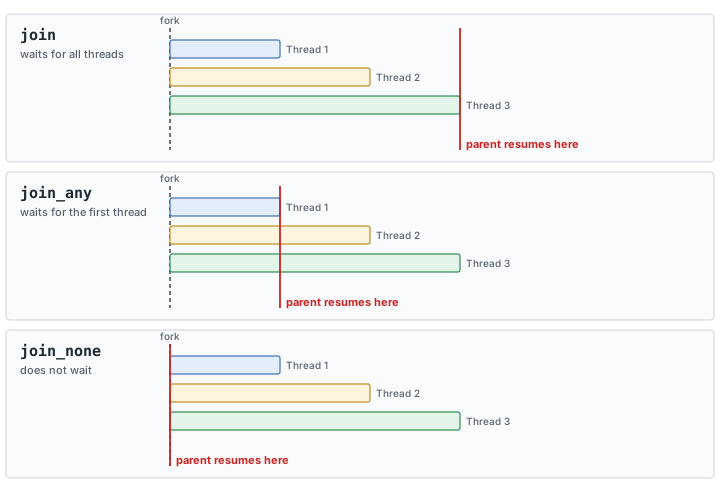
There's a third variant of fork...join: fork...join_none. It lets the parent thread resume execution of whatever follows the fork immediately, regardless of whether any of the forked threads have finished. Fork off five threads with join_none, and the parent thread continues right away while all five keep running in the background.
7 min read | Intermediate Level
What You'll Learn
- How
fork...join_nonediffers from plainfork...joinin when the parent thread resumes - How
join_nonebehaves when nested inside another fork - Why a task called concurrently from multiple
join_nonethreads needs to be declaredautomatic - Exactly what happens, step by step, when a shared (non-automatic) task's variables get overwritten by concurrent calls
- Why forking inside a loop needs its own fresh copy of the loop variable per iteration, and how that differs from the automatic-task fix
Syntax
fork
	// Thread 1
	// Thread 2
	// ...
	// Thread N
join_none
A Basic fork...join_none Example
module tb;
	initial begin
      $display ("[%0t] Main Thread: Fork join going to start", $time);
		fork
          print (20, "Thread1_0");
          print (30, "Thread1_1");
          print (10, "Thread2");
		join_none
      $display ("[%0t] Main Thread: Fork join has finished", $time);
	end

  // Note that we need automatic task
  task automatic print (int _time, string t_name);
    #(_time) $display ("[%0t] %s", $time, t_name);
  endtask
endmodule
Output
ncsim> run
[0] Main Thread: Fork join going to start
[0] Main Thread: Fork join has finished
[10] Thread2
[20] Thread1_0
[30] Thread1_1
ncsim: *W,RNQUIE: Simulation is complete.
Unlike plain fork...join, the main thread doesn't wait for anything here — "Main Thread: Fork join has finished" prints at 0ns, immediately after the fork statement, while Thread1_0, Thread1_1, and Thread2 keep running independently in the background and print later, each according to its own delay.
Quick Check
Q: If all three print() calls above were changed to use a delay of #0 instead of 10/20/30, would "Main Thread: Fork join has finished" still print before any of the three print() outputs?
Show Answer
Yes. join_none always lets the parent thread continue immediately after the fork statement itself, regardless of how long — or how short — the forked threads take. The parent's own next statement isn't waiting on anything the forked threads do.
Nested fork...join_none
module tb;
	initial begin
      $display ("[%0t] Main Thread: Fork join going to start", $time);
		fork
          begin
			fork
              print (20, "Thread1_0");
              print (30, "Thread1_1");
            join_none
            $display("[%0t] Nested fork has finished", $time);
          end
          print (10, "Thread2");
        join_none
      $display ("[%0t] Main Thread: Fork join has finished", $time);
	end

  // Note that we need automatic task
  task automatic print (int _time, string t_name);
    #(_time) $display ("[%0t] %s", $time, t_name);
  endtask
endmodule
Output
ncsim> run
[0] Main Thread: Fork join going to start
[0] Main Thread: Fork join has finished
[0] Nested fork has finished
[10] Thread2
[20] Thread1_0
[30] Thread1_1
ncsim: *W,RNQUIE: Simulation is complete.
The outer fork...join_none spawns the begin/end block and Thread2, then the main thread continues immediately without waiting for either. Inside the begin/end block, the inner fork...join_none spawns Thread1_0 and Thread1_1 in the background, and since that's also join_none, the block doesn't wait for them either — it immediately continues to print "Nested fork has finished," which is why that line shows up at 0ns too, right alongside the main thread's own completion message.
Why Do We Need an automatic Task?
Without the automatic keyword, the same display task called with different string arguments can end up printing the same message every time. This happens because multiple threads calling the same non-automatic (static) task share one single copy of its arguments and local variables in simulator memory. For each thread to get its own independent copy, the task needs to be declared automatic:
module tb;
  initial begin
      $display ("[%0t] Main Thread: Fork join going to start", $time);
    fork
          print (20, "Thread1_0");
          print (30, "Thread1_1");
          print (10, "Thread2");
    join_none
      $display ("[%0t] Main Thread: Fork join has finished", $time);
  end

  // Note that this is not an automatic task, its static
  task print (int _time, string t_name);
    #(_time) $display ("[%0t] %s", $time, t_name);
  endtask
endmodule
Output
ncsim> run
[0] Main Thread: Fork join going to start
[0] Main Thread: Fork join has finished
[10] Thread2
[20] Thread2
[30] Thread2
ncsim: *W,RNQUIE: Simulation is complete.
Every one of the three delayed prints now shows "Thread2" — even the ones originally called with "Thread1_0" and "Thread1_1" — but the delay times (10, 20, 30) still match each call correctly. Here's why both things happen at once:
All three forked calls to print begin executing at 0ns, one after another, since none of them have blocked yet. Each call's #(_time) delay is evaluated immediately as that call reaches it — before yielding to the next spawned call — so each thread correctly latches its own delay duration (10, 20, or 30ns) before suspending. But t_name is only read later, inside $display, which executes after the delay completes. By the time any of the three delays actually finish, all three calls have already run their initial setup and overwritten the single shared copy of t_name — and since print(10, "Thread2") is the last of the three calls to execute that setup, "Thread2" is whatever's left in shared storage when every delayed $display eventually fires.
Where Is fork...join_none Used?
fork...join_none is the usual way to launch a persistent background task — a monitor that watches a signal for the rest of the test, or a scoreboard that keeps checking results as they arrive — without blocking the main sequence of test steps that follows. It's often paired with a forever loop inside the forked thread to keep that background task running indefinitely.
Forking Inside a Loop
A related but different gotcha shows up when you fork directly inside a loop, without any task at all — spawning a batch of similar background processes is an extremely common pattern in testbenches:
module tb;
  initial begin
    for (int i = 0; i < 5; i++) begin
      fork
        #10 $display ("[%0t] i = %0d", $time, i);
      join_none
    end
    #20 $finish;
  end
endmodule
The intent here is five processes, each printing a different value of i (0 through 4). In practice, most or all of them end up printing the same value — typically the last one the loop reached. This isn't the same bug as a non-automatic task from the example above: there's no task here at all. The problem is that i itself is a single storage location that the loop keeps incrementing, and every forked process just holds a reference to that one variable — not a snapshot of whatever value it happened to hold at fork time. By the time any of the #10-delayed $display statements actually execute, the loop has already finished, and i holds whatever value it ended on.
The fix is to give each loop iteration its own independent copy of the value, and fork off of that copy instead of the loop variable itself:
module tb;
  initial begin
    for (int i = 0; i < 5; i++) begin
      automatic int j = i;   // a fresh copy, local to this iteration
      fork
        #10 $display ("[%0t] j = %0d", $time, j);
      join_none
    end
    #20 $finish;
  end
endmodule
Because j is declared automatic inside the loop body, a brand-new copy of it is created on every single iteration, and each forked process captures its own iteration's copy rather than sharing one variable with all the others. This time, all five processes correctly print their own distinct value.
This is the same underlying idea as declaring a task automatic — giving each concurrent user of a variable its own independent storage — just applied to a loop variable instead of a task's arguments. There's no task involved here at all, so the fix is a different pattern: an automatic local re-declared fresh on every loop iteration, not an automatic task.
Quick Check
Q: In the broken (non-automatic) version above, what value would you expect most or all five forked processes to print?
Show Answer
5. The for loop's exit condition is i < 5, so the loop increments i to 5 before the condition fails and the loop ends — by the time any of the delayed $display statements fire, i has already reached that final value.
Common Beginner Mistakes
Mistake #1: Assuming join_none waits for at least one thread
join_none waits for zero threads — the parent continues immediately after the fork statement. Why? If you actually need the parent to wait for at least one thread to finish before continuing, that's fork...join_any instead, covered next in this chapter.
Mistake #2: Forgetting automatic on a task called concurrently
As the example above shows in detail, a non-automatic task called from multiple concurrently forked threads shares a single copy of its variables, and later calls silently overwrite earlier ones. Why? This produces output that's still individually timed correctly but carries the wrong data — a subtle bug that's easy to miss if you're not specifically checking the printed values against the expected calls.
Mistake #3: Not accounting for leftover background threads
Threads spawned with join_none keep running after the parent moves on, and nothing automatically cleans them up. Why? If a test finishes without explicitly waiting for (wait fork) or terminating (disable fork) those background threads, they can still be active when the simulation ends, which is rarely what was intended.
Mistake #4: Forking inside a loop without capturing a fresh copy of the loop variable
As the "Forking Inside a Loop" section above shows, every process forked from inside a loop shares the loop variable itself unless you explicitly snapshot it into a fresh automatic local first. Why? Since forking doesn't automatically copy anything, all the spawned processes end up seeing whatever value the loop variable holds by the time they actually run — usually its final value, not the one that was current when each was forked.
Practice Exercise
Challenge: Fix the Broken Task
Using the broken, non-automatic version of print from the "Why Do We Need an automatic Task?" section, predict what the output would look like if the three calls inside the fork were reordered to print(30, "Thread1_1"), print(10, "Thread2"), print(20, "Thread1_0") — still without the automatic keyword.
Hint
The delay times still latch correctly per call, in the order given. The shared t_name ends up holding whatever the last call in the fork block wrote to it, regardless of delay length.
Solution
All three delayed prints would show "Thread1_0", since that's now the last call listed in the fork block: the output would print at 10ns, 20ns, and 30ns respectively (matching each call's own delay), but every line would read "Thread1_0" instead of its original intended name — the same shared-storage overwrite bug, just landing on a different name because the call order changed.
Summary
In this tutorial, you learned:
fork...join_nonelets the parent thread resume immediately after theforkstatement, without waiting for any spawned thread to finish- Threads spawned with
join_nonecontinue running independently in the background - A nested
fork...join_nonebehaves the same way at every level — neither the inner nor outer fork blocks its containing thread - A task called concurrently from multiple threads must be declared
automatic, or all calls will share one copy of its local variables - A delay value used to control timing (like
#(_time)) is latched immediately when reached, but a variable only read later (like inside a delayed$display) can be overwritten by other concurrent calls before it's ever used - Forking inside a loop shares the loop variable across every spawned process unless you snapshot it into a fresh
automaticlocal declared inside the loop body first
Continuing the Threads & Processes Chapter
Continue with SystemVerilog fork join_any, wait fork, and disable fork join for waiting on or cleaning up background threads like the ones in this article.
