
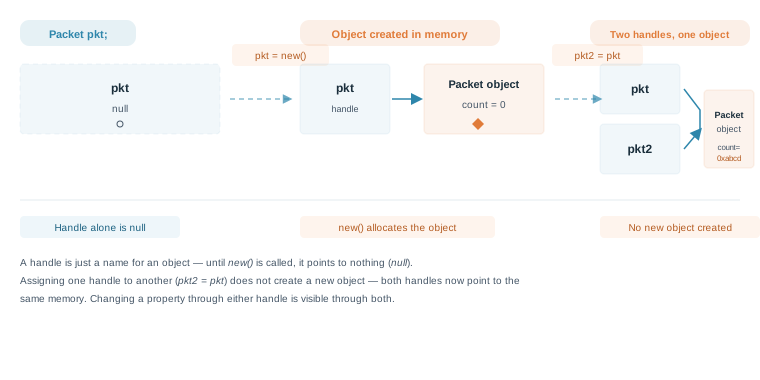
A class variable such as pkt is only a name by which an object is known — it can hold the handle to an object of a class, but until it's assigned something, it is always null. This article looks closely at the difference between a handle and the object it points to, what happens when two handles point to the same object, and how to build arrays of objects using fixed, dynamic, and associative arrays.
7 min read | Intermediate Level
What You'll Learn
- The difference between a class handle and a class object
- Why accessing a property through a
nullhandle causes a runtime error - What happens when two handles are assigned to the same object
- How to build fixed, dynamic, and associative arrays of class objects
What Is a Class Handle?
When you declare a variable of a class type, SystemVerilog does not create an object — it only creates a handle, a reference that can later point to an object. Until that handle is assigned the result of a new() call, it points to nothing, and its value is null.
// Create a new class with a single member called
// count that stores integer values
class Packet;
	int count;
endclass

module tb;
  	// Create a "handle" for the class Packet that can point to an
  	// object of the class type Packet
  	// Note: This "handle" now points to NULL
	Packet pkt;

  	initial begin
      if (pkt == null)
        $display ("Packet handle 'pkt' is null");

      // Display the class member using the "handle"
      // Expect a run-time error because pkt is not an object
      // yet, and is still pointing to NULL. So pkt is not
      // aware that it should hold a member
      $display ("count = %0d", pkt.count);
  	end
endmodule
Output
ncsim> run
Packet handle 'pkt' is null
count = ncsim: *E,TRNULLID: NULL pointer dereference.
          File: ./testbench.sv, line = 18, pos = 33
         Scope: tb
          Time: 0 FS + 0

./testbench.sv:18       $display ("count = %0d", pkt.count);
ncsim> exit
Accessing a property or method through a handle that is still null is one of the most common simulation errors in SystemVerilog — reported as a null pointer dereference (or "null object access"). The fix is always the same: make sure new() has been called before the handle is used.
null is a keyword, not a string. Comparing a handle to the literal text "null" is a type mismatch and will not compile — always compare with pkt == null.
What Is a Class Object?
An instance of a class is created only when its new() function is invoked. To reference that object again later, you assign its handle to a variable of the matching class type.
// Create a new class with a single member called
// count that stores integer values
class Packet;
	int count;
endclass

module tb;
  	// Create a "handle" for the class Packet that can point to an
  	// object of the class type Packet
  	// Note: This "handle" now points to NULL
	Packet pkt;

  	initial begin
      if (pkt == null)
        $display ("Packet handle 'pkt' is null");

      // Call the new() function of this class
      pkt = new();

      if (pkt == null)
        $display ("What's wrong, pkt is still null ?");
      else
        $display ("Packet handle 'pkt' is now pointing to an object, and not NULL");

      // Display the class member using the "handle"
      $display ("count = %0d", pkt.count);
  	end
endmodule
Output
ncsim> run
Packet handle 'pkt' is null
Packet handle 'pkt' is now pointing to an object, and not NULL
count = 0
ncsim: *W,RNQUIE: Simulation is complete.
Notice that count prints as 0 even though it was never explicitly assigned. SystemVerilog initializes integer-type class properties to their default value (0 for int) at the moment the object is constructed, the same way module-level variables default to a known value.
Quick Check
Q: Why does the first $display in this example succeed, while the equivalent line in the previous example caused a null pointer dereference?
Show Answer
The first $display in both examples only checks pkt == null, which is comparing the handle itself — that's always safe, even on a null handle. The error only happens when you try to access a member through the handle, like pkt.count, before new() has been called. In this second example, pkt = new() runs first, so by the time pkt.count is accessed, the object already exists.
What Happens When Two Handles Point to the Same Object?
If you assign one handle to another, the second handle does not get its own copy of the object — it simply starts pointing to the same memory as the first.
// Create a new class with a single member called
// count that stores integer values
class Packet;
	int count;
endclass

module tb;
  	// Create two "handles" for the class Packet
  	// Note: These "handles" now point to NULL
	Packet pkt, pkt2;

  	initial begin


      // Call the new() function of this class and
      // assign the member some value
      pkt = new();
      pkt.count = 16'habcd;

      // Display the class member using the "pkt" handle
      $display ("[pkt] count = 0x%0h", pkt.count);

      // Make pkt2 handle to point to pkt and print member variable
      pkt2 = pkt;
      $display ("[pkt2] count = 0x%0h", pkt2.count);
  	end
endmodule
Output
ncsim> run
[pkt] count = 0xabcd
[pkt2] count = 0xabcd
ncsim: *W,RNQUIE: Simulation is complete.
Now pkt and pkt2 both point to the same instance of Packet. This is because pkt2 = pkt did not create a new object — it only copied the handle, so both names now refer to the same memory. If you changed pkt2.count after this point, reading pkt.count would show the new value too, since there's only one object behind both names.
This handle-copy behavior is exactly why SystemVerilog provides a separate copy() convention (often hand-written, or via the built-in shallow-copy method) when you actually want a second, independent object with the same property values rather than two names for the same one.
Arrays of Class Objects
Just like a single class variable, each element of an array of class objects is its own handle, and starts out as null until it's individually constructed with new().
Fixed Array
A fixed-size array, also known as a static array, is declared with a specific size at compile time. In this example, fixed_array can hold exactly 5 Packet objects, and that size is locked in when the code compiles.
Packet fixed_array [5]; // Declares a fixed array of 5 Packet objects
// Define the Packet class
class Packet;
    int count;
    // Constructor to initialize count
    function new(int c = 0);
        count = c;
    endfunction
endclass

module tb;

    // Declare a fixed array of Packet objects
    Packet fixed_array[5];

    initial begin
        $display("--- Fixed Array Example ---");

        // Initialize each element of the fixed array
        for (int i = 0; i < 5; i++) begin
            fixed_array[i] = new(i * 10); // Create a new Packet object and assign it
        end

        // Access and display data from the fixed array
        for (int i = 0; i < 5; i++) begin
            $display("fixed_array[%0d].count = %0d", i, fixed_array[i].count);
        end

        // Example of accessing a null element if not initialized (would cause an error if dereferenced)
        // assert(fixed_array[0] != null); // Check if initialized
    end

endmodule
Output
xcelium> run
--- Fixed Array Example ---
fixed_array[0].count = 0
fixed_array[1].count = 10
fixed_array[2].count = 20
fixed_array[3].count = 30
fixed_array[4].count = 40
xmsim: *W,RNQUIE: Simulation is complete.
Dynamic Array
A dynamic array is declared without a specific size and can grow or shrink at runtime. You allocate it using the new[size] syntax.
Packet   dynamic_array[];       // Declares a dynamic array of Packet objects
dynamic_array = new[10];        // Initializes the array with a size of 10
Here, dynamic_array starts out empty. The call to new[10] allocates space for 10 handles, each of which still needs its own new() call before it points to an actual Packet object.
module tb;

    initial begin
        // Declare a dynamic array of Packet objects
        Packet dynamic_array[];

        $display("--- Dynamic Array Example ---");

        // Initialize the dynamic array with a specific size
        dynamic_array = new[3]; // Creates space for 3 Packet references

        // Initialize each element of the dynamic array
        for (int i = 0; i < dynamic_array.size(); i++) begin
            dynamic_array[i] = new(i + 1); // Create new Packet objects
        end

        // Access and display data
        foreach (dynamic_array[i]) begin
            $display("dynamic_array[%0d].count = %0d", i, dynamic_array[i].count);
        end
    end

endmodule
Output
xcelium> run

--- Dynamic Array Example ---
dynamic_array[0].count = 1
dynamic_array[1].count = 2
dynamic_array[2].count = 3
xmsim: *W,RNQUIE: Simulation is complete.
Associative Array
An associative array uses a key, rather than a numerical index, to access elements. The key can be an integer, a string, or another data type, and the array only stores elements that have been explicitly added.
Packet assoc_array[*];           // Declares an associative array of Packet objects
assoc_array[100] = new;          // Adds a Packet object with key 100
assoc_array["header"] = new;     // Adds a Packet object with key "header"
Here, assoc_array is declared with a wildcard index [*], so it can be indexed by any integral expression. The integer 100 is used directly, and the string literal "header" is automatically cast to a bit vector of equivalent size, so it is still an integral key. Non-integral index values are illegal for a wildcard array, and an associative array has only one index type, declared once; to use real string keys, declare it as Packet assoc_array[string], as in the example below. This is useful when the range of indices isn't known up front, or when you want to associate an object with a meaningful label instead of a plain number.
module tb;

    // Declare an associative array where the key is a string and the value is a Packet object
    Packet assoc_array[string];

    initial begin
        $display("--- Associative Array Example ---");

        // Assign Packet objects to the associative array using string keys
        assoc_array["packet_A"] = new(50);
        assoc_array["packet_B"] = new(75);
        assoc_array["packet_C"] = new(100);

        // Access and display data using keys
        $display("assoc_array[\"packet_A\"].count = %0d", assoc_array["packet_A"].count);
        $display("assoc_array[\"packet_C\"].count = %0d", assoc_array["packet_C"].count);

        // Iterate through the associative array (order is not guaranteed unless specified)
      foreach (assoc_array[k]) begin
            $display("Key: %s, Count: %0d", k, assoc_array[k].count);
        end

        // Check if a key exists
        if (assoc_array.exists("packet_B")) begin
            $display("Packet_B exists in the associative array.");
        end
    end

endmodule
Output
xcelium> run

--- Associative Array Example ---
assoc_array["packet_A"].count = 50
assoc_array["packet_C"].count = 100
Key: packet_A, Count: 50
Key: packet_B, Count: 75
Key: packet_C, Count: 100
Packet_B exists in the associative array.
xmsim: *W,RNQUIE: Simulation is complete.
The foreach loop above happens to iterate in insertion order in this run, but the code's own comment is correct to caution that associative array iteration order isn't formally guaranteed — don't rely on it matching insertion order.
Where Is This Used?
Scoreboards and transaction trackers in verification environments frequently use associative arrays of class objects, keyed by a transaction ID or address, so a monitor can look up the matching expected transaction the moment a response arrives — without scanning through a fixed-size or dynamic array every time.
Common Beginner Mistakes
Mistake #1: Accessing a member through a handle before calling new()
Wrong: Packet pkt; $display("count = %0d", pkt.count);
Right: Packet pkt; pkt = new(); $display("count = %0d", pkt.count);
Why? A handle on its own is null. Reading a property through a null handle causes a null pointer dereference, since there's no object in memory for count to belong to.
Mistake #2: Assuming pkt2 = pkt creates a second, independent object
Wrong: Changing pkt2.count and expecting pkt.count to stay the same.
Right: Treat pkt and pkt2 as two names for the same object after a plain handle assignment — a change through either one is visible through both.
Why? pkt2 = pkt only copies the handle, not the object it points to. To get a second, independent object, you need a separate call to new().
Mistake #3: Declaring a fixed or dynamic array of objects and skipping the per-element new() call
Wrong: Packet fixed_array [5]; fixed_array[0].count = 10;
Right: Packet fixed_array [5]; fixed_array[0] = new(); fixed_array[0].count = 10;
Why? Declaring Packet fixed_array [5] only reserves five handles, all initialized to null. Each element still needs its own new() call before it becomes a usable object.
Practice Exercise
Challenge: Independent vs. Aliased Handles
Using the Packet class from this article, write a small testbench that creates one object pkt with count = 5. Then create a second handle pkt_alias that points to the same object as pkt, and a third handle pkt_copy that points to a brand new, independent object also constructed with count = 5. Change pkt.count to 99, then display count through all three handles to confirm which ones changed.
Hint
pkt_alias should be created with a plain handle assignment (pkt_alias = pkt;), while pkt_copy needs its own call to new() with the same starting value.
Solution
class Packet;
    int count;
    function new (int c = 0);
        count = c;
    endfunction
endclass

module tb;
    Packet pkt, pkt_alias, pkt_copy;

    initial begin
        pkt = new (5);
        pkt_alias = pkt;        // Same object as pkt
        pkt_copy  = new (5);    // A separate, independent object

        pkt.count = 99;

        $display ("pkt.count       = %0d", pkt.count);
        $display ("pkt_alias.count = %0d", pkt_alias.count);
        $display ("pkt_copy.count  = %0d", pkt_copy.count);
    end
endmodule
pkt_alias.count also shows 99, since pkt_alias and pkt point to the same object. pkt_copy.count still shows 5, since it was built with its own new() call and is a completely separate object.
Summary
In this tutorial, you learned:
- A class handle is just a reference — it stays
nulluntilnew()is called to construct an actual object - Accessing a property or method through a
nullhandle causes a runtime null pointer dereference - Assigning one handle to another (
pkt2 = pkt) makes both handles point to the same object, not two separate objects - Fixed arrays, dynamic arrays, and associative arrays can all hold class objects, but every element still needs its own
new()call before use
