
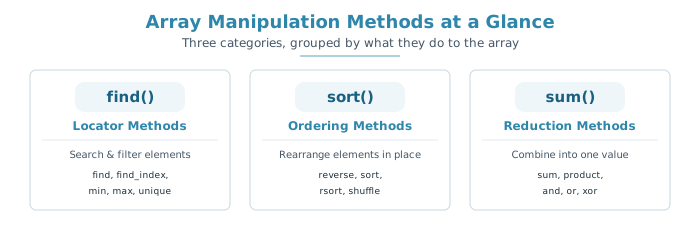
SystemVerilog arrays come with a rich set of built-in methods for searching, ordering, and reducing their contents — without you having to hand-write a single loop.
Each method iterates through the array elements and evaluates the expression given in the with clause for every element. The iterator argument names the local variable used to refer to the current element inside that expression; if you don't provide one, item is used by default.
Specifying an iterator argument without a with clause is illegal — the iterator only exists to be used inside the expression.
10 min read | Intermediate Level
What You'll Learn
- How the
withclause and iterator argument work across array methods - Search and filter arrays using locator methods like
find()andfind_index() - Reorder arrays in place with
sort(),rsort(),reverse(), andshuffle() - Collapse an array down to a single value using reduction methods like
sum()andxor()
Syntax
Every array manipulation method follows the same general call pattern.
array_name.method_name(iterator_name) with (expression);   // custom iterator
array_name.method_name with (expression);                   // default iterator: item
array_name.method_name();                                   // no expression needed
method_name– one of the locator, ordering, or reduction methods covered belowiterator_name– optional local variable name representing the current element; defaults toitemwith (expression)– a boolean or value expression evaluated per element; mandatory for some methods, optional for others, and disallowed for a few
Array Locator Methods
Locator methods search through an array and return either the matching elements or their indices, without modifying the original array.
Mandatory 'with' Clause
These methods filter elements based on a given expression and collect every element that satisfies it, so the with clause is required.
| Method | Description |
|---|---|
find() | Returns all elements satisfying the given expression |
find_index() | Returns the indices of all elements satisfying the given expression |
find_first() | Returns the first element satisfying the given expression |
find_first_index() | Returns the index of the first element satisfying the given expression |
find_last() | Returns the last element satisfying the given expression |
find_last_index() | Returns the index of the last element satisfying the given expression |
Example
module tb;
  int array[9] = '{4, 7, 2, 5, 7, 1, 6, 3, 1};
  int res[$];

  initial begin
    res = array.find(x) with (x > 3);
    $display ("find(x)         : %p", res);

    res = array.find_index with (item == 4);
    $display ("find_index      : res[%0d] = 4", res[0]);

    res = array.find_first with (item < 5 & item >= 3);
    $display ("find_first      : %p", res);

    res = array.find_first_index(x) with (x > 5);
    $display ("find_first_index: %p", res);

    res = array.find_last with (item <= 7 & item > 3);
    $display ("find_last       : %p", res);

    res = array.find_last_index(x) with (x < 3);
    $display ("find_last_index : %p", res);
  end
endmodule
Output
ncsim> run
find(x)         : '{4, 7, 5, 7, 6}
find_index      : res[0] = 4
find_first      : '{4}
find_first_index: '{1}
find_last       : '{6}
find_last_index : '{8}
ncsim: *W,RNQUIE: Simulation is complete.
Notice that find_index and find both use the default iterator item in some calls and a custom iterator x in others — either works as long as the name matches what's used inside the with expression. The find_index line's $display is a bit of a pun: res[0] holds the index (0) where the value 4 was found, so the format string reads as "the index found is 0, and the value there is 4."
Quick Check
Q: Is calling array.find_index() without a with clause legal?
Show Answer
No. For all six methods in this table — find, find_index, find_first, find_first_index, find_last, and find_last_index — the with clause is mandatory. Omitting it is a compile-time error.
Optional 'with' Clause
These methods work with or without a with clause — used alone they operate on the raw element values, and with a clause they operate on the expression result instead.
| Method | Description |
|---|---|
min() | Returns the element with minimum value, or whose expression evaluates to a minimum |
max() | Returns the element with maximum value, or whose expression evaluates to a maximum |
unique() | Returns all elements with unique values, or whose expression evaluates to a unique value |
unique_index() | Returns the indices of all elements with unique values, or whose expression evaluates to a unique value |
Example
module tb;
  int array[9] = '{4, 7, 2, 5, 7, 1, 6, 3, 1};
  int res[$];

  initial begin
    res = array.min();
    $display ("min          : %p", res);

    res = array.max();
    $display ("max          : %p", res);

    res = array.unique();
    $display ("unique       : %p", res);

    res = array.unique(x) with (x < 3);
    $display ("unique       : %p", res);

    res = array.unique_index;
    $display ("unique_index : %p", res);
  end
endmodule
Output
ncsim> run
min          : '{1}
max          : '{7}
unique       : '{4, 7, 2, 5, 1, 6, 3}
unique       : '{4, 2}
unique_index : '{0, 1, 2, 3, 5, 6, 7}
ncsim: *W,RNQUIE: Simulation is complete.
The second unique call is the interesting one: array.unique(x) with (x < 3) doesn't return elements with unique values — it groups elements by the boolean result of x < 3, and keeps the first element for each distinct result (one for false, one for true). That's why it collapses down to just '{4, 2}' instead of the full array.
Locator methods are a natural fit for scoreboard and reference-model code — for example, using find_first with (item.addr == expected_addr) to pull a matching transaction out of a list of received packets.
Array Ordering Methods
Unlike locator methods, ordering methods operate on and alter the array directly — there's no separate result to capture.
| Method | Description |
|---|---|
reverse() | Reverses the order of elements in the array; a with clause is not allowed here either |
sort() | Sorts the array in ascending order, optionally using a with clause |
rsort() | Sorts the array in descending order, optionally using a with clause |
shuffle() | Randomizes the order of the elements in the array; a with clause is not allowed here |
Example
module tb;
  int array[9] = '{4, 7, 2, 5, 7, 1, 6, 3, 1};

  initial begin
    array.reverse();
    $display ("reverse  : %p", array);

    array.sort();
    $display ("sort     : %p", array);

    array.rsort();
    $display ("rsort    : %p", array);

    for (int i = 0; i < 5; i++) begin
    	array.shuffle();
      $display ("shuffle Iter:%0d  = %p", i, array);
    end
  end
endmodule
Output
ncsim> run
reverse  : '{1, 3, 6, 1, 7, 5, 2, 7, 4}
sort     : '{1, 1, 2, 3, 4, 5, 6, 7, 7}
rsort    : '{7, 7, 6, 5, 4, 3, 2, 1, 1}
shuffle Iter:0  = '{6, 7, 1, 7, 3, 2, 1, 4, 5}
shuffle Iter:1  = '{5, 1, 3, 4, 2, 7, 1, 7, 6}
shuffle Iter:2  = '{3, 1, 7, 4, 6, 7, 1, 2, 5}
shuffle Iter:3  = '{6, 4, 7, 3, 1, 7, 5, 2, 1}
shuffle Iter:4  = '{3, 6, 2, 5, 4, 7, 7, 1, 1}
ncsim: *W,RNQUIE: Simulation is complete.
Each call mutates array in place and builds on the result of the previous call — sort() runs on whatever order reverse() left behind, and rsort() runs on whatever sort() left behind. The final multiset of values never changes; only the order does.
Quick Check
Q: Which of reverse(), sort(), rsort(), and shuffle() do not accept a with clause?
Show Answer
reverse() and shuffle(). Neither orders by a value — reverse() just flips the existing order and shuffle() randomizes it — so a with expression wouldn't have anything meaningful to act on for either one; specifying one for either method is a compiler error. sort() and rsort() both accept an optional with clause.
Using Array Ordering on Classes
The with clause makes sort() and rsort() useful on arrays of class objects too, letting you sort by one or more object properties instead of the raw element value.
class Register;
  string name;
  rand bit [3:0] rank;
  rand bit [3:0] pages;

  function new (string name);
    this.name = name;
  endfunction

  function void print();
    $display("name=%s rank=%0d pages=%0d", name, rank, pages);
  endfunction

endclass

module tb;
  Register rt[4];
  string name_arr[4] = '{"alexa", "siri", "google home", "cortana"};

  initial begin
    $display ("
-------- Initial Values --------");
    foreach (rt[i]) begin
      rt[i] = new (name_arr[i]);
      rt[i].randomize();
      rt[i].print();
    end

    $display ("
--------- Sort by name ------------");

    rt.sort(x) with (x.name);
    foreach (rt[i]) rt[i].print();

    $display ("
--------- Sort by rank, pages -----------");

    rt.sort(x) with ( {x.rank, x.pages});
    foreach (rt[i]) rt[i].print();
  end
endmodule
Output
ncsim> run

-------- Initial Values --------
name=alexa rank=12 pages=13
name=siri rank=6 pages=12
name=google home rank=12 pages=13
name=cortana rank=7 pages=11

--------- Sort by name ------------
name=alexa rank=12 pages=13
name=cortana rank=7 pages=11
name=google home rank=12 pages=13
name=siri rank=6 pages=12

--------- Sort by rank, pages -----------
name=siri rank=6 pages=12
name=cortana rank=7 pages=11
name=alexa rank=12 pages=13
name=google home rank=12 pages=13
ncsim: *W,RNQUIE: Simulation is complete.
Concatenating {x.rank, x.pages} inside the second with clause sorts by rank first and uses pages as a tiebreaker — notice alexa and google home share rank=12 and pages=13, so their relative order stays exactly as it was going in, since the sort has nothing left to distinguish them by.
Sorting class-object arrays by a struct-like key such as {x.rank, x.pages} is a common pattern for ordering a queue of transactions by priority and then by arrival time, without writing a custom compare function.
Array Reduction Methods
Reduction methods collapse every element in the array down into a single value.
| Method | Description |
|---|---|
sum() | Returns the sum of all array elements |
product() | Returns the product of all array elements |
and() | Returns the bitwise AND (&) of all array elements |
or() | Returns the bitwise OR (|) of all array elements |
xor() | Returns the bitwise XOR (^) of all array elements |
module tb;
  int array[4] = '{1, 2, 3, 4};
  int res[$];

  initial begin
    $display ("sum     = %0d", array.sum());
    $display ("product = %0d", array.product());
    $display ("and     = 0x%0h", array.and());
    $display ("or      = 0x%0h", array.or());
    $display ("xor     = 0x%0h", array.xor());
  end
endmodule
Output
ncsim> run
sum     = 10
product = 24
and     = 0x0
or      = 0x7
xor     = 0x4
ncsim: *W,RNQUIE: Simulation is complete.
Reduction methods map directly onto hardware-style checks in a testbench — xor() over a data array is a quick way to model a parity check, and sum() is handy for a running total when self-checking a counter or accumulator against your DUT.
Common Mistakes
Mistake #1: Omitting the mandatory 'with' clause
Calling array.find() or array.find_first_index() without a with clause is a compile error, since these methods have nothing to filter by otherwise. Only the min/max/unique family and the reduction methods can be called with no clause at all.
Mistake #2: Adding a 'with' clause to shuffle()
array.shuffle() with (item) is illegal — shuffle() randomizes order and doesn't accept a with clause under any circumstance, unlike sort() and rsort().
Mistake #3: Confusing find() with find_index()
find() returns the matching values; find_index() returns the matching positions in the array. Mixing these up is a common source of off-by-one bugs when the result is used to index back into the original array.
Mistake #4: Assuming ordering methods return a new array
array.sort() and array.reverse() mutate array directly and don't return a usable value — writing sorted = array.sort(); doesn't do what it looks like it does. If you need to keep the original order too, copy the array first.
Practice Exercise
Challenge: Filter, Sort, and Reduce
Given int vals[6] = '{12, 5, 9, 5, 20, 9};, use array methods to: find all elements greater than 8, sort a copy of the array in descending order, and compute the sum of the original array.
Hint
Use find() with a with clause for the filter step, copy the array into a new variable before calling rsort() so the original is untouched, and call sum() directly on the original.
Solution
module tb;
  int vals[6] = '{12, 5, 9, 5, 20, 9};
  int above8[$];
  int sorted_copy[6];

  initial begin
    above8 = vals.find(x) with (x > 8);
    $display("above8 = %p", above8);

    sorted_copy = vals;
    sorted_copy.rsort();
    $display("sorted_copy (desc) = %p", sorted_copy);

    $display("sum of vals = %0d", vals.sum());
  end
endmodule
Summary
In this tutorial, you learned:
- Array manipulation methods use a shared
withclause and iterator pattern, withitemas the default iterator name - Locator methods like
find()andfind_index()search and filter without altering the array; thewithclause is mandatory for most of them - Ordering methods like
sort(),rsort(), andreverse()mutate the array in place;shuffle()never accepts awithclause sort()/rsort()can order arrays of class objects by one or more properties using thewithclause- Reduction methods like
sum()andxor()collapse the whole array into a single value, useful for checksums and running totals
