
SystemVerilog supports using a foreach loop inside a constraint block, so entire arrays can be constrained with a single rule instead of writing out one expression per element. The foreach construct iterates over an array's elements, with its argument acting as an identifier representing a single entity in the array (see SystemVerilog Loops for a refresher on foreach outside of constraints).
15 min read | Intermediate Level
What You'll Learn
- How
foreachinside a constraint lets you constrain every element of an array with one rule - Why dynamic arrays and queues need their size established before or within the constraint, unlike fixed-size arrays
- How nested
foreachloops reach into multidimensional arrays, including packed sub-dimensions - How array reduction methods like
sum()can be used directly inside a constraint with thewithclause
Basic foreach Constraint
Here, a static array of 5 elements is constrained so each element equals its own index:
class ABC;
  rand bit[3:0] array [5];

  // This constraint will iterate through each of the 5 elements
  // in an array and set each element to the value of its
  // particular index
  constraint c_array { foreach (array[i]) {
    					array[i] == i;
  						}
                     }
endclass

module tb;

  initial begin
    ABC abc = new;
    abc.randomize();
    $display ("array = %p", abc.array);
  end
endmodule
Output
ncsim> run
array = '{'h0, 'h1, 'h2, 'h3, 'h4}
ncsim: *W,RNQUIE: Simulation is complete.
Each element is assigned a value equal to its own index — not one shared random value applied to all 5 elements, but 5 independently-generated values, each following the rule expressed in the loop body.
Quick Check
Q: If the array were declared bit[3:0] array[8] instead of [5], what would array[7] be constrained to?
Show Answer
7. The rule array[i] == i applies to every index the foreach loop reaches, regardless of the array's actual size — each element still just equals its own index.
Dynamic Arrays and Queues
Dynamic arrays and queues don't have a size at the time of declaration, so foreach can't be used directly until that size is established — either by assigning it directly, or by constraining it as part of the same set of constraints:
class ABC;
  rand bit[3:0] darray []; 		// Dynamic array -> size unknown
  rand bit[3:0] queue [$]; 		// Queue -> size unknown

  // Assign size for the queue if not already known
  constraint c_qsize  { queue.size() == 5; }

  // Constrain each element of both the arrays
  constraint c_array  { foreach (darray[i])
    					  darray[i] == i;
                        foreach (queue[i])
                          queue[i] == i + 1;
                      }

    // Size of an array can be assigned using a constraint like
    // we have done for the queue, but let's assign the size before
    // calling randomization
    function new ();
		darray = new[5]; 	// Assign size of dynamic array
	endfunction
endclass

module tb;

  initial begin
    ABC abc = new;
    abc.randomize();
    $display ("array = %p\nqueue = %p", abc.darray, abc.queue);
  end
endmodule
Output
ncsim> run
array = '{'h0, 'h1, 'h2, 'h3, 'h4}
queue = '{'h1, 'h2, 'h3, 'h4, 'h5}
ncsim: *W,RNQUIE: Simulation is complete.
Two different approaches to sizing are shown side by side: darray's size is fixed directly in the constructor (new[5]), before randomization ever runs, while queue's size is fixed through its own constraint (queue.size() == 5), letting the solver establish it as part of the same solve.
Quick Check
Q: Would foreach (queue[i]) queue[i] == i + 1; work correctly if c_qsize were removed entirely?
Show Answer
No — queue would have no established size for foreach to iterate over. The size has to be pinned down somewhere, either through a constraint like c_qsize or a direct assignment, before a foreach constraint on its elements makes sense.
Multidimensional Arrays
SystemVerilog constraints are powerful enough to apply to multidimensional arrays too, including ones that mix packed and unpacked dimensions. Here, each element of a 3×5 unpacked array is itself a 20-bit packed value, structured as five 4-bit nibbles:
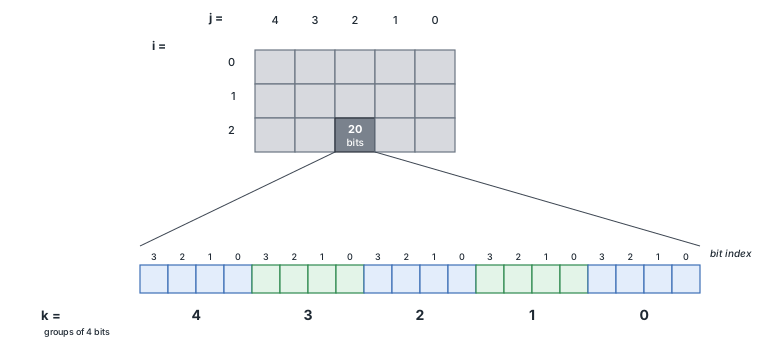
The constraint sets alternating nibbles to 0xF and 0, producing the pattern 0xF0F0F in every element:
class ABC;
  rand bit[4:0][3:0] md_array [3][5]; 	// Multidimensional Arrays

  constraint c_md_array {
    foreach (md_array[i]) {
    	foreach (md_array[i][j]) {
          foreach (md_array[i][j][k]) {
            if (k %2 == 0)
              md_array[i][j][k] == 'hF;
            else
              md_array[i][j][k] == 0;
        }
      }
    }
  }


endclass

module tb;

  initial begin
    ABC abc = new;
    abc.randomize();
    $display ("md_array = %p", abc.md_array);
  end
endmodule
Output
ncsim> run
md_array = '{'{'hf0f0f, 'hf0f0f, 'hf0f0f, 'hf0f0f, 'hf0f0f}, '{'hf0f0f, 'hf0f0f, 'hf0f0f, 'hf0f0f, 'hf0f0f}, '{'hf0f0f, 'hf0f0f, 'hf0f0f, 'hf0f0f, 'hf0f0f}}
ncsim: *W,RNQUIE: Simulation is complete.
The nesting order matters here: the first two foreach levels (i, then j) walk the array's unpacked dimensions, in the same order they appear in the declaration ([3][5]). The third level (k) then reaches into the element's own packed dimension ([4:0]), letting the constraint address individual nibbles within each 20-bit value. With k running 0 through 4, the even indices land on 0xF and the odd ones on 0 — exactly the alternating pattern that produces 0xF0F0F.
Quick Check
Q: Which array dimension does foreach (md_array[i][j][k])'s k actually iterate over — an unpacked dimension, or the packed one?
Show Answer
The packed dimension, [4:0]. The first two foreach levels already consumed both unpacked dimensions ([3] and [5]); the third level goes one level deeper, into the packed structure of each individual element.
Multidimensional Dynamic Arrays
Constraining a multidimensional dynamic array is trickier, and support varies by simulator. Here, neither dimension of a 2D array has a known size up front:
class ABC;
  rand bit[3:0] md_array [][]; 	// Multidimensional Arrays with unknown size

  constraint c_md_array {
     // First assign the size of the first dimension of md_array
     md_array.size() == 2;

     // Then for each sub-array in the first dimension do the following:
     foreach (md_array[i]) {

        // Randomize size of the sub-array to a value within the range
        md_array[i].size() inside {[1:5]};

        // Iterate over the second dimension
        foreach (md_array[i][j]) {

           // Assign constraints for values to the second dimension
           md_array[i][j] inside {[1:10]};
         }
      }
   }

endclass

module tb;

  initial begin
    ABC abc = new;
    abc.randomize();
    $display ("md_array = %p", abc.md_array);
  end
endmodule
Output
ncsim> run
md_array = '{'{'h9, 'h6, 'h7, 'h9, 'h1}, '{'h5, 'h9, 'h4, 'h2}}
ncsim: *W,RNQUIE: Simulation is complete.
The outer dimension is pinned to exactly 2 sub-arrays. Each sub-array's own size is then randomized within [1:5] — the first ends up with 5 elements, the second with 4 — and every individual value across both falls within [1:10], exactly as required.
Array Reduction Iterative Constraint
Array reduction methods can produce a single value from an array of integral values, and this can be used directly inside a constraint. Here, an array of 5 elements is constrained so their sum equals 20:
class ABC;
  rand bit[3:0] array [5];

  // Intrepreted as int'(array[0]) + int'(array[1]) + .. + int'(array[4]) == 20;
  constraint c_sum { array.sum() with (int'(item)) == 20; }

endclass

module tb;
  initial begin
    ABC abc = new;
    abc.randomize();
    $display ("array = %p", abc.array);
  end
endmodule
Output
ncsim> run
array = '{'h4, 'h2, 'h2, 'h4, 'h8}
ncsim: *W,RNQUIE: Simulation is complete.
4 + 2 + 2 + 4 + 8 = 20 — the solver found a combination of 4-bit values that sums to exactly the required total. The int'(item) cast inside the with clause avoids any width truncation surprises while accumulating the total, since each element on its own is only 4 bits wide.
Where Is This Used?
Constraining an array's sum is a common way to model something like a set of priority weights or a checksum-like field that needs to add up to a known total. Constrained multidimensional arrays are a natural fit for memory or register-file models, where the same structural rule needs to apply uniformly across every entry.
Common Beginner Mistakes
Mistake #1: Using foreach on a dynamic array or queue before its size is set
As the "Dynamic Arrays and Queues" example shows, foreach needs a known size to iterate over. Why? An unsized dynamic array or queue has to have its size fixed first — either directly (like darray = new[5] in the constructor) or through its own constraint (like queue.size() == 5) — before a foreach constraint on its elements makes sense.
Mistake #2: Nesting foreach dimensions in the wrong order for a mixed packed/unpacked array
As the multidimensional example shows, the unpacked dimensions are walked first, in declaration order, before reaching into any packed sub-dimensions. Why? Getting this order wrong means the innermost foreach variable won't actually correspond to the dimension you intended to address.
Mistake #3: Forgetting to cast array elements before using a reduction method
As the sum() example shows, casting each element with int'(item) inside the with clause avoids width-related surprises while accumulating a total. Why? Without the cast, arithmetic on narrow elements can behave unexpectedly — the cast makes sure the running total is computed with enough width to hold the actual result.
Mistake #4: Assuming foreach applies one shared random value to every element
Each element reached by a foreach constraint gets its own independently-generated value, following whatever rule the loop body expresses. Why? array[i] == i ties each element to its own index specifically — it doesn't mean every element ends up equal to each other, or to a single shared random pick.
Practice Exercise
Challenge: Constrain a Strictly Increasing Array
Write a class with rand bit [3:0] arr[5] and a foreach constraint requiring every element (after the first) to be strictly greater than the one before it.
Hint
Use foreach combined with an if (i > 0) check, comparing arr[i] against arr[i-1].
Solution
class SortedArr;
  rand bit [3:0] arr[5];

  constraint c_sorted {
    foreach (arr[i])
      if (i > 0) arr[i] > arr[i-1];
  }
endclass
A result like '{2, 5, 6, 9, 13} satisfies this constraint, since each element is strictly greater than the one before it. A result like '{2, 2, 5, 9, 13} would not — the second element equals the first rather than exceeding it, violating the strict > comparison.
Summary
In this tutorial, you learned:
foreachinside a constraint applies a rule to every element of an array, with each element getting its own independently-generated value- Dynamic arrays and queues need their size established — directly or through a constraint — before
foreachcan iterate over them - Nested
foreachloops walk unpacked dimensions first, in declaration order, before reaching into any packed sub-dimensions - Array reduction methods like
sum()can be used directly inside a constraint through thewithclause, with a cast to avoid width-related truncation
