
This last chapter steps back from individual protocols. Given a real design problem, which interface fits? How do you verify any of them, whatever the protocol? And how do the ideas of this tutorial come up in an interview? The answers reuse everything from the earlier chapters.
Choosing an interface is a trade between speed, pin count, distance, the number of devices, and what the parts on the board actually support. Inside a chip, the choice is between AMBA buses; on a board, between UART, SPI, I2C and a few others such as CAN and USB. This article compares them and gives a practical way to decide.
7 min read | Beginner to Intermediate
What You'll Learn
- Compare UART, SPI, I2C, CAN and USB on speed, wires and topology
- Choose an on-chip AMBA bus for a block
- Pick a board-level interface for a peripheral
- Recognize when a protocol is the wrong choice
On-Chip: Which AMBA Bus?
- APB for registers of slow peripherals: simple, small, two cycles per access.
- AXI4-Lite for register blocks that sit on an AXI interconnect, especially IP that must plug into AXI systems.
- AHB for small systems and microcontrollers: pipelined, bursts, one master per layer.
- AXI4 for anything that moves a lot of data or has high latency: processors, DMA, memory controllers.
- AXI4-Stream for data that flows without addresses: video, packets, DSP chains.
The deciding question is usually bandwidth and latency. A block with eight registers on AXI4 is waste; a memory controller on APB is a bottleneck.
On the Board: Serial Interfaces
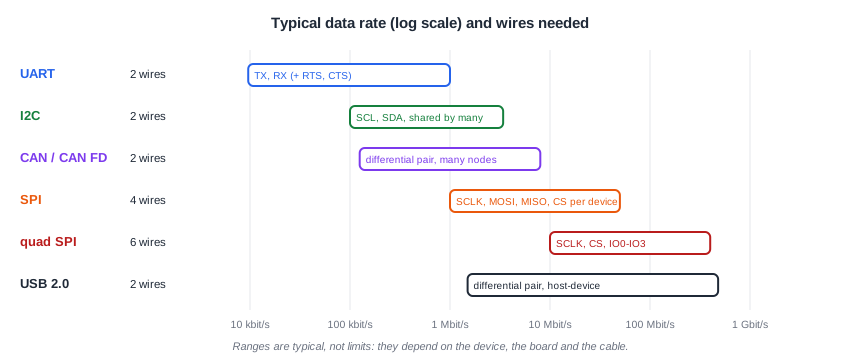
| UART | SPI | I2C | CAN | USB | |
|---|---|---|---|---|---|
| Wires | 2 (+2 flow control) | 3 + 1 CS per device | 2 | 2 (differential) | 2 (differential) |
| Clock | none, agreed baud rate | from the master | from the controller | none, bit timing | embedded in the data |
| Devices | point to point | one master, several slaves | many, by address | many nodes, by message ID | host and devices through hubs |
| Duplex | full | full | half | half | half |
| Typical speed | up to ~1 Mbit/s | tens of Mbit/s | 100 kbit/s to 3.4 Mbit/s | up to 1 Mbit/s, CAN FD more | 480 Mbit/s (USB 2.0) |
| Distance | board, metres with RS-232/485 | board | board | tens of metres | a few metres |
| Typical use | consoles, modules, GPS | flash, displays, ADCs | sensors, EEPROM, PMICs | cars, industrial control | PC peripherals |
A Way to Decide
- What does the part support? Most sensors, memories and modules offer one or two interfaces. Often the decision is made for you.
- How much data, how often? A temperature sensor read once a second is fine on I2C; a display or flash needs SPI or quad SPI.
- How many pins can you spare? I2C connects many devices with two pins; SPI needs a chip select per device.
- How far, and how noisy? Across a board, any of them. Across a machine or a car, a differential bus such as CAN or RS-485.
- Who talks to whom? Point to point (UART), one master (SPI), several controllers (I2C, CAN), host-centric (USB).
Quick Check
Q: A board has a microcontroller, six sensors read ten times a second, and a 128 Mbit flash holding images for a display. Which interfaces would you use?
Show Answer
I2C for the six sensors: two pins, addressed devices, low data rates. Quad SPI for the flash, which needs bandwidth to feed the display. A UART for a debug console is usually added too.
A Few Others Worth Knowing
- CAN: a differential multi-node bus with message-based arbitration and error handling, built for cars and industry. CAN FD raises the data-phase speed.
- USB: host-controlled, with enumeration, device classes and a complex software stack; used when a device must plug into a PC.
- I3C: the successor to I2C for sensors, faster and with in-band interrupts.
- Ethernet, PCI Express, MIPI: high-speed serial links with dedicated PHYs, far beyond the scope of these simple interfaces.
Quick Check
Q: Why is I2C a poor choice for a link between two boxes 10 metres apart?
Show Answer
I2C relies on pull-up resistors charging the line capacitance; a 10-metre cable has far too much capacitance and picks up noise on single-ended lines. A differential bus such as RS-485 or CAN is designed for it.
Running It in ChipVerify Lab
Every interface in this tutorial has a runnable example. The SPI example, for instance, lets you compare the four SPI modes on the same transfer.
Common Mistakes
Mistake #1: Choosing by familiarity
Using UART everywhere because it is easy ignores pin counts, speed and the number of devices. Start from the requirements.
Mistake #2: Ignoring bus capacitance
Adding many devices or long traces to I2C slows the edges until the bus fails at the chosen speed. Check the capacitance budget and pull-up values.
Mistake #3: Forgetting the software cost
USB and CAN bring protocol stacks; UART, SPI and I2C need only small drivers. The hardware choice decides much of the software work.
Practice Exercise
Challenge: Pick the Interfaces
A data logger has a GPS module (UART or I2C), an accelerometer sampled at 1 kHz (SPI or I2C), a 1 Gbit NAND flash (SPI or parallel) and a connection to a PC. Choose an interface for each and justify it in one sentence. Then open the SPI example and estimate how long it takes to read 512 bytes at the simulated SPI clock.
Hint
Look at data rate and pin count for each device, and remember that each SPI byte takes 8 SCLK periods.
Solution
GPS: UART, which most modules use for their continuous sentence stream. Accelerometer: SPI, because 1 kHz samples of several bytes are comfortable there and SPI avoids I2C's slower bus. NAND flash: SPI (or quad SPI) to save pins. PC: USB through a USB device controller or a USB-to-UART bridge. With the example's 12.5 MHz SCLK (80 ns period), 512 bytes take 512 x 8 x 80 ns, about 328 µs, plus command overhead.
Open the ready-made example in the lab and run the simulation.
Summary
- On chip: APB for slow registers, AXI4-Lite for AXI register blocks, AHB for small systems, AXI4 for bandwidth, AXI4-Stream for streaming data.
- On the board: UART point to point, SPI fast with a chip select per device, I2C many devices on two wires.
- CAN and RS-485 handle distance and noise; USB connects to PCs.
- Decide from the parts, the data rate, the pins, the distance and the topology.
- Account for the software stack and the electrical limits, not just the protocol.
