
Two choices shape every bus and interface. Does it move all the bits of a word at once over many wires, or one bit at a time over a single wire? And where does the timing come from: a clock that both sides share, or separate clocks that only agree on a rate? This article explains both choices with a byte sent over a parallel link and over a serial line, simulated side by side.
8 min read | Beginner
What You'll Learn
- Compare parallel and serial transfer in speed, pin count and cost
- Explain bit order and why both sides must agree on it
- Tell synchronous from asynchronous interfaces
- Design a simple serializer and deserializer in Verilog
Parallel: One Wire per Bit
A parallel bus has one wire for every bit of the word. An 8-bit byte moves in one clock cycle, a 32-bit word too, if the bus is 32 bits wide. On-chip buses are parallel because wires inside a chip are cheap and short: a 64-bit AXI data bus is normal.
The receiver in the example simply registers all eight bits when load is high:
module par_link (
  input            clk,
  input            rst,
  input            load,
  input      [7:0] din,
  output reg [7:0] dout,
  output reg       done
);
  always @(posedge clk) begin
    if (rst) begin
      dout <= 8'h00;
      done <= 1'b0;
    end
    else begin
      done <= load;
      if (load)
        dout <= din;
    end
  end
endmodule
Serial: One Wire, One Bit at a Time
A serial link sends the bits one after another over a single wire. The sender needs a shift register that pushes out one bit per clock, and the receiver needs a shift register that collects them. This transmitter sends the least significant bit first and raises sframe while the bits are on the line:
module ser_tx (
  input            clk,
  input            rst,
  input            load,
  input      [7:0] din,
  output           sd,
  output reg       sframe
);
  reg [7:0] sh;
  reg [3:0] n;

  assign sd = sh[0];

  always @(posedge clk) begin
    if (rst) begin
      n      <= 4'd0;
      sframe <= 1'b0;
    end
    else if (load) begin
      sh     <= din;
      n      <= 4'd8;
      sframe <= 1'b1;
    end
    else if (n != 0) begin
      sh <= sh >> 1;
      n  <= n - 4'd1;
      if (n == 4'd1)
        sframe <= 1'b0;
    end
  end
endmodule
The receiver shifts each incoming bit in from the top, sh <= {sd, sh[7:1]}, so after eight bits the first bit has moved all the way down to bit 0.
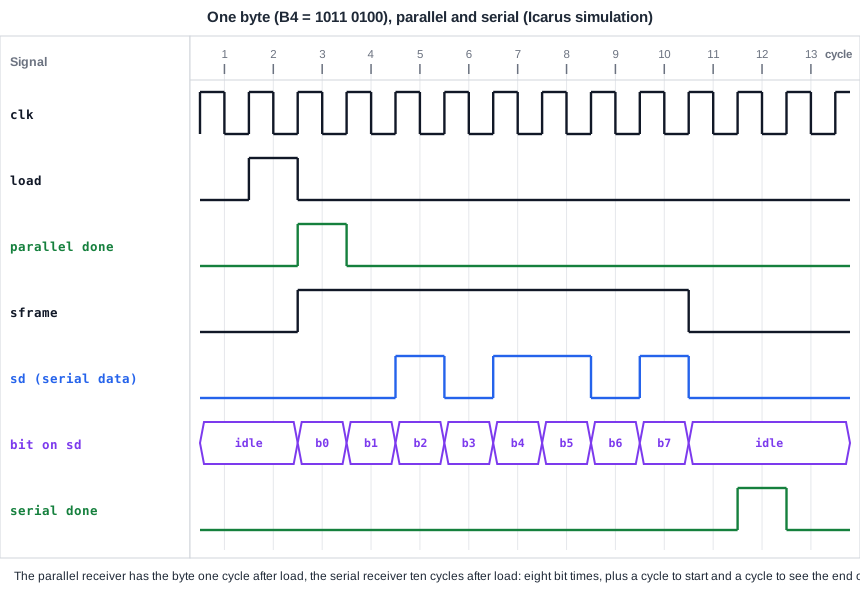
The simulation sends the byte B4 both ways. The parallel receiver has it one cycle after load; the serial receiver ten cycles after load:
35  parallel received b4
125  serial   received b4
Quick Check
Q: B4 is 1011_0100 in binary. Which bits appear on sd, in order?
Show Answer
Least significant bit first: 0, 0, 1, 0, 1, 1, 0, 1. That is exactly the sequence on sd in cycles 3 to 10 of the waveform.
Why Off-Chip Links Are Serial
Serial looks slower, and per clock it is. But off the chip, each pin costs package area, board space and power, and parallel wires on a board must all arrive at the same moment, which gets harder as the clock gets faster. A single serial wire avoids that skew problem and can run at a much higher bit rate. That is why UART, SPI and I2C, and also modern high-speed links such as USB and PCI Express, are serial.
| Parallel | Serial | |
|---|---|---|
| Wires for a byte | 8 (plus control) | 1 (plus control) |
| Cycles for a byte | 1 | 8 or more |
| Typical use | on-chip buses, memory interfaces | pins and cables: UART, SPI, I2C, USB |
| Hard part | many wires, skew between them | framing: where does a word start? |
Bit Order
A serial link must define which bit goes first. UART and I2C differ here: UART sends the least significant bit first, I2C the most significant bit first, and SPI devices can use either. If the sender and receiver disagree, every byte arrives mirrored. The exercise shows what that looks like.
Synchronous and Asynchronous
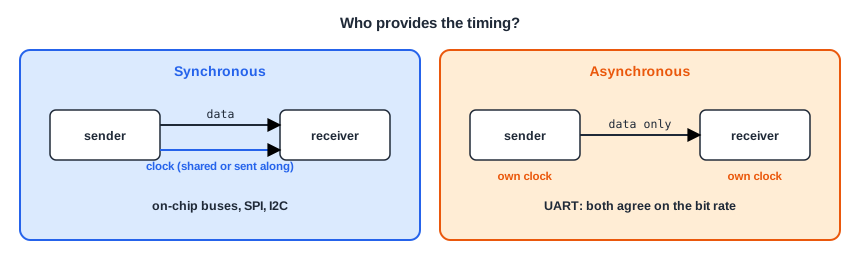
- Synchronous: both sides use the same clock. On-chip buses share the chip clock. SPI and I2C send their own clock on a separate wire (SCLK, SCL), so the receiver knows exactly when to sample each bit.
- Asynchronous: there is no shared clock. A UART sender and receiver each have their own clock and only agree on the bit rate, for example 115200 bits per second. The receiver finds the start of each byte from a start bit and samples the bits at the agreed rate. The UART chapter shows how.
The serial link in this article is synchronous: transmitter and receiver run on the same clock, and sframe tells the receiver which cycles carry bits.
Quick Check
Q: SPI has a clock wire, UART does not. Which one is synchronous?
Show Answer
SPI. The master sends SCLK with the data, so the receiver samples on its edges. UART is asynchronous: each side has its own clock, and they only agree on the bit rate.
Running It in ChipVerify Lab
The example contains the parallel link, the serial transmitter and receiver, and the testbench that sends one byte both ways. Run it and compare the two paths in the waveform.
Common Mistakes
Mistake #1: Mismatched bit order
A sender that shifts out the most significant bit first and a receiver that expects the least significant bit first deliver every byte bit-reversed. Check the bit order in both specifications.
Mistake #2: No framing
A serial receiver must know where a word starts. Without a frame signal, a start bit or a chip select, it cannot tell the first bit from the fifth.
Mistake #3: Assuming serial means slow
Per clock, serial carries fewer bits. Per second, a serial link can be faster than a parallel one, because a single line can run at a far higher rate.
Practice Exercise
Challenge: Send the Wrong End First
Open the example. Change the transmitter so it sends the most significant bit first, but leave the receiver as it is. Predict the byte the serial receiver reports, then run the simulation.
Hint
Send sh[7] and shift left. The receiver still treats the first bit as bit 0.
Solution
assign sd = sh[7];
// ...
sh <= sh << 1;
The receiver reports 2d: the bits of B4 in reverse order, 1011_0100 read backwards is 0010_1101. The parallel path still reports b4, because it has no bit order to get wrong.
Open the ready-made example in the lab and run the simulation.
Summary
- Parallel links move a whole word per cycle over many wires; serial links move one bit per cycle over one wire.
- On-chip buses are parallel; links at the pins and over cables are serial, because pins are expensive and one line can run very fast.
- Serial links need framing and an agreed bit order: UART sends LSB first, I2C MSB first.
- Synchronous links share or send a clock (on-chip buses, SPI, I2C); asynchronous links agree only on a bit rate (UART).
