
Whatever the protocol, verifying a bus or serial interface follows the same pattern: drive the pins from abstract transactions, decode the pins back into transactions with a passive monitor, check every protocol rule on the way, and compare the decoded transactions with a reference model. Serial interfaces add their own twists: no shared clock, open-drain lines, timing tolerances, and errors that must be injected on purpose. This article shows the pattern with an I2C bus monitor that finds a bug no data check would explain.
9 min read | Intermediate
What You'll Learn
- Structure a testbench for any bus or serial interface
- Write a passive monitor that decodes the pins into transactions
- Choose protocol checks and error injection for serial links
- Plan the coverage that shows the interface is really verified
The Common Structure
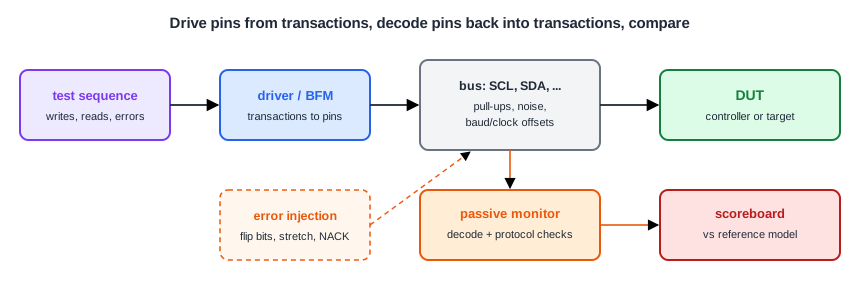
- Driver or bus functional model (BFM): turns "write register 1 = 0xA7" into pin activity. In the earlier chapters these were the APB, AHB and AXI tasks and the I2C command tasks.
- Bus model: the wires themselves, with pull-ups for I2C, crossed TX/RX for UART, tri-state MISO for SPI, and a place to add noise, delays or a baud rate offset.
- Passive monitor: watches only the pins and rebuilds the transactions. It must not use any internal signal of the driver or the DUT, so it checks what is really on the bus.
- Protocol checks: the rules of the protocol, checked continuously.
- Scoreboard and reference model: predict what the DUT should do with each transaction, and compare.
In UVM, these become an agent (driver, sequencer, monitor) per interface, plus a scoreboard; the structure is the same in plain Verilog, as the AXI and APB verification articles showed.
An I2C Bus Monitor
The monitor samples SCL and SDA with the system clock. A change of SDA while SCL is high is a START or a STOP; a data bit is sampled while SCL is high and counted only when SCL falls again, so that the high period before a STOP is not mistaken for a bit:
// SDA changing while SCL is high: START or STOP
if (scl === 1'b1 && m_scl_d === 1'b1 && sda !== m_sda_d) begin
  if (m_bits != 0) begin
    $display("%0t  MONITOR: %0s in the middle of a byte (bit %0d)", $time, sda ? "STOP" : "START", m_bits);
    m_errors = m_errors + 1;
  end
  // ... print S, Sr or P and update m_active
end
// the bus is free after a STOP: SCL must not toggle until the next START
else if (!m_active && scl === 1'b0 && m_scl_d === 1'b1) begin
  $display("%0t  MONITOR: SCL toggles while the bus is free (no START)", $time);
  m_errors = m_errors + 1;
end
// a bit is sampled while SCL is high and only counts once SCL falls again
else if (m_active && scl === 1'b1 && m_scl_d === 1'b0) begin
  m_bit = sda;
end
// ... on the falling edge: shift the bit into the byte, or print the byte and its ACK
With the correct target, the monitor turns the pins into readable transactions and finds no protocol errors:
245  monitor: S [0x50 W] ACK 0x01 ACK 0xa7 ACK 0xc3 ACK P
8025  monitor: S [0x50 W] ACK 0x01 ACK Sr [0x50 R] ACK 0xa7 NACK P
15855  read  0x50 reg1 = 0xa7
16035  monitor: S [0x50 W] ACK 0x02 ACK Sr [0x50 R] ACK 0xc3 NACK P
23865  read  0x50 reg2 = 0xc3
24045  monitor: S [0x52 W] NACK P
26155  write 0x52: no ACK (NACK)
MONITOR: no protocol errors
Finding the Bug
The example's target has a bug in how it releases SDA after acknowledging a data byte. A data check alone would only say that register 2 reads 0x00 instead of 0xC3. The monitor says why:
245  monitor: S [0x50 W] ACK 0x01 ACK 0xa7 ACK P
6015  MONITOR: SCL toggles while the bus is free (no START)
6215  MONITOR: SCL toggles while the bus is free (no START)
...
 P
8025  monitor: S [0x50 W] ACK 0x01 ACK Sr [0x50 R] ACK 0xa7 NACK P
15855  read  0x50 reg1 = 0xa7
16035  monitor: S [0x50 W] ACK 0x02 ACK Sr [0x50 R] ACK 0x00 NACK P
23865  read  0x50 reg2 = 0x00
MONITOR: 9 protocol errors
After the ACK of 0xA7, the bus shows a STOP that the controller never sent, followed by clock pulses on a free bus. The target kept pulling SDA low past the ACK clock and released it while SCL was high for the first bit of 0xC3, which on the wires is exactly a STOP. Every device on the bus would see the transaction end there, and 0xC3 was never written. The monitor's decode points straight at the ACK release timing.
Quick Check
Q: Why must the monitor decode START and STOP from the pins rather than from the controller's command signals?
Show Answer
Because the bug was a STOP the controller never commanded. Only the pins show what every device on the bus actually sees. A monitor that trusts the driver's intent would miss it.
What to Check and Inject
- UART: frame format, stop bits, parity; inject baud rate offsets in both directions, glitches on the idle line, bit flips, missing stop bits.
- SPI: all four modes, chip select setup and hold, MISO high impedance when not selected, bit order; inject mode mismatches and short chip select pulses.
- I2C: SDA stable while SCL high, START/STOP placement, ACK/NACK, clock stretching of various lengths, arbitration with a second controller, NACK from missing devices.
- AMBA: the handshake rules, burst rules and response rules covered in the APB, AHB and AXI verification articles.
Coverage then shows which of these actually happened: every mode, every transaction type, every error injected and detected, minimum and maximum lengths, back-to-back transactions.
Quick Check
Q: A UART receiver passes all tests with matching baud rates. Which test would you add first?
Show Answer
A baud rate offset sweep in both directions, for example from minus 5 to plus 5 percent, checking that bytes are received correctly well inside the tolerance and that framing errors appear outside it. As the UART receiver article showed, the tolerance is often not symmetric.
Running It in ChipVerify Lab
The example contains the buggy target and the monitor testbench. Read the monitor output and find the bug in the target's ACK handling.
Common Mistakes
Mistake #1: A monitor that peeks inside the DUT
Using internal signals makes the monitor agree with the DUT's own view, including its bugs. Decode from the pins only.
Mistake #2: Only testing the happy path
Serial interfaces fail at the edges: timing tolerance, noise, missing devices, stretching. Inject those conditions on purpose.
Mistake #3: Checking data but not the protocol
A wrong value at the end says something failed; protocol checks say where and when. Run both.
Practice Exercise
Challenge: Fix the Target
In the example's target, the ACK of a data byte is released on the next rising SCL edge instead of the falling edge that ends the ACK clock. Fix it so that SDA is released at the end of the acknowledge clock, and rerun the monitor test.
Hint
Look for the late_release logic. Releasing SDA in the WDATA case of the acknowledge-slot-end branch is what the correct target does.
Solution
WDATA: begin
  sda_oe <= 1'b0;          // release SDA when the ACK clock ends, while SCL is low
  if (STRETCH != 0)
    hold <= STRETCH;
end
245  monitor: S [0x50 W] ACK 0x01 ACK 0xa7 ACK 0xc3 ACK P
8025  monitor: S [0x50 W] ACK 0x01 ACK Sr [0x50 R] ACK 0xa7 NACK P
15855  read  0x50 reg1 = 0xa7
16035  monitor: S [0x50 W] ACK 0x02 ACK Sr [0x50 R] ACK 0xc3 NACK P
23865  read  0x50 reg2 = 0xc3
24045  monitor: S [0x52 W] NACK P
26155  write 0x52: no ACK (NACK)
MONITOR: no protocol errors
The burst write now carries both data bytes, register 2 reads 0xC3, and the monitor reports no errors. Remove the late_release register and its use on the rising edge as well.
Open the ready-made example in the lab and run the simulation.
Summary
- Every interface testbench has a driver, a bus model, a passive monitor, protocol checks and a scoreboard.
- The monitor decodes only the pins, so it sees what every device on the bus sees.
- Protocol checks localize bugs that a data check only notices at the end.
- Serial links need deliberate error injection: timing offsets, noise, missing devices, stretching, arbitration.
- Coverage shows that every mode, transaction type and injected error was really exercised.
