
Verification is not just about running tests — it is about knowing when to stop. Without a way to measure progress, a team has no way to answer the question every project manager will eventually ask: how confident are we that this chip works? Verification metrics give that answer in concrete, trackable numbers. This article covers the three main categories: coverage metrics, bug rate, and escape rate.
12 min read | Intermediate Level
What You'll Learn
- What coverage metrics measure and why both code and functional coverage are needed
- How bug rate tracks verification progress and what a plateau signals
- What escape rate is and why it is the most costly metric to ignore
- How to read red flags that indicate verification is not on track
Why Metrics Matter
Running a thousand random tests and seeing them all pass is reassuring — but it says nothing about which scenarios were actually exercised. A design could have a critical bug in an error-handling path that none of those tests ever touched. Metrics exist to expose exactly this kind of gap: they tell you not just that tests ran, but what they covered and how many real problems they found.
In practice, three complementary metric categories are tracked throughout a verification project:
- Coverage metrics — did the tests exercise the design thoroughly?
- Bug rate — how quickly is the team finding new bugs, and is that rate healthy?
- Escape rate — how many bugs slipped through simulation and were found only after silicon was manufactured?
Coverage Metrics
Coverage is the primary answer to "did the tests actually exercise the design?" There are two fundamentally different types, and both are needed.
Code Coverage
Code coverage is collected automatically by the simulator as it runs. It tracks which lines, branches, and expressions in the RTL were actually executed. The main types are statement coverage, branch coverage, expression coverage, and toggle coverage — each covered in depth in Chapter 6.
The key property of code coverage is that it requires no extra work from the DV engineer: the simulator instruments the RTL and produces the report. A block sitting at 60% branch coverage after a week of testing is an immediate signal that large sections of the design have not been exercised at all.
High code coverage is a necessary condition for sign-off, but not a sufficient one. 100% branch coverage means every branch was taken at least once — it says nothing about whether the right combinations of branches were tested together.
Functional Coverage
Functional coverage is written by the DV engineer and tracks design-level scenarios that the specification says are important. Where code coverage asks "was this line executed?", functional coverage asks "was this specific transaction type seen?" or "did the FIFO go from full to empty under back-pressure?".
A covergroup sampling an AXI interface might track combinations of burst length, burst type, and address alignment. Code coverage cannot express this — it has no understanding of what the transactions mean. Functional coverage bridges that gap.
The verification plan (Vplan) should define the functional coverage model before testbench development begins. Functional coverage points that are not closing by mid-project are the highest-value targets for new directed tests or tighter constraints.
Assertion Coverage
Concurrent assertions written in SVA can carry both assert properties (things that must never happen) and cover properties (things that must happen at least once). The pass rate of assert properties and the hit rate of cover properties together form assertion coverage — a third dimension that catches protocol violations and confirms positive scenarios were exercised.
Quick Check
Q: A simulation run achieves 98% statement coverage but functional coverage is only 55%. Is verification complete enough to proceed toward sign-off?
Show Answer
No. 55% functional coverage means nearly half the design-level scenarios defined in the Vplan were never exercised. Statement coverage only confirms lines were executed — it cannot confirm that meaningful input combinations and protocol scenarios were tested. Both metrics need to be at or near their sign-off targets before closure can begin.
Bug Rate
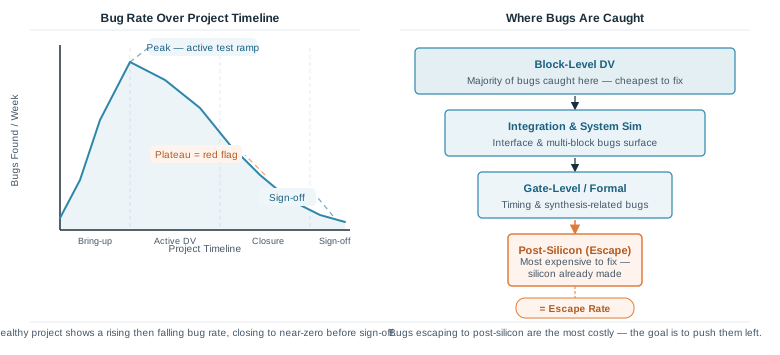
Bug rate measures how many new bugs are being found per unit of time — typically per week. It is one of the most useful health indicators of a verification project because its shape over time tells a story about where the project actually is.
The Expected Bug Rate Curve
In a healthy project, the bug rate follows a characteristic arc:
- Early ramp: As the first tests run against new RTL, bugs appear quickly. The rate rises steeply.
- Peak: During the most active test development phase, the rate hits its highest point. This is normal and expected.
- Decline: As the obvious bugs are fixed and tests mature, the rate gradually falls. Harder-to-reach corner cases take longer to surface.
- Near-zero: As sign-off approaches, the bug rate should drop to near zero. This, combined with closing coverage, signals that the design is stable.
Red Flag — The Bug Rate Plateau
A plateau occurs when the bug rate stops declining and stays flat for an extended period late in the project. This almost always means one of two things: either the tests are no longer finding new scenarios (coverage has stalled), or bugs are being found but not being fixed and retested fast enough for the rate to reflect real progress.
A bug rate that plateaus well above zero close to a sign-off milestone is a serious warning sign. It typically indicates that coverage gaps remain open and the design still has undiscovered bugs waiting to be found — either in simulation or, worse, in silicon.
Red Flag — Late-Arriving Critical Bugs
The severity of bugs found over time should also trend downward as a project matures. Finding Blocking or Critical (S1/S2) bugs late in the project — after most coverage has closed — is a red flag that either the verification plan missed important scenarios or a significant RTL change was made without adequate re-verification. A single late S1 bug can push a tapeout date by weeks.
Quick Check
Q: Two weeks before the sign-off milestone, the bug rate has been flat at 8 bugs per week for three weeks running, and coverage has not moved. What does this indicate, and what should the team do?
Show Answer
This is a classic coverage stall. The existing tests are not reaching new scenarios, so the same familiar bugs keep appearing while unexplored areas of the design remain untested. The team should analyse the functional coverage report to identify the largest uncovered bins, then write directed tests or tighten constraints specifically targeting those gaps. Simply running more of the same tests will not break the plateau.
Escape Rate
Escape rate measures the fraction of bugs that were not caught during pre-silicon verification and were only discovered after the chip was fabricated. It is the harshest metric in verification because by the time an escaped bug is found, the cost is at its absolute highest.
Why Escapes Are So Expensive
When a bug is found during block-level simulation, fixing it costs an RTL edit and a regression run — a matter of hours. When the same bug escapes to post-silicon, the cost includes:
- Silicon re-spin: manufacturing a corrected chip typically costs hundreds of thousands of dollars and takes months
- Schedule slip: product launch delays have direct revenue impact
- Debug effort: diagnosing a bug in real silicon using logic analysers and JTAG is far harder than stepping through a waveform in simulation
This is why the chip design industry talks about "shifting left" — the goal is to catch every bug as early in the flow as possible, where fixing it is fast and cheap.
The worst-case escape is a bug that also slips through post-silicon validation and is discovered by a customer in a shipped product. At this point the costs extend beyond engineering: a field recall or firmware workaround must be issued, the company's reputation takes a hit, and contractual penalties may apply. A single customer-found silicon bug has ended product lines and delayed follow-on chip generations by years. This is the ultimate motivation for thorough pre-silicon verification — post-silicon validation catches many escapes, but it runs under controlled lab conditions and cannot replicate the full range of real-world usage scenarios a customer will encounter.
What Drives a High Escape Rate
Post-silicon escapes are a direct reflection of pre-silicon verification quality. Common root causes include:
- Incomplete functional coverage model: Scenarios that were never defined in the Vplan were never tested
- Undertested corner cases: Constrained-random tests did not have tight enough constraints to force rare conditions
- Late RTL changes without re-verification: A last-minute design fix that bypassed the regression flow
- Over-reliance on code coverage: 100% branch coverage was achieved but functional coverage was not adequately defined or closed
Escape rate feeds directly back into the verification plan for the next project. Post-silicon bug reports from one chip generation are reviewed to identify which scenario types the verification environment missed, and new coverpoints and constraints are added to prevent the same class of escapes from recurring.
Measuring Escape Rate
Escape rate is typically expressed as the number of post-silicon bugs attributable to pre-silicon verification gaps, divided by total bugs found across the full project lifecycle. A lower percentage means the pre-silicon verification environment was more effective. Tracking this number across successive chip generations is one of the clearest indicators of whether a verification team's processes are improving.
Using Metrics to Predict Remaining Effort
Individually, each metric tells part of the story. Together, they allow a DV lead to estimate how much verification work remains:
| Signal | What it suggests |
|---|---|
| Coverage closing steadily, bug rate declining | Project is on track; continue current test strategy |
| Coverage stalled, bug rate flat | Test strategy needs adjustment; add directed tests for coverage gaps |
| Coverage high, bug rate suddenly spikes | Likely a significant RTL change was made; re-verify affected blocks |
| Coverage closing but late S1/S2 bugs appearing | Coverage model may be incomplete; review Vplan for missing scenarios |
| All metrics green but post-silicon escapes historically high | Functional coverage model needs richer corner-case bins from prior escape analysis |
Common Mistakes
Mistake 1: Treating code coverage as the only sign-off metric.
Wrong: Declaring verification complete once 100% branch coverage is achieved, without checking functional coverage.
Right: Both code and functional coverage targets must be met. Code coverage confirms the RTL was exercised; functional coverage confirms the right scenarios were exercised.
Why? It is entirely possible to achieve 100% branch coverage with tests that never explore meaningful combinations of inputs. The simulator has no way to know which combinations matter — only the DV engineer, working from the specification, can encode that knowledge into a covergroup.
Mistake 2: Ignoring a bug rate plateau and continuing with the same test suite.
Wrong: Running more regression with identical seeds and constraints when the bug rate has been flat for two weeks.
Right: Analyse uncovered functional coverage bins and write targeted tests or constraints to force new scenarios.
Why? A plateau means the current tests have exhausted the scenarios they can reach. Additional runs of the same tests will not find new bugs — the unexplored regions of the design will remain untested until the test strategy changes.
Mistake 3: Not tracking escape rate across projects.
Wrong: Closing out post-silicon bugs without recording which ones were pre-silicon verification escapes.
Right: Log every post-silicon bug with a root cause tag indicating whether it was a verification gap, an RTL bug not caught in sim, or a post-silicon-only effect (parasitics, voltage, temperature).
Why? Without tracking escape rate, a team has no way to improve. The same classes of bug will escape on the next project because the verification plan was never updated to address the gaps.
Practice Exercise
Challenge: Interpret a Metrics Dashboard
A verification project is four weeks from its sign-off milestone. The weekly status report shows:
- Statement coverage: 97%, branch coverage: 89%, toggle coverage: 84%
- Functional coverage: 71%
- Bug rate this week: 11 bugs — same as the previous three weeks
- Two S2 (Critical) bugs filed this week against the interrupt controller block
Identify the red flags and describe what actions the team should take.
Hint
Look at each metric category independently first, then consider what the combination of signals means for the sign-off timeline.
Sample Answer
Red flags:
1. Functional coverage at 71% with four weeks to sign-off is a significant gap — roughly 29% of Vplan scenarios have not been exercised.
2. The bug rate has been flat at 11 per week for three weeks — a plateau, indicating the current tests are not reaching new scenarios.
3. Two Critical bugs filed late against the interrupt controller suggest either that block was underverified earlier, or a recent RTL change was made without adequate re-verification.
Actions:
1. Pull the functional coverage report and identify the largest uncovered bins — these are the highest-priority areas.
2. Write directed tests or tighten constraints specifically targeting interrupt controller scenarios and any other large coverage gaps.
3. Check the RTL change log for the interrupt controller — if a recent change was made, confirm it went through full block-level regression before integration.
4. Flag the sign-off milestone to the project lead: four weeks may not be sufficient if functional coverage needs to move from 71% to target (typically 95%+) while also closing the critical bugs.
Summary
In this article, you learned:
- Code coverage tracks which RTL lines and branches were executed; functional coverage tracks which design-level scenarios were exercised — both are required for sign-off
- Bug rate should rise during active test development then decline toward near-zero as sign-off approaches; a flat plateau is a warning that coverage has stalled
- Escape rate measures bugs that slipped through simulation and were only found post-silicon — the most expensive point in the flow to discover a bug
- Late-arriving Critical bugs and a stalled coverage percentage together are the clearest signal that a sign-off milestone is at risk
