
When a simulation fails, the log file is the first place you look. Every message in that log came from a system task — $display, $monitor, $strobe, or an assertion. Understanding exactly when each of these fires, what value it reads, and how to format its output clearly makes the difference between a log that helps you find bugs in minutes and one that misleads you with stale or misformatted values.
8 min read | Intermediate Level
What You'll Learn
- When
$display,$strobe, and$monitorexecute within the simulation timestep and why it matters - How to choose the right task for each logging scenario
- The difference between
$time,$realtime, and$stime - Format specifiers and patterns for writing clear, structured log output
The Three Tasks and When They Fire
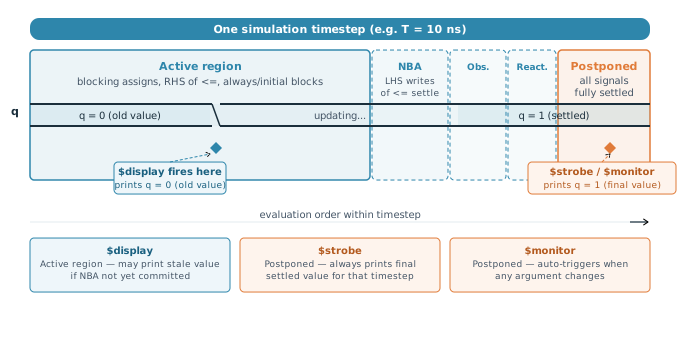
All three tasks print formatted text to the simulation log, but they fire at different points in the simulation timestep. As covered in article 4.2, a single timestep contains multiple scheduling regions. The region in which a task fires determines which version of a signal's value it sees — and getting this wrong produces log messages that contradict the waveform.
$display
$display prints its message immediately when the line of code executes, in the Active region. It fires exactly once per encounter and always appends a newline at the end. Because it runs in Active, it may read a signal value before non-blocking assignment updates have been committed to the NBA region — meaning it can print the old value of a register even though a <= assignment to that register appears earlier in the same block.
always @(posedge clk) begin
    q <= d;                          // schedules q update for NBA region
    $display("q = %b", q);          // fires in Active — prints OLD value of q
end
Use $display when you want a message tied to a specific point of execution — for example, confirming that a particular branch was taken, or printing a value immediately after a blocking assignment where you know the value is already settled.
$strobe
$strobe has identical syntax to $display but fires in the Postponed region — at the very end of the timestep, after all Active, NBA, Observed, and Reactive work is complete. Every signal is fully settled by then. $strobe therefore always prints the final value of a signal for that timestep, regardless of when within the timestep you placed the call.
always @(posedge clk) begin
    q <= d;                          // NBA update scheduled
    $strobe("q = %b", q);           // fires in Postponed — prints NEW settled value of q
end
Prefer $strobe over $display whenever you are printing the value of a signal driven by a non-blocking assignment. It eliminates the "why does my log show the wrong value" confusion entirely.
$monitor
$monitor is fundamentally different from the other two: rather than printing when a line executes, it registers a watch on its argument list and prints automatically in the Postponed region of any timestep in which any of those arguments changes value. You call it once — usually at the start of an initial block — and it runs for the rest of the simulation without further intervention.
initial begin
    $monitor("%0t  clk=%b  d=%b  q=%b", $time, clk, d, q);
end
// Prints a new line every time clk, d, or q changes value
Because $monitor fires in Postponed, it always sees settled values. Only one $monitor can be active at a time — calling $monitor again silently cancels the previous one. Use $monitoroff and $monitoron to temporarily suppress output during uninteresting phases of simulation without cancelling the monitor entirely.
A $monitor that watches a fast-toggling signal like clk will print a new line every half-period for the entire simulation, producing a log file that can reach gigabytes in size and becomes impossible to read. Only monitor signals that change infrequently, or use $monitoroff during clock-heavy setup phases.
Quick Check
Q: A register count is updated with count <= count + 1 on every posedge. You add $display("count = %0d", count) inside the same always @(posedge clk) block. What value does it print at T=10 ns, when count increments from 4 to 5?
Show Answer
It prints count = 4 — the old value. $display fires in the Active region. The count <= count + 1 non-blocking assignment has only scheduled the update at this point; it is not committed until the NBA region. Replacing it with $strobe would print count = 5.
Choosing Between Them
A simple rule covers most situations:
- Use
$displayfor messages tied to execution flow — branch confirmations, transaction start/end markers, values after blocking assignments. - Use
$strobefor printing signal values in clocked blocks — whenever the signal is updated by a non-blocking assignment in the same or a concurrent block. - Use
$monitorfor continuous tracing of a small, slowly-changing set of signals across the entire simulation — typically during initial bring-up of a new design.
There is also $write, which is identical to $display but does not append a newline. Use it when you want to build a line incrementally across multiple calls — for example, printing a bus byte by byte in a loop before finishing with $display("") to flush the newline.
$time, $realtime, and $stime
Every log message should include a timestamp so you can correlate it with the waveform. SystemVerilog provides three variants:
$time— returns the current simulation time as a 64-bit integer in the time units declared by the`timescaledirective. This is the right choice in most cases. Print it with the%0tformat specifier.$realtime— returns the current simulation time as a real number, preserving fractional time. Useful when your design uses a timescale with fine precision (e.g.`timescale 1ns/1ps) and you need to log sub-unit events accurately.$stime— a 32-bit unsigned integer version of$time. It wraps around at 2³² time units, making it unsafe for long simulations. Avoid it unless you have a specific reason.
`timescale 1ns/1ps

initial begin
    #10.5;
    $display("$time    = %0t",  $time);     // prints: 10  (truncated to integer ns)
    $display("$realtime = %0t", $realtime);  // prints: 10.5 (preserves fraction)
    $display("$stime   = %0d",  $stime);     // prints: 10  (32-bit integer)
end
Always use $time with %0t rather than %d. The %t specifier respects the `timescale unit and prints the time with the correct unit suffix when used with $timeformat. Using %d just prints a raw integer with no unit context.
Format Specifiers
All three tasks use the same format string syntax. The format string can contain literal text, escape sequences, and format specifiers starting with %:
| Specifier | Prints as | Example output |
|---|---|---|
%d | Decimal (with leading spaces) | 42 |
%0d | Decimal (no leading spaces) | 42 |
%h | Hexadecimal (lowercase) | 2a |
%H | Hexadecimal (uppercase) | 2A |
%b | Binary | 00101010 |
%o | Octal | 52 |
%s | String | IDLE |
%t | Time value | 10 |
%e | Scientific notation (reals) | 4.200000e+01 |
Common escape sequences in the format string: \n inserts a newline (useful with $write), \t inserts a tab for column alignment, and %% prints a literal percent sign.
Writing Structured Log Output
A log file that is easy to grep and parse saves significant debug time. A few consistent conventions make a large difference:
// Consistent timestamp prefix on every line
$display("[%0t] WRITE addr=0x%h data=0x%h", $time, addr, wdata);
$display("[%0t] READ  addr=0x%h data=0x%h", $time, addr, rdata);

// Severity tags for filtering
$display("[%0t] ERROR: data mismatch — exp=0x%h got=0x%h", $time, exp, got);
$display("[%0t] INFO:  reset deasserted", $time);

// Aligned columns using tab stops
$display("[%0t]\taddr=%0h\tdata=%0h\tbe=%b", $time, addr, data, be);
With a consistent [time] prefix, you can quickly find all messages at a specific timestep with a simple text search. Severity tags (ERROR, WARN, INFO) let you filter the log down to just failures when running regression. Column alignment makes bus values easy to compare across multiple lines.
Where This Matters in Practice
In a large regression run across thousands of tests, log files may be several hundred megabytes each. Verification teams typically post-process logs with scripts that grep for ERROR and FAIL tags to generate a summary report. If your messages do not use a consistent tag format, your failures will be invisible to the automation — meaning bugs go undetected until someone manually inspects a log. Consistent formatting from the start pays off every time regression runs.
Quick Check
Q: You want to print the value of a 32-bit bus data in hex without leading zeros, prefixed by the simulation time. Write the $strobe call.
Show Answer
$strobe("[%0t] data = 0x%0h", $time, data);
The %0t suppresses leading spaces on the time value. The %0h suppresses leading zeros on the hex value. Using $strobe instead of $display ensures you see the fully settled value at the end of the timestep rather than a potentially mid-evaluation value.
Common Mistakes
Mistake 1: Using $display to print a non-blocking assignment target in the same always block.
Wrong: $display("q=%b", q) immediately after q <= d in the same always @(posedge clk) block.
Right: $strobe("q=%b", q) — fires in Postponed after the NBA update has committed.
Why? $display runs in Active, before the NBA region. The non-blocking assignment has only scheduled the update — q still holds its previous value when $display executes. The log shows the old value while the waveform shows the new one, creating a confusing discrepancy.
Mistake 2: Calling $monitor on a signal that toggles every cycle, such as clk.
Wrong: $monitor("%0t clk=%b data=%b", $time, clk, data) — prints twice per clock cycle for the entire simulation.
Right: Remove clk from the monitor argument list and monitor only slowly-changing control signals, or use $monitoroff during phases where output is not needed.
Why? Every change to any argument triggers a new print in the Postponed region. A 100 MHz clock changes 200 million times per millisecond of simulated time. The resulting log becomes unreadable and the file size can exhaust disk space.
Mistake 3: Omitting the timestamp from log messages.
Wrong: $display("transaction complete, data=0x%h", data) — no time prefix.
Right: $display("[%0t] transaction complete, data=0x%h", $time, data)
Why? Without a timestamp, you cannot correlate a log message to a waveform position. When a failure occurs, you need to know exactly when it happened to jump to the right location in the waveform viewer. A timestamp on every line makes this immediate.
Practice Exercise
Challenge: Fix the Logging
The following testbench has three logging problems. Identify each one and rewrite the relevant lines.
`timescale 1ns/1ps

module tb;
    reg clk, rst_n, valid;
    reg [7:0] data;

    // Clock generation
    initial clk = 0;
    always #5 clk = ~clk;

    // Monitor — logs every signal change
    initial
        $monitor("clk=%b rst=%b valid=%b data=%h", clk, rst_n, valid, data);

    // Stimulus
    initial begin
        rst_n = 0; valid = 0; data = 8'h00;
        #12 rst_n = 1;
        @(posedge clk);
        data  <= 8'hA5;        // non-blocking
        valid <= 1;
        $display("sent: data=%h valid=%b", data, valid);  // check values
    end
endmodule
Hint
Look at what the monitor is watching, what the display will actually print given the assignment type used, and whether timestamps are present anywhere.
Solution
Three problems:
- Problem 1 — Monitor watches clk: The monitor fires twice every 10 ns clock period, flooding the log. Remove
clkfrom the argument list and watch onlyrst_n,valid, anddata. - Problem 2 — $display after non-blocking assigns:
data <= 8'hA5andvalid <= 1are non-blocking. The$displayfires in Active and prints the old values (0x00 and 0). Replace with$strobeto print the settled values. - Problem 3 — No timestamps: Neither the monitor nor the display include
$time. Add%0tand$timeto both.
// Fixed monitor — no clk, includes timestamp
initial
    $monitor("[%0t] rst=%b valid=%b data=%h", $time, rst_n, valid, data);

// Fixed display — use $strobe, include timestamp
@(posedge clk);
data  <= 8'hA5;
valid <= 1;
$strobe("[%0t] sent: data=%h valid=%b", $time, data, valid);
Summary
$displayfires in the Active region when the line executes — use it for execution-flow messages and values after blocking assignments$strobefires in the Postponed region at the end of the timestep — always prints the final settled value, making it correct for non-blocking assignment targets$monitorauto-triggers in Postponed whenever any argument changes — use it sparingly on slowly-changing signals, and never include fast-toggling signals like clocks- Always prefix log messages with
$timeusing%0t, use severity tags, and keep format strings consistent for grep-friendly logs
