
Finding a bug once is only half the job. The other half is making sure it never comes back undetected. Regression testing is the systematic practice of re-running a curated set of tests after every RTL change, so that a fix in one place does not silently break something elsewhere. Combined with seed management — the discipline of preserving the exact random stimulus that exposed a real bug — a well-run regression suite becomes a continuously growing safety net that protects the entire design history.
9 min read | Intermediate Level
What You'll Learn
- How regression suites are structured into tiers with different speed and coverage tradeoffs
- Why different random seeds find different bugs and how coverage accumulates across runs
- How to record, reproduce, and permanently archive a seed that exposed a real bug
- How to triage a new regression failure to determine whether it is a real RTL bug or a testbench issue
What Is a Regression Suite?
A regression suite is a curated collection of simulation tests that runs automatically whenever the RTL changes. Its purpose is not to find new bugs — that is the job of exploratory random testing during active verification. Its purpose is to confirm that nothing already working has been broken by the latest change. Every test in the suite at one point caught or verified something real; that is the criterion for inclusion.
The suite grows over the lifetime of a project. It starts with a handful of directed tests written during initial bring-up and expands with every bug found: the test that exposed the bug, run with the seed that triggered it, gets added permanently. By tapeout, a mature suite for a complex block may contain hundreds or thousands of tests, each one a record of a past vulnerability in the design.
A regression suite is only as useful as its automation. Tests that require manual inspection to determine pass or fail — where an engineer has to look at a waveform to decide whether output is correct — cannot run in a regression. Every test in the suite must have a self-checking mechanism: a scoreboard, an assertion, or a reference model comparison that produces a clear pass or fail result without human intervention.
Regression Tiers
Not all tests need to run after every RTL change. Running the full sign-off suite on every commit would take days and make the development loop impossibly slow. The solution is to organise tests into tiers with different trigger frequencies and coverage goals.
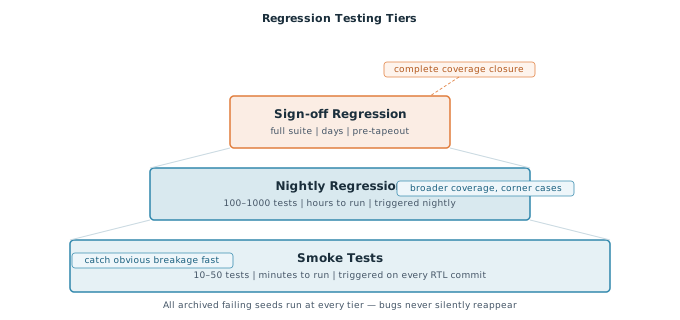
Smoke tests are a small, fast subset — typically 10 to 50 tests — that run in minutes and cover the most critical functionality. They are triggered automatically on every RTL commit, either by a continuous integration system or by convention within the team. If a smoke test fails, the engineer knows immediately that their change broke something fundamental and can fix it before anyone else is affected. Smoke tests deliberately sacrifice coverage for speed.
Nightly regressions run a larger set — typically hundreds to a few thousand tests — overnight, completing before the team arrives in the morning. They cover corner cases, protocol interactions, and random stimulus that smoke tests skip. The results are reviewed at the start of each working day. A nightly failure that appeared overnight tells you which of the previous day's commits introduced the problem, making triage straightforward.
Sign-off regressions run the complete test suite and are required to pass before a block is declared ready for integration or before a tapeout. They may run for hours or days on a compute farm. Sign-off regressions enforce the full coverage closure requirements defined in the verification plan: every test passes, coverage targets are met, and no open waivers exist on critical assertions.
Quick Check
Q: An engineer fixes a timing bug in a counter. Which regression tier should they run immediately after making the fix, and why?
Show Answer
The smoke test suite. It runs in minutes, confirms the fix did not break any fundamental behaviour, and provides immediate feedback. The nightly suite will run automatically that evening and give broader confirmation. Running the full sign-off suite immediately for a single counter fix would be disproportionately slow.
Randomization Seeds and Why They Matter
Constrained random tests generate different stimulus on every run by using a random seed — an integer that initialises the random number generator. The same test with the same seed produces identical stimulus every time. The same test with a different seed produces completely different transactions, addresses, data values, and timing sequences.
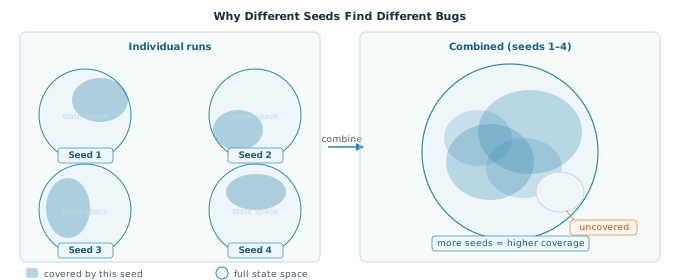
This means that running the same test ten times with ten different seeds is not redundant — each run explores a different region of the design's state space and may expose a different bug. A bug that requires a specific sequence of three back-to-back write transactions followed by a read to a particular address range might be hit by seed 4721 and missed by every other seed in your nightly run. The more seeds you accumulate over time, the more of the state space you cover.
The seed used for each run is printed near the top of the simulation log. It typically looks something like:
// Simulator log output at start of run
// Cadence Xcelium / Synopsys VCS:
// Random seed: 4721
// To reproduce: +ntb_random_seed=4721
To reproduce a specific run exactly, pass the seed back to the simulator:
// Reproduce a specific seed — simulator-dependent syntax
// Synopsys VCS and Cadence Xcelium:
+ntb_random_seed=4721

// Mentor Questa:
-sv_seed 4721
Some teams run a fixed number of seeds per test in nightly regression — for example, 20 seeds per test. Others run with a fresh random seed each night. Both approaches have merit. The key is to be consistent: if you change the seeding strategy, your coverage metrics from previous nights are no longer directly comparable.
Seed Archiving
When a failing seed reveals a real RTL bug, two things must happen before you move on. First, the bug must be fixed. Second, the test run with that specific seed must be added to the permanent regression suite as a directed regression entry. This is seed archiving.
The rationale is straightforward. The seed found a vulnerability — a specific combination of stimulus that exercises a corner the design got wrong. That vulnerability may exist again in the future if someone modifies the surrounding logic. Without the archived seed, the only way to catch a regression is to hope that the same seed happens to be used again in a future random run. With it, every future regression run checks that specific scenario explicitly.
// Example regression list entry — seed archived after bug fix
// test: mem_write_read_basic  seed: 4721  added: 2024-03-15  bug: PR-1042
// Covers: back-to-back write then read to same address causes data corruption
Over the lifetime of a project this archive grows into a precise record of every vulnerability the design has ever had. A new team member who inherits the block can read the regression list and understand exactly what classes of bugs were found and what stimulus patterns are known to be dangerous.
Never discard a failing seed before the bug is fixed and the seed is added to regression. Engineers sometimes lose seeds when they close a terminal, restart the simulator, or simply forget to record the number before rerunning. Make recording the seed the first action when a failure is discovered — before any debugging begins.
Triage — Real Bug or Testbench Issue?
Not every new regression failure is an RTL bug. When a test that previously passed starts failing after an RTL change, there are three possible causes: the RTL change introduced a real bug, the testbench has a pre-existing issue that only now manifests, or the test infrastructure itself changed. Triage is the process of determining which one applies before spending time on a full debug session.
A structured triage sequence saves significant time:
- Check the commit history. What changed in the RTL since the test last passed? If nothing changed in the block the test exercises, the failure is likely a testbench or infrastructure issue, not an RTL bug.
- Reproduce the failure deterministically. Re-run with the same seed. If the failure is intermittent — appearing in some runs but not others with the same seed — suspect a race condition in the testbench rather than an RTL bug. Race conditions in testbenches are non-deterministic by nature.
- Check the failure message. Does the error originate from the scoreboard comparing DUT output to a reference model? That points to an RTL bug. Does it originate from a testbench timeout, a null pointer in the environment, or a UVM phase error? That points to a testbench issue.
- Bisect the commit history. If multiple commits landed overnight, use the same divide-and-conquer approach from article 4.5 — identify which specific commit first caused the failure by reverting commits one at a time or using a binary search over the commit log.
- Check for shared failures. If the same failure appears across multiple unrelated tests simultaneously, the cause is almost certainly in shared infrastructure — a base class, a common interface, or a simulation setup script — rather than in the RTL of any individual block.
Where This Matters in Practice
On a mature verification project, the triage step prevents the team from spending hours debugging a test only to discover the failure was caused by a one-line typo in a shared utility function that was committed the same night. Teams that skip triage and go straight to waveform debug for every failure waste a significant fraction of their total verification time. A five-minute triage checklist before opening any waveform pays back consistently.
Quick Check
Q: A nightly regression run shows 47 failures across 12 different test categories. Yesterday's run had zero failures. Three RTL commits landed overnight. What does the pattern of 47 failures across 12 categories suggest, and what should you investigate first?
Show Answer
47 failures across 12 unrelated categories almost certainly points to a shared infrastructure problem — not 47 independent RTL bugs. Check whether the failures share a common error message or UVM phase. Then check whether any of the three overnight commits touched shared testbench infrastructure: a base sequence, an interface definition, a common register model, or a simulation Makefile. One bad commit to shared code can cause exactly this pattern.
Common Mistakes
Mistake 1: Adding tests to regression without a self-checking mechanism.
Wrong: Adding a test that completes without error but requires a human to inspect waveforms or log output to confirm correctness.
Right: Every regression test must produce an automatic pass or fail verdict — via scoreboard comparison, assertion pass rate, or explicit $error / $fatal calls.
Why? A test that always "passes" because nothing checks for failure gives false confidence. The regression suite grows in size while its actual coverage guarantee degrades.
Mistake 2: Discarding a failing seed before archiving it.
Wrong: Noticing a failure, closing the terminal to start a fresh debug session, and losing the seed in the process.
Right: Copy the seed from the log immediately when any failure is observed, before doing anything else.
Why? Without the seed, the failure cannot be reproduced deterministically. The bug may take days of re-running to rediscover, or may never be hit again before tapeout.
Mistake 3: Skipping triage and going straight to waveform debug on every failure.
Wrong: Opening the waveform viewer the moment a test fails without first checking whether the failure is an RTL bug, a testbench issue, or an infrastructure problem.
Right: Spend five minutes on the triage checklist before committing to a full debug session.
Why? A large fraction of regression failures have non-RTL root causes. Debugging a testbench race condition in the waveform viewer is wasted time when a one-line commit history check would have pointed straight to the real cause.
Practice Exercise
Challenge: Design a Regression Strategy
You are the verification lead for a new AXI memory controller block. The block has just reached RTL freeze — the design is functionally complete but verification is still ongoing. You have 200 tests in your suite. Describe how you would organise them into tiers, what your seeding strategy would be for nightly runs, and what your policy would be for archiving seeds.
Hint
Think about which tests cover the most critical behaviour that must never regress, which tests cover broader corner cases, and how you would balance run time against coverage in each tier.
Solution
A reasonable strategy for 200 tests:
- Smoke tier (~15 tests): Include the directed reset test, one basic write/read test, one burst test, and one error injection test. These run in under 5 minutes and confirm the block is fundamentally working. Trigger on every RTL commit.
- Nightly tier (~185 tests): All remaining tests including constrained random write/read sequences, back-to-back transactions, FIFO boundary conditions, and all protocol corner cases. Run each test with 10 different seeds nightly, rotating the seed set each week to explore new stimulus. Target completion in under 4 hours on the compute farm.
- Sign-off tier: All 200 tests, each with 50 seeds, plus any tests written specifically for coverage closure. Run on a larger compute allocation; target completion in under 24 hours.
- Seed archiving policy: Any seed that exposed a real RTL bug (confirmed by the design team) is added to the smoke tier with a comment referencing the bug ID. It runs on every commit from that point on. Seeds that exposed testbench issues are fixed and not archived.
Summary
- A regression suite is a curated, self-checking set of tests that runs automatically after every RTL change — its purpose is to confirm nothing working has been broken, not to find new bugs
- Tests are organised into tiers: smoke tests run in minutes on every commit, nightly regression runs in hours, and sign-off regression runs the full suite before tapeout
- Different random seeds exercise different regions of the design state space — running multiple seeds per test is not redundant, it is how coverage accumulates over time
- When a seed finds a real bug, record it immediately and add it to permanent regression so the same vulnerability can never silently reappear
- Triage new regression failures before debugging — determine whether the cause is an RTL change, a testbench issue, or shared infrastructure before opening the waveform viewer
