
No single memory technology is both large and fast, so computers combine several: a few fast registers, small fast memories close to the processor, larger slower memories further away, and storage that keeps data when the power is off. This arrangement is the memory hierarchy. It works because programs do not use memory evenly: they keep returning to the same few addresses. This article explains why memory is slow, what locality is and how much of it real programs have, how each level of the hierarchy fits in, and how to work out the average time of an access.
12 min read | Beginner
What You'll Learn
- Explain why fast memories are small and large memories are slow
- Define temporal and spatial locality and find them in code
- Describe each level of the memory hierarchy and what it trades
- Calculate the effect of a memory hierarchy on average access time
The Problem: Fast or Large, Not Both
A simple processor assumes that memory answers in one cycle. For a long time that was true. In the 1980s, memory chips were about as fast as processors. Then processor speed grew much faster than memory speed for two decades, and the gap between them became known as the memory wall. Today a large core running at several gigahertz waits a hundred nanoseconds or so for main memory, enough time to run hundreds of instructions or more.
The reason is physical. Three things limit a memory's speed. A larger array has longer wires, which take longer to charge. Reaching off the chip means going through pins and board traces. And the cheapest storage cells are slow to read. SRAM, static RAM, stores each bit in six transistors, and it is fast but takes a lot of area. DRAM, dynamic RAM, stores each bit as charge in a tiny capacitor with one transistor, and so it is far denser and cheaper per bit, but slower, and it must be refreshed. Flash keeps its data without power, but writes are slow. No technology wins on speed, size and cost together, as Memories in a System explains in detail.
The way out is to use several kinds at once, and to arrange for the small fast memory to hold whatever is needed right now. If that works well, the system feels as fast as its fastest memory and as large as its largest. It works because of a property of programs.
Locality
Programs do not read memory at random. They show two kinds of locality:
- Temporal locality: an address used now is likely to be used again soon. The instructions of a loop run over and over, and a counter is read and written on every pass.
- Spatial locality: an address near one just used is likely to be used soon. Instructions run in sequence, and programs walk through arrays element by element.
A loop that adds up an array shows both. Its four instructions are fetched thousands of times, which is temporal locality in the code. Its array elements are read one after another, which is spatial locality in the data.
Real programs show this strongly. In one test, six small programs ran through a model of a tiny instruction memory holding only 256 bytes of the most recently used code. On five of them, fewer than 1 fetch in 1,000 had to go to the larger memory. Only a linked-list program, with more code in its loops, did worse, at about 1 fetch in 50. The programs themselves execute thousands of instructions, but they spend nearly all of their time in a few dozen bytes.
Data is less obliging. A program may touch new data all the time, and a linked list scatters its nodes through memory. Yet even so, a small memory usually catches most accesses. Cache Sizing Studies measures this.
The Levels
A typical system arranges memory like this, with each level larger, slower and cheaper per byte than the one above:
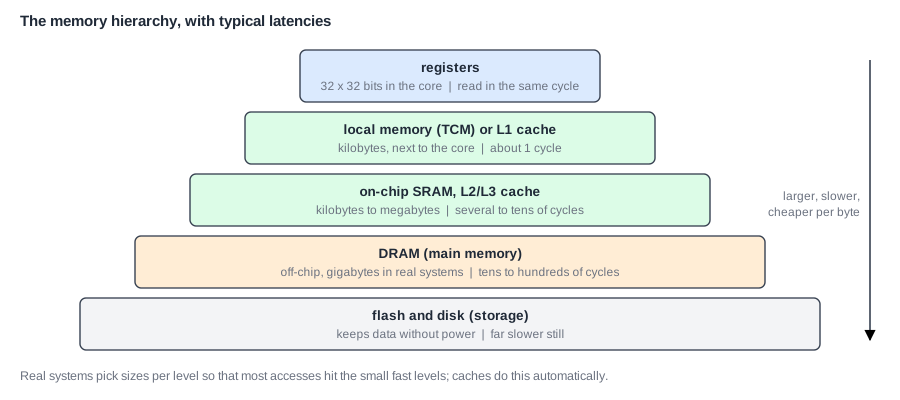
Registers are inside the core and are managed by the compiler, as Registers and the Register File explains. Caches are small SRAM memories that keep copies of recently used main memory, managed automatically by hardware. Software does not need to know that they are there. Main memory is DRAM, usually in separate chips. Storage, on flash or disk, keeps files, and the operating system moves data between it and main memory.
Each level exists to hide the slowness of the next one down. An important rule follows: the speed of the system depends on how rarely each level must ask the one below.
Tightly Coupled Memory
Embedded chips often use another option. A tightly coupled memory (TCM) is a small fast SRAM at a fixed address range, not a cache. Software chooses what goes in it. Its timing is exactly the same every time, which is why real-time systems often prefer it to a cache: a cache may be fast on average, but it can occasionally be slow, and a control loop cannot afford that.
Quick Check
Q: A program reads a large file one byte at a time, in order, and does not return to any of it. Which kind of locality does it have?
Show Answer
Spatial locality only. Each new byte is next to the last one, but no byte is used twice. A memory that fetches a block of neighboring bytes at a time helps a lot here, even though each byte is used just once.
Reading Code for Locality
With a little practice you can see locality in the source code. Compare these two ways of adding up a square array in C, which stores a two-dimensional array row after row in memory:
for (i = 0; i < N; i++)            // by rows: follows memory order
    for (j = 0; j < N; j++)
        s += a[i][j];

for (j = 0; j < N; j++)            // by columns: jumps a whole row each time
    for (i = 0; i < N; i++)
        s += a[i][j];
Both do the same additions, and they execute nearly the same instructions. The first walks through memory one element at a time, so most accesses land on data that was fetched along with its neighbors. The second jumps a full row between accesses. If a row is longer than the block of data the cache fetches at once, nearly every access goes to a new block. When the array is larger than the cache, the second version can be many times slower, for no reason visible in the arithmetic.
Pointer-heavy code is the hard case. A linked list has one node here and the next one anywhere in memory, so a walk through it has little spatial locality. Each step also depends on the value just loaded, which means no hardware can easily run ahead. In one test, a linked-list program missed on about a third of its data accesses in a 1 KB cache, where a checksum in the same cache missed on about 3 percent.
What Memory Delay Costs
When an access takes longer than a cycle, the pipeline stalls, as Load-Use Stalls and Control Hazards explains. In one test, a memory copy program ran on a simple pipeline in which each data access waited one extra cycle, and its run took about 15 percent longer. With four extra cycles, about 59 percent longer. A checksum, which rarely uses memory, took only about 9 percent longer with four.
Those are small waits. If every access had to go to DRAM, at around a hundred cycles, an ordinary program would run many times slower. This is why caches are not optional on any fast processor.
Average Memory Access Time
The figure that sums up a hierarchy is the average memory access time (AMAT):
AMAT = hit time + miss rate x miss penalty
A hit is an access found in the fast memory. A miss is one that is not. The miss rate is the fraction of accesses that miss. The miss penalty is the extra time needed to get the data from the next level.
Take a cache with a 1-cycle hit time, a 5 percent miss rate and a 100-cycle penalty. These numbers are assumptions for this example. AMAT = 1 + 0.05 x 100 = 6 cycles. A memory of 100 cycles now looks like a memory of 6 cycles. Now see how sensitive that is: at a 10 percent miss rate the AMAT is 11 cycles, nearly double. At 1 percent it is 2 cycles. Halving the miss rate is worth far more than halving the hit time, as long as the penalty is large. Miss Types and Average Memory Access Time goes further.
Where Does This Matter?
Programmers feel the hierarchy directly. Going through a two-dimensional array row by row can be many times faster than column by column, for the same arithmetic, because one order walks memory in sequence and the other jumps. Databases, game engines and scientific code arrange their data to fit cache lines. And a chip's designers often spend more than half of the die on caches, since memory is what most programs wait for.
Who Moves the Data?
Each boundary in the hierarchy has its own way of moving data, and the differences matter:
| Boundary | Who moves the data | Typical unit |
|---|---|---|
| registers and cache | the compiler, using loads and stores | a word |
| cache and next cache | hardware, automatically | a line, often 64 bytes |
| cache and main memory | hardware, automatically | a line |
| main memory and storage | the operating system, using virtual memory | a page, often 4 KB |
The unit grows as the levels get slower. When a level is very slow, each trip is expensive, so the system brings back a larger block and hopes that spatial locality makes use of it. Why Virtual Memory explains the bottom boundary.
The Same Idea Everywhere
The hierarchy is not only for hardware. A web browser keeps a cache of recently seen pages. A disk drive has a small DRAM cache. Networks have caches near their users. Wherever there is a small fast store and a large slow one, and the accesses have locality, the same logic and the same AMAT calculation apply. The same words, hit, miss and eviction, are used too.
Quick Check
Q: A cache has a 2-cycle hit time and a miss penalty of 50 cycles. What miss rate gives an AMAT of 3 cycles?
Show Answer
3 = 2 + m x 50, so m = 1 / 50 = 2 percent. To stay near its hit time, a cache must miss very rarely.
Common Mistakes
Mistake #1: Thinking of memory as uniform
A single load can take from a few cycles to hundreds, depending on where the data is. Performance estimates that use one memory latency for everything can be wrong by a large factor.
Mistake #2: Testing with data that fits in the cache
A small benchmark may never miss, and so show no memory cost. Results then say little about real workloads with large data.
Mistake #3: Using a cache where timing must be guaranteed
A cache is fast on average, not always. Hard real-time code may need a TCM, or a locked region of the cache, so that its worst case is known.
Practice Exercise
Challenge: Is a Cache Worth It?
A processor has a CPI of 1.2 with perfect memory. 30 percent of its instructions are loads or stores. Main memory takes 60 cycles. These numbers are assumptions for this exercise. (a) With no cache at all, and counting only data accesses, what is the CPI? (b) With a cache that hits 95 percent of the time, with no added delay on a hit, what is the CPI? (c) What is the speedup? (d) What would the CPI be if the miss rate rose to 10 percent?
Hint
Stall cycles per instruction = accesses per instruction x misses per access x penalty.
Solution
(a) 1.2 + 0.3 x 60 = 19.2. (b) 1.2 + 0.3 x 0.05 x 60 = 2.1. (c) 19.2 / 2.1 = 9.1. (d) 1.2 + 0.3 x 0.10 x 60 = 3.0. Even a good cache leaves memory as the largest single cost, and doubling the miss rate raises the CPI by over 40 percent.
Summary
- Memory technologies trade speed against size and cost, and processors outran memory long ago.
- Programs have temporal and spatial locality, so a small memory can catch most accesses.
- Registers, caches, main memory and storage form a hierarchy, each level hiding the slowness of the next.
- AMAT = hit time + miss rate x miss penalty.
- With a large penalty, the miss rate matters far more than the hit time.
