
A page table is the data structure that holds the map from virtual pages to physical frames. For a 32-bit address space a single flat table would take 4 MB per process, almost all of it unused, so real systems use a tree of small tables. This article explains why, and walks through the RISC-V Sv32 scheme in full: the format of a page table entry, the two-level walk step by step with real numbers, permission checks, superpages and the wider schemes used by 64-bit systems.
12 min read | Intermediate
What You'll Learn
- Explain why page tables have several levels
- Describe every field of a RISC-V Sv32 page table entry
- Walk a two-level page table by hand
- Explain superpages and the Sv39 and Sv48 schemes
Why a Flat Table Fails
As Why Virtual Memory explained, 32-bit addresses with 4 KB pages give 220 pages. A flat table with one 4-byte entry per page takes 4 MB, for every process, however small. A program that uses 8 MB of memory touches only about 2,000 of those million entries. Almost all the table says "nothing here".
Address spaces are sparse: a program uses a few regions, for its code at the bottom and its stack at the top, with a huge gap between them. A tree takes advantage of this. The top-level table divides the address space into large regions, and only regions in use need a second-level table. An empty region costs one entry that says "nothing here".
Sv32
Sv32 is the RISC-V virtual memory scheme for 32-bit processors. It has two levels, and it is designed so that every table is exactly one 4 KB page. Each page table entry (PTE) is 4 bytes, so a table holds 1,024 entries, which takes 10 bits to index. Two levels of 10 bits each, plus a 12-bit offset, makes 32 bits:
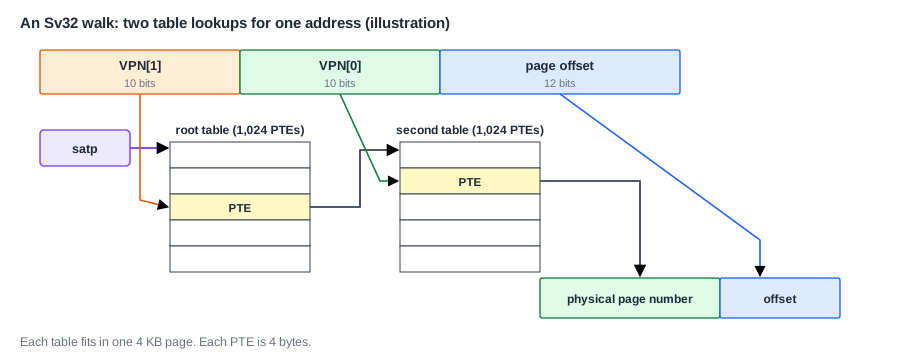
The two parts of the virtual page number are VPN[1], the top 10 bits, and VPN[0], the next 10. An entry in the root table covers 210 pages, 4 MB of address space. Unused 4 MB regions need no second-level table. For a program using 8 MB in two separate regions, a handful of tables will do: one root table plus a few second-level ones, a few pages in all, rather than the 1,024 pages of a flat table.
The Page Table Entry
A PTE is 32 bits:

| Bit | Meaning |
|---|---|
| V | valid: if 0, the entry is unused, and all the other bits are free for software |
| R, W, X | the page may be read, written, executed. All three 0 means this entry points to the next level |
| U | user mode may access the page |
| G | global: mapped in every address space, usually kernel pages |
| A | accessed: the page has been read, written or fetched |
| D | dirty: the page has been written |
| RSW | 2 bits reserved for the OS to use |
| PPN | physical page number, 22 bits |
The 22-bit physical page number plus the 12-bit offset gives a 34-bit physical address, so a 32-bit Sv32 processor can reach up to 16 GB of physical memory. Each process can only see 4 GB of it at a time.
The A and D bits let the OS make good decisions. A page with A clear has not been used recently, which makes it a candidate for eviction. A page with D clear has not been changed, so it can be dropped without writing it to disk. The OS clears A from time to time and then sees which pages come back.
A Walk, Step by Step
The hardware that reads the tables is the page table walker. Take the virtual address 0x0040_3ABC:
binary:  0000 0000 0100 0000 0011 1010 1011 1100
VPN[1] = top 10 bits  = 0000000001 = 1
VPN[0] = next 10 bits = 0000000011 = 3
offset = low 12 bits  = 0xABC
Suppose satp holds a PPN of 0x80000, so the root table is at physical address 0x8000_0000. The walk goes:
- Compute the first PTE's address: root + VPN[1] x 4 = 0x8000_0000 + 1 x 4 = 0x8000_0004.
- Read it from memory. Say it holds PPN 0x80001 with V = 1 and R, W, X = 0. Since R, W and X are all 0, this is a pointer to the next table, at 0x8000_1000.
- Compute the second PTE's address: 0x8000_1000 + VPN[0] x 4 = 0x8000_100C.
- Read it. Say it holds PPN 0x12345 with V = 1, R = W = 1. This is a leaf: the final translation.
- Check the permissions against the access and current mode.
- The physical address is the PPN followed by the offset: 0x1234_5ABC.
So one memory access has become three: two table reads and the access itself. That would be far too slow if it happened each time, which is why TLBs exist. The tables themselves live in ordinary memory, so they can be in the cache, and the walker usually reads them through it.
Note that all the table addresses are physical. If they were virtual, reading a table would need a translation, which would need a table read, and so on forever.
Quick Check
Q: What are VPN[1], VPN[0] and the offset of the virtual address 0x0080_1004? Which address does the walker read first, if the root table is at 0x8000_0000?
Show Answer
0x0080_1004 = 0000 0000 1000 0000 0001 0000 0000 0100. VPN[1] = 0000000010 = 2, VPN[0] = 0000000001 = 1, offset = 0x004. The first read is at 0x8000_0000 + 2 x 4 = 0x8000_0008.
Permission Checks
At the leaf, the hardware checks the access:
- An instruction fetch needs X, a load needs R, and a store needs W.
- User mode may touch a page only if U is set.
- Supervisor mode may touch a page with U set only if a bit called SUM in
sstatusallows it, and it can never execute one. This stops a kernel from being tricked into running or using user data by mistake.
If a check fails, the instruction takes a page fault: code 12 for a fetch, 13 for a load, or 15 for a store, with the address in stval. A page with X and no W, marked for code, keeps a program from overwriting its own instructions. A data page with no X stops an attacker from running code placed in a buffer. Most modern systems keep a rule that a page may be writable or executable, but never both.
Some encodings make no sense, such as W = 1 with R = 0, and these are reserved: a PTE like this causes a page fault.
Superpages
Look again at the rule that says R, W and X all zero means "pointer to next level". A non-zero value at the top level means the walk stops early: this PTE is itself a leaf, mapping a whole 4 MB region at once. This is a superpage, or huge page. The offset then has 22 bits, and only PPN[1] is used. The PPN[0] field must be zero, so the region starts at a 4 MB boundary, or the entry causes a fault.
Superpages suit large regions such as frame buffers, the kernel's own memory, or the big data sets of a database. A walk takes one memory read in place of two, and, more importantly, one TLB entry then covers 4 MB in place of 4 KB.
64-Bit Schemes
A 64-bit processor cannot use a flat table or a two-level one, since the address space is too large. RISC-V defines schemes with more levels, all using 8-byte PTEs and 4 KB tables, so each table has 512 entries and each level uses 9 bits:
| Scheme | Levels | Virtual bits | Address space |
|---|---|---|---|
| Sv32 | 2 | 32 | 4 GB |
| Sv39 | 3 | 39 | 512 GB |
| Sv48 | 4 | 48 | 256 TB |
| Sv57 | 5 | 57 | 128 PB |
Each extra level adds a memory access to a walk. In Sv39, the top bits of a 64-bit address that are not used must all match bit 38, so any address outside the valid range causes a fault. x86 and Arm have very similar four-level and five-level trees.
Where Is This Used?
Linux on 64-bit RISC-V normally uses Sv39 or Sv48, and the kernel keeps one tree per process, with the kernel's own mappings shared between them all. A hypervisor adds a second layer of translation, so that a guest's physical addresses are themselves translated. A walk under virtualization can then take many memory reads, which is why hardware support for it matters. The same structures are also used by IOMMUs, which translate the addresses of DMA devices.
Keeping Tables Up to Date
The OS writes page tables as ordinary data, but the hardware may have cached old copies. After changing a mapping, the OS must run sfence.vma, which tells the hardware to discard stale translations. The hardware may set A and D itself as it walks, or it may raise a page fault and leave that to the OS. RISC-V allows both. A processor that sets them must do it atomically, since another core could be using the same table.
Quick Check
Q: How much memory does a process need for page tables under Sv32 if it uses 1 MB of code at the bottom of the address space and 16 KB of stack at the top?
Show Answer
One root table, one second-level table for the code region, and one for the stack: 3 x 4 KB = 12 KB, compared with 4 MB for a flat table, assuming that neither region crosses a 4 MB boundary.
Hardware or Software Walks?
RISC-V, x86 and Arm walk page tables in hardware, so that the processor handles a translation miss by itself, and the OS is involved only on a real fault. Some older RISC designs, such as MIPS, did it differently: a translation miss caused an exception, and a short software routine filled in the entry. This keeps the hardware simple and lets the OS use any table format it likes. But a trap for each miss is slow, and it disturbs the pipeline, so hardware walkers won out. RISC-V leaves room for this too: its manual says machine mode can implement features that are too difficult or expensive to build directly in hardware, so a small design could handle a walk in firmware. A hardware walker is a fairly small state machine, and on large cores it often runs several walks at once.
Common Mistakes
Mistake #1: Confusing a pointer PTE with a leaf
A PTE with R, W and X all zero points to the next level. Setting a permission bit in a pointer entry by mistake turns it into a superpage, with strange effects.
Mistake #2: Forgetting sfence.vma
After a change to a table, the TLB may keep using the old entry. The change seems to have no effect, or to take effect at random times, depending on what gets evicted.
Mistake #3: Multiplying the index by the wrong size
Each Sv32 PTE is 4 bytes, so a walker adds VPN x 4 to the table base. In Sv39, it is VPN x 8. A hand-written walker that gets this wrong finds plausible-looking but wrong entries.
Practice Exercise
Challenge: Decode a PTE and Walk
A second-level Sv32 PTE reads 0x2003_40CF. (a) What is its PPN, and which flag bits are set? (b) Can user code read it? Can it execute it? (c) The virtual address has offset 0x123. What is the physical address? (d) The root entry for a different address reads 0x2003_4001. What does that entry mean? (e) How many memory reads does the whole walk use if the top-level PTE is a superpage?
Hint
The low 10 bits are flags, and the PPN is the value shifted right by 10.
Solution
(a) Shifting right by 10 gives the PPN 0x800D0. The low 10 bits are 0x0CF = 00 1100 1111, so D, A, X, W, R and V are set, while U and G are clear. (b) U is clear, so user code can do neither. Only supervisor mode may read, write or execute it. (c) 0x800D0 followed by 123 gives 0x800D_0123. (d) The low bits are 0x001, so V = 1 and R = W = X = 0: a pointer to a next-level table at page 0x800D0. (e) One read of the table, since the walk stops at the top level.
Summary
- Address spaces are sparse, so tables are trees, which only store what is used.
- Sv32 uses two levels of 10 bits each and a 12-bit offset, with 4-byte PTEs and 4 KB tables.
- A PTE holds a PPN and the flags V, R, W, X, U, G, A and D; R, W and X all zero means "next level".
- A walk reads one PTE per level, then checks permissions, so one access may become three.
- Superpages stop the walk early, and Sv39 and Sv48 add more levels for 64-bit addresses.
