
Virtual memory gives every program the illusion of having a large, private memory of its own, starting at the same addresses, no matter what else is running. The hardware quietly translates each address the program uses into a real location in physical memory. It looks like a complication, but it solves several hard problems at once: protection between programs, running more than fits in memory, and loading a program anywhere. This article explains the problems, the basic idea of pages and translation, and what happens on a page fault.
11 min read | Beginner to Intermediate
What You'll Learn
- Explain the problems that virtual memory solves
- Distinguish virtual addresses from physical addresses, and pages from frames
- Split an address into a page number and an offset
- Describe what happens during a page fault
The Problems
Imagine a computer with no address translation, in which each address a program uses goes straight to memory. That is how simple microcontrollers work, and with one trusted program it is fine. Now run several programs at once, and four problems appear.
Relocation. A program is linked to run at certain addresses, as Assembling, Linking and Loading shows. If two programs want the same addresses, one must be moved, and every address in it would have to be patched.
Protection. Any program can load from or store to any address. A bug in one program can corrupt another, or the operating system itself. A malicious program can read everyone else's passwords.
Fragmentation. As programs start and stop, free memory becomes scattered into small pieces. There may be enough free memory in total for a new program, but not all in one place.
Capacity. Programs may need more memory than the machine has. Older systems made the programmer manage this by hand, by loading and unloading pieces of the program, which was slow and painful.
The Idea
Add a level of indirection. The addresses a program uses are virtual addresses. Each is translated on the fly into a physical address, the real location in memory. Every program has its own map, so address 0x1000 in one program and address 0x1000 in another can be different places:
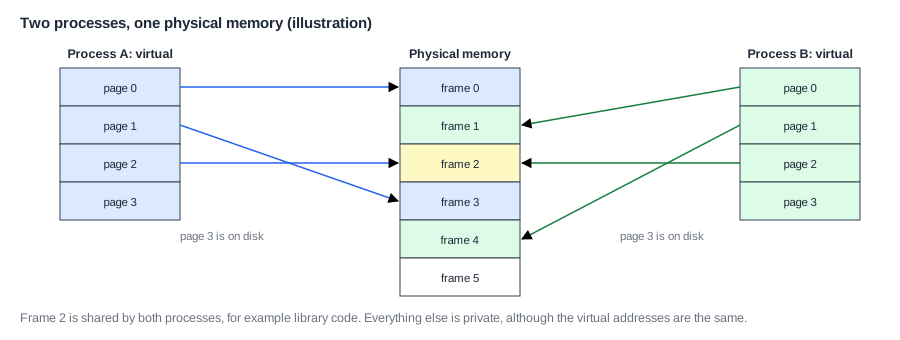
A running program is called a process, and each has its own address space. In the picture, the pages of both processes are scattered over physical memory, but each process sees a neat continuous range.
Now see how each problem goes away:
- Relocation: every program can be linked at the same virtual addresses. The map decides where it really goes.
- Protection: a process can only reach what its map includes. There is simply no address it can use for another process's data. The map also records permissions, such as read-only or no-execute.
- Fragmentation: a program's memory doesn't need to be together physically. Any free frame will do.
- Capacity: some of a program's memory can be kept on disk or flash, and brought in only when it is used. Programs can be larger than memory.
There is a bonus as well. Two processes can map the same frame, as in the picture, so one copy of a shared library can serve every program, which saves a lot of memory. Processes that want to cooperate can share a region on purpose.
Pages
Storing a map entry for every byte would take far more memory than the data itself. So memory is divided into fixed-size blocks: pages in virtual memory, and frames, also called physical pages, in physical memory. Pages and frames are the same size, most often 4 KB. Everything in one page maps together.
A 4 KB page has 4,096 bytes, so 12 bits are enough to pick a byte within it. An address therefore has two parts:

The page number is translated, and the offset is copied straight through, since a byte's position inside a page doesn't change. For example, virtual address 0x0000_3A7C has page number 0x3 and offset 0xA7C. If page 3 is mapped to frame 0x1234, the physical address is 0x0123_4A7C.
Why 4 KB? Larger pages need fewer map entries, and transfer to disk is more efficient per byte. But a program that needs only part of a page wastes the rest, which is called internal fragmentation. The 4 KB size has been the usual compromise since the 1980s, and modern systems add much larger pages for programs with huge data. TLBs and Page Table Walks explains why.
Quick Check
Q: With 4 KB pages, what are the virtual page number and the offset of the address 0x0040_2F18? If that page maps to frame 0x00050, what is the physical address?
Show Answer
The low 12 bits are the offset: 0xF18. The page number is 0x00402. The physical address is 0x00050 followed by F18: 0x0005_0F18.
Who Does What
Virtual memory is a partnership between hardware and the operating system (OS). The OS decides the maps. It keeps them in memory as data structures called page tables, one set per process. The hardware unit that uses those tables is the memory management unit (MMU), and it translates every instruction fetch, load and store. This must happen on every memory access, so it has to be very fast: Page Tables and Address Translation explains the tables, and the TLB explains the speed.
On RISC-V, the OS turns translation on by writing the CSR satp, which holds the physical address of the current process's page table. To switch processes, it writes satp with another value. In that one instruction, the entire memory the processor can see changes.
Translation is applied in supervisor and user modes. Machine mode uses physical addresses directly. Privilege is what keeps this safe: only the OS can change satp, as Privilege Levels and CSRs explains. A user program cannot reach or change its own map, because the page tables themselves are not in its map.
Page Faults
When the MMU finds no valid mapping, or the access is not permitted, it raises a page fault, an exception. The instruction stops, the OS's handler runs, and mepc or sepc records the instruction so that it can be restarted, as Traps and Precise Exceptions explains. What the OS does depends on why it happened:
- The page is valid for this process but is on disk. The OS picks a free frame, or evicts another page, reads the page in, updates the table, and returns. The instruction reruns and succeeds. This is demand paging.
- The page has never been touched. The OS gives it a fresh frame filled with zeros. This is why a program can reserve a huge array at almost no cost until it uses it.
- The page is shared and marked read-only, and the process tried to write it. The OS makes a private copy, which is called copy-on-write, and this makes starting a new process cheap.
- The address is simply invalid. The OS ends the program, with the familiar "segmentation fault".
Disk access is enormously slow compared with a cache miss. A page fault that goes to disk can take millions of cycles. That has shaped the design. Pages are placed anywhere in memory (fully associative), with replacement decided carefully in software, usually with an approximation of LRU. It is worth a lot of effort to avoid even one fault. If a system runs out of memory and spends all its time moving pages in and out, it is said to be thrashing.
Virtual Memory as a Cache
You may have noticed the similarity with caches. Main memory acts as a cache for the disk. A page is a line, a page fault is a miss, and the table is the tag store. The main differences come from the size of the penalty. Because a miss is a million times more expensive, the design moved everything into software, chose full associativity, and always uses write-back.
Where Is This Used?
Any system running Linux, Android, iOS, Windows or macOS relies on virtual memory. Small microcontrollers skip it: they have no MMU and no disk, and they run trusted code, so the cost in silicon, power and timing gains nothing. In between, a real-time system may use a simple memory protection unit, or RISC-V's PMP, to get protection without translation, which keeps timing predictable.
Other Ways to Do It
Paging was not the only idea. Early machines used base and bound registers: each process got one continuous block of physical memory, the hardware added the base to each address, and it checked the result against the bound. This is cheap, and it gives relocation and protection, but a process must fit in one piece, and fragmentation is a serious problem. Segmentation extended this to several blocks per process, such as one for code and one for data. It survives in old corners of the x86 architecture. Paging replaced both, because fixed-size blocks make the allocation of memory trivial: any free frame fits any page. The first paged virtual memory was built on the Atlas computer at Manchester around 1960, and the idea has hardly changed since.
What It Costs
Translation costs time on every access, memory for the tables, and area for the MMU. Good design makes the time cost small, and a modern system pays only a few percent overall. For workloads with very large data, it can be much more, and some database and supercomputing systems use very large pages to reduce it.
Quick Check
Q: Two processes each store a value at virtual address 0x1000, and then each reads it back. Do they see each other's value?
Show Answer
No. Their page tables map that address to different frames, so these are two different physical locations. They would share only if the OS deliberately mapped both to the same frame.
Translation also makes timing a little less repeatable. The same program can run slightly differently from one run to the next, because the frames the OS happens to give it change which cache sets its data falls in.
Common Mistakes
Mistake #1: Thinking physical addresses are contiguous for a program
A buffer that is continuous in virtual memory may be scattered physically. A DMA engine, which uses physical addresses, needs a special allocation, or a list of pieces.
Mistake #2: Assuming memory exists because the allocation succeeded
The OS may promise memory that it has not yet assigned, and frames are added only on first use. The first touch of a large allocation may therefore be much slower than later ones, which can distort measurements.
Mistake #3: Treating every page fault as an error
Most page faults are normal. They happen whenever a program starts or touches new memory. Only a fault on an invalid address is a bug.
Practice Exercise
Challenge: Translate by Hand
A system has 4 KB pages. Part of a process's table is: page 0x00010 maps to frame 0x08000 (read and execute); page 0x00011 maps to frame 0x08005 (read and write); page 0x00012 is not mapped. (a) Translate a load from 0x0001_1234. (b) Translate an instruction fetch from 0x0001_0FFC. (c) What happens on a store to 0x0001_0100? (d) What happens on a load from 0x0001_2000? (e) How many entries would a flat table need to cover all 32-bit addresses, and at 4 bytes each, how large would it be?
Hint
The low three hex digits are the offset.
Solution
(a) Page 0x00011 maps to 0x08005, offset 0x234: physical 0x0800_5234. (b) Page 0x00010 maps to 0x08000, offset 0xFFC: 0x0800_0FFC. (c) A store page fault: the page is not writable. (d) A load page fault: the page is not mapped. The OS decides whether this is valid. (e) 220 = 1,048,576 entries, or 4 MB per process, which is why real tables have several levels.
Summary
- Virtual memory gives each process a private address space, translated to physical memory.
- It solves relocation, protection, fragmentation and capacity, and it allows sharing.
- An address splits into a page number, which is translated, and an offset, which is not.
- The OS sets up page tables; the MMU uses them on every access.
- A page fault is an exception that the OS handles, often transparently, by bringing a page in.
