
A cache is a small fast memory that keeps copies of recently used data, and it must answer one question on every access in a fraction of a nanosecond: is this address here? The way it is organized decides how fast that answer is, and how often it is yes. This article builds a cache from the ground up: how an address is split into tag, index and offset, how a direct-mapped cache works, what associativity adds, what a lookup costs, and how to calculate the storage of a real cache.
12 min read | Beginner to Intermediate
What You'll Learn
- Explain what a cache line is and why data moves in lines
- Split an address into tag, index and offset for a given cache
- Trace a lookup in a direct-mapped and a set-associative cache
- Calculate the total storage a cache needs, tags included
The Idea of a Cache
The Memory Hierarchy and Locality explained why a small memory can catch most accesses. A cache does this automatically. Every load, store and instruction fetch goes to the cache first. If the data is there, that is a hit, and it comes back quickly. If not, that is a miss: the cache gets the data from the next level, keeps a copy, and passes it on. Software normally does not know any of this is happening, and the program's results do not change. Only the timing does.
Since a cache holds only a tiny part of memory, it has to store not just the data but also which address the data came from. Designing this store of addresses so that a search is fast is the heart of cache organization.
Cache Lines
A cache does not store single bytes. It stores lines, also called blocks: fixed-size runs of memory, usually 64 bytes in large processors and often 16 or 32 in small ones. A line starts at an address that is a multiple of its size. When a program reads one byte, the cache fetches the whole line around it.
There are two reasons for this. Spatial locality makes the neighboring bytes likely to be used soon. And storing one address per line, rather than per byte, saves a great deal of storage. In one test on a matrix program, a 1 KB cache with 4-byte lines missed on about 22 percent of data accesses. With 16-byte lines, it missed on about 6 percent. Cache Sizing Studies looks at how far this goes.
Splitting the Address
Every address is divided into three fields. Take a 1 KB cache with 16-byte lines, so 1,024 / 16 = 64 lines, on a 32-bit address:
- The offset selects a byte within the line. 16 bytes need 4 bits: bits 3 to 0.
- The index selects a line in the cache. 64 lines need 6 bits: bits 9 to 4.
- The tag is everything left over: bits 31 to 10, or 22 bits. It records which piece of memory is now in that line.
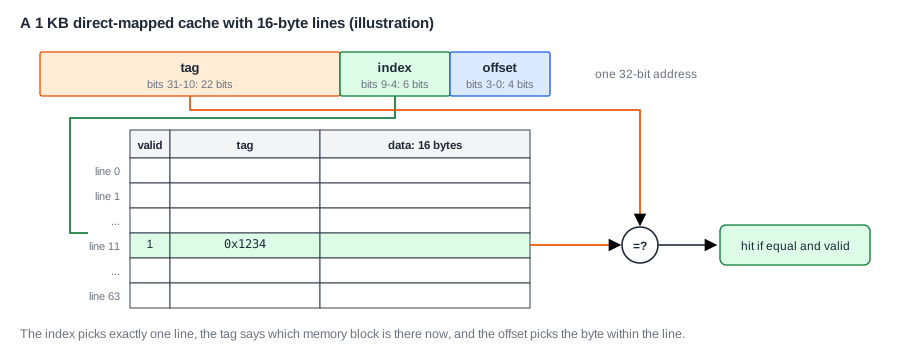
Here is an example with the address 0x0000_12B4. In binary, the low 16 bits are 0001 0010 1011 0100. The low 4 bits, 0100, give offset 4. The next 6 bits, 101011, give index 43. The rest gives the tag 0x4. So the cache looks at line 43, and if that line's stored tag is 0x4, the data is in the cache, and the wanted byte is 4 bytes into the line.
Direct-Mapped Lookup
A direct-mapped cache has exactly one place for any address, given by the index. Each line holds three things:
- a valid bit, which says the line holds real data. Lines are empty after reset;
- the tag of the memory block stored there;
- the data itself.
A lookup takes the index, reads that one line's tag and data at the same time, compares the stored tag with the address tag, and checks the valid bit. If they match, it is a hit, and the data is sent back. That is one small memory read and one comparator, which is why a direct-mapped cache is so fast.
Why is the index in the middle of the address, and not at the top? Nearby addresses should spread over different lines, so that a whole array can be in the cache at once. If the index came from the top bits, every address in a region would map to the same line, and they would all fight over it.
The weakness of direct mapping is that two addresses with the same index cannot be in the cache at once. In a 1 KB cache, addresses exactly 1 KB apart map to the same line. If a loop alternates between them, each access pushes out the other, and every access misses, even with the rest of the cache empty. This is called thrashing. In one test, a 1 KB direct-mapped cache missed on 62.5 percent of data accesses in a memory copy, because its source and destination arrays kept landing on the same lines.
Quick Check
Q: A 4 KB direct-mapped cache has 32-byte lines, with 32-bit addresses. How many bits are in the offset, index and tag?
Show Answer
Offset: 32 bytes need 5 bits. Lines: 4,096 / 32 = 128, so 7 index bits. Tag: 32 - 7 - 5 = 20 bits.
Set-Associative Caches
The fix is to give each block a choice of places. In an N-way set-associative cache, the lines are grouped into sets of N, and a block may go in any line, or way, of its set:
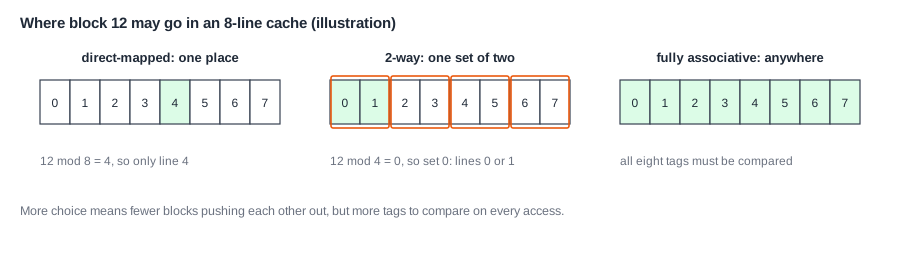
The index now selects a set, not a line. For a 1 KB, 4-way cache with 16-byte lines, there are 64 lines in 16 sets, so 4 index bits and a tag of 24 bits. A lookup reads all the tags in the set and compares them at once, using N comparators, then a multiplexer selects the data of the way that matched.
Two blocks that fight in a direct-mapped cache can now live side by side. In the test above, going from direct-mapped to 2-way cut the memory copy's miss rate from 62.5 to 25 percent. The cache size did not change.
At the extreme, a fully associative cache lets a block go in any line. It has no index at all. Every tag must be compared on every access, which is possible only for very small structures, such as a TLB of a few dozen entries.
When a set is full and a new block arrives, one must be evicted. Which one is the question of Replacement and Write Policies.
The Cost of Associativity
More ways cost more. There are N comparators instead of one, a wider multiplexer in the data path, and more power, because all the ways are read on each access. The multiplexer adds delay, which may lengthen the hit time. And the benefit shrinks quickly. For most programs, 2 ways are much better than 1, 4 are a little better than 2, and 8 are slightly better than 4. Most first-level caches use between 4 and 12 ways. Small embedded caches often use 1 or 2.
What a Read Looks Like
Here is the sequence for a load that hits, and for one that misses:
hit:   index selects the set
       all tags in the set are compared
       one way matches and is valid
       the offset selects the word, which is returned

miss:  no way matches
       the pipeline waits
       the cache requests the whole line from the next level
       a victim line is chosen and replaced
       the wanted word is returned, and the pipeline restarts
A refinement helps here. The line arrives over a narrow bus, one piece at a time, and the wanted word may not be first. Many caches ask for the wanted word first, and pass it to the processor as soon as it arrives, while the rest of the line fills in behind. This is called critical word first.
Where Is This Used?
A large modern core has separate first-level caches for instructions and data, usually 32 to 64 KB each with 8 to 12 ways, and 64-byte lines. The two are separate because the pipeline must fetch and access data in the same cycle. A microcontroller may have a small instruction cache of a few kilobytes in front of slow flash, and no data cache at all, because its SRAM is already fast.
How Much Storage a Cache Takes
The size of a cache, such as "32 KB", counts only its data. The tags and status bits add more. For a 32 KB, 8-way cache with 64-byte lines on a 32-bit address:
lines       = 32,768 / 64           = 512
sets        = 512 / 8               = 64
offset bits = log2(64)              = 6
index bits  = log2(64)              = 6
tag bits    = 32 - 6 - 6            = 20
per line    = 512 data + 20 tag + 1 valid + 1 dirty + LRU bits (about 3)
total       = 512 x 537 bits        = about 34 KB
So tags add around 5 percent here. With a smaller line, the overhead is much higher, which is another reason for large lines. A dirty bit records that a line was modified, as Replacement and Write Policies explains.
Tags and data are usually stored in separate SRAM arrays. To save power, some caches read the tags first and then only the matching data way, at the cost of an extra cycle. That is a common choice for large second-level caches, where a little more latency does not hurt.
Quick Check
Q: A 2-way cache with 64 sets receives two addresses with the same index. Can both be in the cache? What about a third with the same index?
Show Answer
The first two can both be there, one in each way of the set. A third evicts one of them. Associativity gives a little room, not unlimited room.
One more decision is what the lookup uses as its address. A program uses virtual addresses, while memory uses physical ones, and the cache may use either or a mix of the two. Caches and Virtual Memory explains the choice, which is one of the few places where cache design meets the operating system.
Common Mistakes
Mistake #1: Forgetting the valid bit
After reset, the tags contain random values. Without valid bits, a random tag could match an address and return garbage. Clear all the valid bits at reset.
Mistake #2: Counting offset bits for words rather than bytes
Addresses are byte addresses, so a 16-byte line has 4 offset bits, even if the cache delivers 32-bit words. A common error is to count 2, for 4 words.
Mistake #3: Assuming more ways always help
Past a point, more ways add delay and power for nearly no gain. Measure on real workloads and include the hit time, as in AMAT, not only the miss rate.
Practice Exercise
Challenge: Trace a Small Cache
A direct-mapped cache has 4 lines of 16 bytes. (a) Work out the offset and index bits of an address. (b) It starts empty. The program reads these byte addresses in order: 0x00, 0x04, 0x20, 0x40, 0x00, 0x24. Which are hits and which are misses? (c) If the cache were 2-way with 2 sets, same total size, with least-recently-used replacement, how many hits are there?
Hint
Divide each address by 16 to get the block number. The index is the block number mod the number of lines (or sets).
Solution
(a) 4 offset bits and 2 index bits. (b) The blocks are 0, 0, 2, 4, 0, 2, and the indexes are 0, 0, 2, 0, 0, 2. 0x00 misses (line 0 empty). 0x04 hits (same block). 0x20 misses (line 2 empty). 0x40 misses and replaces block 0 in line 0. 0x00 misses and replaces block 4. 0x24 hits (block 2 is still in line 2). That is 2 hits. (c) With 2 sets the index is block mod 2, so all of these blocks fall in set 0. Blocks 0, 2 fill both ways, block 4 replaces block 0, block 0 then replaces block 2, and block 2 then replaces block 4. Only 0x04 hits: 1 hit. Here the 2-way cache did worse, because all blocks shared one set. Associativity helps on average, not on every sequence.
Summary
- A cache stores lines, each with a valid bit and a tag that says which memory block it holds.
- An address splits into tag, index and offset; the index picks a place and the tag confirms it.
- A direct-mapped cache is simple and fast, but blocks with the same index push each other out.
- Set-associative caches give each block several places, and 2 ways cut one test's miss rate by more than half.
- More ways cost comparators, delay and power, with shrinking returns.
