
So far every synthesis run in this series has used the same standard-cell library. This article changes that — and shows how to compare the results side by side.
7 min read | Beginner Level
What You'll Learn
- Why standard-cell library choice affects PPA
- How to re-synthesize the same design with a different library
- How to read the PPA History panel across multiple runs
- How to interpret the trade-offs for this specific design
Why Library Choice Matters
A standard-cell library is a collection of pre-characterized gates for a specific process corner and design point — some libraries prioritize speed, some prioritize low power, and some are general-purpose. The same RTL can land at meaningfully different area and power numbers purely based on which library synthesis targets.
Libraries beyond ms (medium speed) — hd, hs, ls, and hvl — require the PRO tier, as does the PPA History comparison view.
Re-Synthesizing With a Different Library
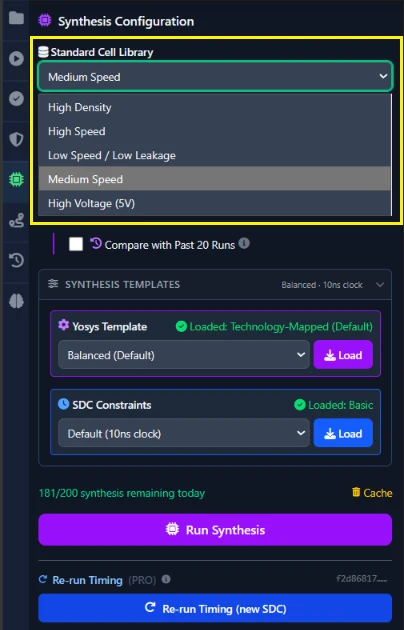
In the Synthesis tab, change the Standard Cell Library dropdown from ms to hd (high density) and click Run Synthesis again. Nothing about your RTL changes — only the target library.
Reading the PPA History Panel
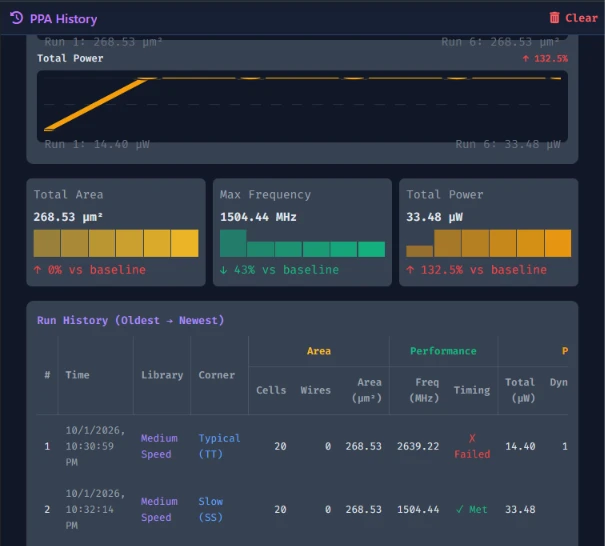
Open the PPA History panel. It lists your recent synthesis runs so you can compare area and power across them directly, instead of switching back and forth between single-run PPA panels and trying to remember the previous numbers.
Interpreting the Trade-offs for the Shift Register
Compare the hd run's Chip Area and Total Power against the ms baseline you recorded in Chapter 5. Try ls (low speed, typically lower power) as a third data point. For a design this small the absolute differences will be tiny, but the direction of the trade-off is the same one that matters at real scale.
Common Mistakes
Mistake #1: Changing more than one variable between runs
If you change both the library and the corner at the same time, you can't tell which one caused a given difference. Change one variable per comparison.
Mistake #2: Trusting the library's name instead of the PPA History panel
It's tempting to assume "high speed" also means smaller, or "low speed" always means lower power, and skip checking. A high-speed library optimizes for delay, not area, and can easily synthesize larger than a general-purpose library. Open the PPA History panel and read the actual numbers instead of predicting from the name.
Where Is This Used?
Standard-cell library selection is a real, first-order PPA lever in ASIC design — the same RTL block might be synthesized against a low-power library for a battery-powered device and a high-speed library for a performance-critical path in the same chip.
Practice Exercise
Challenge: Find the Densest Option
Synthesize the shift register against hd and ls, then use the PPA History panel to identify which one produces the smaller Chip Area for this design.
Hint
Keep the corner fixed at typical for both runs so library is the only thing that changes.
Solution
The answer depends on your exact RTL and the PDK's characterization data for each library — the point of the exercise is reading the comparison directly off the PPA History panel rather than guessing from the library's name.
Summary
In this tutorial, you learned:
- Why standard-cell library choice is a real PPA lever, not just a setting
- How to re-synthesize the same RTL against a different library
- How to read the PPA History panel across multiple runs
- Why library name alone doesn't predict every PPA outcome
