
To understand what a formal tool does, you need one idea from digital design: the state. The state of a design is the set of values stored in all its registers at one moment. Everything a design can do depends on its state and its inputs. This article explains states, which of them a design can actually reach, and why the number of states grows so fast that no tool can list them one by one.
8 min read | Beginner to Intermediate
What You'll Learn
- Explain what the state of a design is and how it changes on a clock edge
- Tell reachable states from unreachable ones, using a state diagram
- Explain why the starting state matters for a formal check
- Describe how fast the number of states grows with the number of flip-flops
What the State Is
A synchronous design has two kinds of logic. Combinational logic, such as gates and multiplexers, computes outputs from its inputs with no memory. Registers, built from flip-flops, store values and update them on the clock edge. The values held in all registers together are the state of the design.
On every clock edge, the next state is computed from the current state and the current inputs. Then the registers take the new values, and the next cycle starts. That is all a synchronous design does, cycle after cycle:
next state = function of (current state, inputs)
If you know the state and the inputs, you know everything that happens next. A formal tool works with exactly this picture.
A Small Example: a Traffic Light
This controller cycles through red, green and yellow, moving to the next color when the input tick is high. The color is stored in a 2-bit register state:
module traffic (input clk, input rst, input tick, output reg [1:0] state);
  localparam RED = 2'd0, GREEN = 2'd1, YELLOW = 2'd2;
  always @(posedge clk)
    if (rst) state <= RED;
    else if (tick)
      case (state)
        RED:     state <= GREEN;
        GREEN:   state <= YELLOW;
        YELLOW:  state <= RED;
        default: state <= RED;
      endcase
endmodule
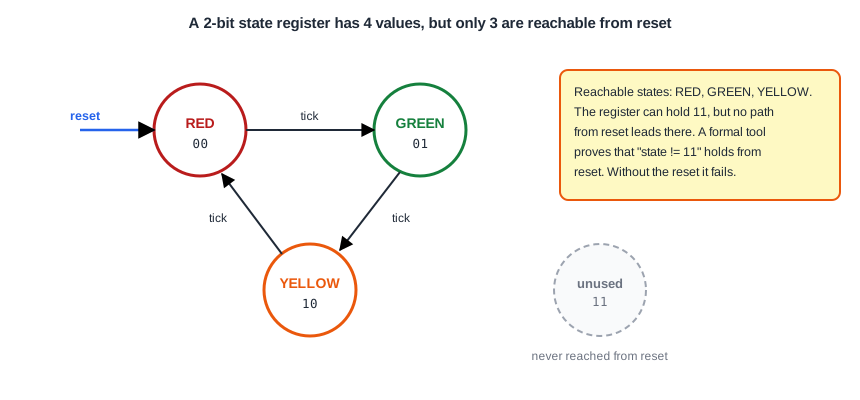
A 2-bit register can hold four values: 00, 01, 10 and 11. The design uses only three of them. The state diagram shows how the states connect:
Reachable and Unreachable States
A state is reachable if some sequence of inputs, starting from the reset, leads to it. Red, green and yellow are all reachable: reset gives red, one tick gives green, two give yellow. The value 11 is unreachable from reset. No arrow in the diagram leads to it, so no sequence of inputs can ever produce it, however long or unusual.
This is exactly the kind of statement a formal tool can prove. The property "the state is never 11" is written in SVA as:
assert property (@(posedge clk) disable iff (rst) state != 2'b11);
On the lab engine, this property passes. The tool considered every sequence of tick values after a reset, within the depth, and none reaches 11.
Quick Check
Q: A 3-bit state register is used by a state machine with 5 states. How many register values exist, and how many of them are unused?
Show Answer
A 3-bit register has 8 values. The machine uses 5, so 3 values are unused. Whether they are reachable depends on the logic, and a formal check can tell.
Why the Starting State Matters
A simulator starts every register at an unknown value, X, until a reset sets it. A formal tool does something stronger: a register that is not initialized can start at any value, and the tool is free to choose the worst one. Remove the reset from the start of the check, and the tool simply starts the traffic light in the state 11. The property fails at once, and the counterexample shows state = 3 from the first step, with no reset at all.
Is that a real bug? Not in this design, which always resets after power-up. It is a reminder that reachability is always "reachable from somewhere". In a formal check you must say where the design starts, usually from a reset. The next chapters show how this is written with an assumption, and Chapter 4 covers the starting state in detail.
Note what the default branch of the case does here. If the register ever held 11, for example after a glitch, the next tick would bring it back to red. The design recovers from the illegal state, which is good practice, but the property only cares whether 11 can be reached at all.
How Fast the States Grow
Each flip-flop can hold 0 or 1, so each extra flip-flop doubles the number of possible states:
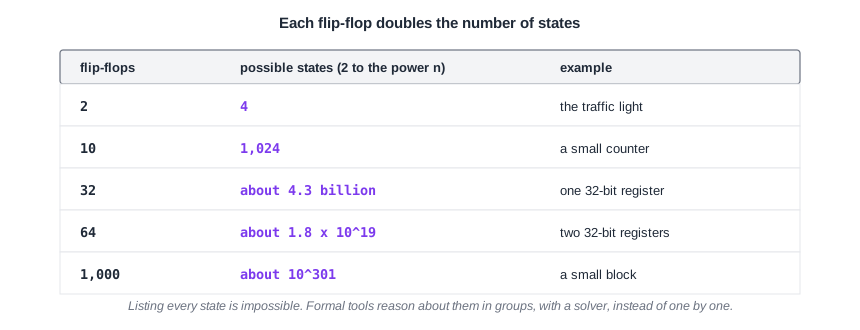
A design with 1,000 flip-flops, which is a small block, has about 10 to the power 301 possible states. That number is far larger than the number of atoms in the universe. No tool could visit those states one by one, and a simulation could never cover them. This rapid growth is called the state explosion, and it is the central challenge of formal verification.
Formal tools cope with it in two ways. First, they do not list states. They describe sets of states with logic formulas and let a solver reason about whole sets at once. Second, they work on blocks of limited size, and on properties that involve only part of the state. A FIFO of 1,000 flip-flops can often be proven because the property depends on a few counters, not on every data bit.
Quick Check
Q: A design grows from 40 to 41 flip-flops. What happens to the number of possible states?
Show Answer
It doubles. Every new flip-flop can be 0 or 1 in combination with every existing state.
Running It in ChipVerify Lab
The lab example checks the same rule in the form that the open-source engine accepts, and starts the design with a reset through an assumption:
`ifdef FORMAL
  reg init = 1'b1;
  always @(posedge clk) init <= 1'b0;
  always @(*) if (init) assume (rst);
  always @(posedge clk) if (!init) assert (state != 2'd3);
`endif
Common Mistakes
Mistake #1: Forgetting that registers start anywhere in formal
Without a reset at the start, the tool may begin in any state, including ones the real design never reaches. Failures that start in such a state are not real bugs. Always make the starting state part of the check.
Mistake #2: Treating unused encodings as harmless without checking
An unused value is only harmless if it is unreachable, or if the design recovers from it. A formal property can prove the first, and a check of the default branch can confirm the second.
Practice Exercise
Challenge: Remove the Reset
Open the traffic light example in ChipVerify Lab and run the formal check. It passes. Then delete the line always @(*) if (init) assume (rst); and run again. Read the counterexample and explain why the result changed.
Hint
Look at the value of state in the very first step of the waveform, and at rst.
Solution
Without the assumption, the tool is free to start the register at any value, and it chooses 11. The reset is never applied, so the state stays 11 and the property fails. The design itself did not change. What changed is the starting point: the state 11 is unreachable from reset, but it is a possible starting value of an uninitialized register.
Open the ready-made example in the lab and run the formal check from the formal panel. The free tier allows a depth of up to 10 cycles, and PRO allows up to 100.
Summary
- The state of a design is the set of values in all its registers. The next state depends on the current state and the inputs.
- A state is reachable if some input sequence from the starting state leads to it. The traffic light never reaches the encoding 11 from reset.
- In formal, an uninitialized register can start at any value, so the starting state must be part of the check.
- Every flip-flop doubles the number of states, so the states of a real design can never be listed one by one.
- Formal tools reason about sets of states with a solver, and work on blocks and properties of limited size.
