
Defining the Transaction Class built reg_transaction on top of uvm_object's family of classes - the right base for data that gets created, used, and thrown away. But a testbench needs more than data. It needs the actual pieces that do the work: something that drives signals onto reg_if, something that watches them, something that organizes all of that into a structure. Every one of those pieces is built on uvm_component, and this article covers what that base class gives you before UVM Driver puts it to use.
6 min read | Intermediate Level
What You'll Learn
- How
uvm_componentdiffers fromuvm_object - The constructor every component needs, and why it takes a parent
- How a component's position in the hierarchy becomes part of its name, and how to look up components within that hierarchy
- Why components are created in
build_phase, not in their constructor
Two Kinds of Class, Two Different Jobs
reg_transaction is created fresh for every operation, gets randomized, eventually gets used, and is then forgotten. A driver is nothing like that. It's built once, at the start of the simulation, and it stays alive doing its job for the entire run. uvm_component exists for exactly that second kind of class: things with a fixed job and a fixed place in the testbench, for as long as the simulation runs.

All major testbench components - drivers, monitors, scoreboards, and the rest - are derivatives of uvm_component and inherit its standard phasing and reporting mechanisms. The diagram below puts that same distinction side by side with what you already know about uvm_object:
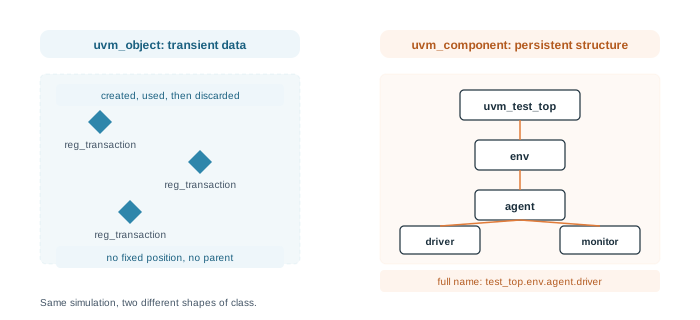
That fixed place is the other half of the story. A uvm_object doesn't belong anywhere in particular - a transaction floats from a sequence to a driver with no permanent home. A uvm_component always has exactly one parent, and that parent relationship is set once, when the component is built, and never changes for the rest of the run.
Where is This Used in Practice
This is exactly why you'll see hierarchical names like uvm_test_top.env.agent.driver in simulation logs and error messages. That dotted path isn't a naming convention someone chose - it's the literal parent chain of uvm_component objects, built automatically from how they were constructed.
The Component Constructor
Every class extending uvm_component needs a constructor with a specific shape: a name, and a handle to its parent.
class my_component extends uvm_component;

  `uvm_component_utils(my_component)

  function new(string name, uvm_component parent);
    super.new(name, parent);
  endfunction

endclass
Compare this to reg_transaction's constructor, which only took a name. That difference is the same fixed-place-versus-floating-data distinction showing up directly in code: a transaction doesn't need a parent because it doesn't have one, but a component always does.
Notice uvm_component_utils here is a single macro, with no field list and no _begin/_end pair like uvm_object_utils_begin in Defining the Transaction Class. That's intentional - you'd never print, copy, or compare a component the way you would a transaction, so there are no fields to register. The macro's only job here is factory registration, which is also what makes factory overrides possible later - substituting a different component type at a given point in the hierarchy without touching the surrounding code. That technique is covered in UVM Factory Override.
Building a Hierarchy
A parent doesn't appear automatically - it's set when a component creates its children. UVM components use the phasing mechanism to perform this kind of setup in a specific order, constructing the internal hierarchy, connecting components together, and finalizing configuration before the test itself ever starts:

Here's a small, two-level example showing the same idea in code: a top-level component that builds one child underneath it.
class child_block extends uvm_component;

  `uvm_component_utils(child_block)

  function new(string name, uvm_component parent);
    super.new(name, parent);
  endfunction

  function void build_phase(uvm_phase phase);
    super.build_phase(phase);
    `uvm_info(get_full_name(), "child_block is alive", UVM_LOW)
  endfunction

endclass

class parent_block extends uvm_component;

  `uvm_component_utils(parent_block)

  child_block c1;

  function new(string name, uvm_component parent);
    super.new(name, parent);
  endfunction

  function void build_phase(uvm_phase phase);
    super.build_phase(phase);
    c1 = child_block::type_id::create("c1", this);
  endfunction

endclass
The line that actually builds the hierarchy is c1 = child_block::type_id::create("c1", this). The second argument, this, is what makes parent_block become c1's parent. From that point on, c1 knows exactly where it sits in the testbench, which is what get_full_name() reports back in the uvm_info call.
You'll see this exact pattern - a parent creating a child with ::type_id::create(name, this) - repeated throughout the rest of this chapter: an environment creating an agent, an agent creating a driver and a monitor, and so on. Once you've seen it once, you've seen the shape of it everywhere.
Why build_phase, Not new()
Children are created inside build_phase, not inside the constructor. build_phase is one of several phases UVM runs every component through automatically, in a fixed order, for the whole testbench. Creating children during this phase guarantees the entire hierarchy is fully built before anything starts running - if components instead created their children inside their own constructors, the order would depend on exactly when each constructor happened to run, which isn't something you want to rely on.
build_phase is just one phase among several - there's also a phase for connecting components together, one for running the actual test, and more. The full picture, including execution order and how to write custom phases, is covered in UVM Phases.
Looking Up Components in the Hierarchy
Once a hierarchy exists, uvm_component gives you a set of built-in methods for navigating it - finding a component's parent, listing its children, or checking whether a particular child exists at all. You won't need most of these for the simple testbench in this chapter, but they're worth knowing about since you'll run into them in larger environments and in UVM source code itself:
// Get handle to parent uvm component that instantiated current component
extern virtual function uvm_component get_parent ();

// Get full hierarchical name of the current component
extern virtual function string get_full_name ();

// Get queue of all children instantiated under current component, not nested
extern function void get_children(ref uvm_component children[$]);

// Get handle to a child by the given name
extern function uvm_component get_child (string name);

// Used in an iterable to get the next child component handle
extern function int get_next_child (ref string name);

// Get the first child handle under current component
extern function int get_first_child (ref string name);

// Get total number of child components, not nested
extern function int get_num_children ();

// Returns 1 if there is atleast one component instantiated
extern function int has_child (string name);

// Get nested child component handle by hierarchical path
extern function uvm_component lookup (string name);

// Depth of the current component from uvm_top=0, uvm_test=1, etc
extern function int unsigned get_depth();
Here's a worked example showing most of these in use, on a small generic hierarchy with one top-level component, an agent containing a monitor, and several sibling child components:
class apb_monitor extends uvm_component;

class apb_agent extends uvm_component;
	apb_monitor	 	m_apb_monitor;
endclass

class child_comp extends uvm_component;

class top_comp extends uvm_component;

	// Child component instantiations
	child_comp 		m_child_comp_sa [5];
	apb_agent 		m_apb_agent;


  	virtual function void end_of_elaboration_phase(uvm_phase phase);

		// Local variables to hold temporary results
    	uvm_component 	l_comp_h;
    	uvm_component 	l_comp_q [$];

		// Get parent and print it
    	l_comp_h = get_parent();
    	`uvm_info ("tag", $sformatf("get_parent=%s", l_comp_h.get_name()), UVM_LOW)

		// Get all children and print them
    	get_children(l_comp_q);
    	foreach (l_comp_q[i])
      		`uvm_info ("tag", $sformatf("child_%0d = %s", i, l_comp_q[i].get_name()), UVM_LOW)

    	// Get a specific child component and print name
    	l_comp_h = get_child("m_child_comp_2");
    	`uvm_info ("tag", $sformatf("Found %s", l_comp_h.get_name()), UVM_LOW)

		// Other function calls
    	`uvm_info ("tag", $sformatf("number of children = %0d", get_num_children()), UVM_LOW)
	    `uvm_info ("tag", $sformatf("has_child('abc') = %0d", has_child("abc")), UVM_LOW)
    	`uvm_info ("tag", $sformatf("has_child('m_apb_agent') = %0d", has_child("m_apb_agent")), UVM_LOW)
    	`uvm_info ("tag", $sformatf("get_depth = %0d", get_depth()), UVM_LOW)

		// Lookup failure will result in a warning
    	l_comp_h = lookup("m_apb_monitor");
    	if (l_comp_h)
      		`uvm_info ("tag", $sformatf("Found %s", l_comp_h.get_full_name()), UVM_LOW)

		// Lookup requires full hierarchical path to the component
      	l_comp_h = lookup("m_apb_agent.m_apb_monitor");
    	if (l_comp_h)
      		`uvm_info ("tag", $sformatf("Found %s", l_comp_h.get_full_name()), UVM_LOW)

  	endfunction
endclass
Running this produces:
UVM_INFO @ 0: reporter [RNTST] Running test my_test...
UVM_INFO testbench.sv(67) @ 0: uvm_test_top.m_top_comp [tag] get_parent=uvm_test_top
UVM_INFO testbench.sv(71) @ 0: uvm_test_top.m_top_comp [tag] child_0 = m_apb_agent
UVM_INFO testbench.sv(71) @ 0: uvm_test_top.m_top_comp [tag] child_1 = m_child_comp_0
UVM_INFO testbench.sv(71) @ 0: uvm_test_top.m_top_comp [tag] child_2 = m_child_comp_1
UVM_INFO testbench.sv(71) @ 0: uvm_test_top.m_top_comp [tag] child_3 = m_child_comp_2
UVM_INFO testbench.sv(71) @ 0: uvm_test_top.m_top_comp [tag] child_4 = m_child_comp_3
UVM_INFO testbench.sv(71) @ 0: uvm_test_top.m_top_comp [tag] child_5 = m_child_comp_4
UVM_INFO testbench.sv(75) @ 0: uvm_test_top.m_top_comp [tag] Found m_child_comp_2
UVM_INFO testbench.sv(77) @ 0: uvm_test_top.m_top_comp [tag] number of children = 6
UVM_INFO testbench.sv(79) @ 0: uvm_test_top.m_top_comp [tag] has_child('abc') = 0
UVM_INFO testbench.sv(80) @ 0: uvm_test_top.m_top_comp [tag] has_child('m_apb_agent') = 1
UVM_INFO testbench.sv(81) @ 0: uvm_test_top.m_top_comp [tag] get_depth = 2
UVM_WARNING /xcelium20.09/tools//methodology/UVM/CDNS-1.2/sv/src/base/uvm_component.svh(2017) @ 0: uvm_test_top.m_top_comp [Lookup Error] Cannot find child m_apb_monitor
UVM_INFO testbench.sv(89) @ 0: uvm_test_top.m_top_comp [tag] Found uvm_test_top.m_top_comp.m_apb_agent.m_apb_monitor
The warning in that log is worth noticing rather than skipping past: lookup("m_apb_monitor") fails because m_apb_monitor isn't a direct child of top_comp - it's nested one level deeper, inside m_apb_agent. The very next call, lookup("m_apb_agent.m_apb_monitor"), succeeds because it spells out the full path. lookup() needs the complete hierarchical path from the component you call it on, not just a name.
This example only demonstrates end_of_elaboration_phase, a phase that runs after the whole hierarchy is built, which is why it's a safe place to call lookup methods like these. Components are also connected to each other in a phase of their own, connect_phase, usually using TLM ports - covered in UVM Phases and UVM TLM. For now, just know that build_phase creates the hierarchy, and a later phase wires the pieces together.
Quick Check
Q: What would happen if parent_block tried to create c1 inside its constructor instead of build_phase?
Show Answer
It would likely still work for a small, simple example like this one, but it goes against how UVM expects components to be built, and it stops being safe once components depend on configuration or other setup that hasn't happened yet at construction time. build_phase exists specifically so every component is created in a predictable, synchronized order - relying on constructor timing instead gives that up for no real benefit.
Common Mistakes
Mistake #1: Giving the constructor only one argument
Wrong:
function new(string name);
  super.new(name);
endfunction
Right:
function new(string name, uvm_component parent);
  super.new(name, parent);
endfunction
Why? A single-argument constructor is correct for a uvm_object, but uvm_component requires both a name and a parent. Leaving out parent breaks the hierarchy this base class exists to provide.
Mistake #2: Creating child components inside new() instead of build_phase
It's tempting to construct everything in the constructor, especially coming from general SystemVerilog or object-oriented habits elsewhere. In UVM, component creation belongs in build_phase, where it happens in a controlled, predictable order across the whole testbench.
Practice Exercise
Challenge: Add a Second Child
Extend parent_block so it builds two instances of child_block instead of one, named c1 and c2.
Hint
You'll need a second handle declared alongside c1, and a second create() call inside build_phase, following the same pattern as the first.
Solution
child_block c1;
child_block c2;

function void build_phase(uvm_phase phase);
  super.build_phase(phase);
  c1 = child_block::type_id::create("c1", this);
  c2 = child_block::type_id::create("c2", this);
endfunction
Both c1 and c2 get parent_block as their parent, so their full names become parent_block.c1 and parent_block.c2 - same parent, different names, no conflict.
Summary
In this article, you learned:
uvm_componentis for parts of the testbench with a fixed job and a fixed place, unlike the transient datauvm_objectrepresents- A component's constructor always takes a name and a parent
- A component's full hierarchical name comes directly from how it was created, not from any naming convention
- Components create their children inside
build_phase, which keeps construction order predictable across the whole testbench - Built-in methods like
get_parent(),get_children(), andlookup()let you navigate that hierarchy once it's built
Going Deeper
- The full UVM class tree: Base Classes
- Every phase and its execution order: UVM Phases
- Swapping component types without editing code: UVM Factory Override
