
In SystemVerilog, messages are usually printed with $display:
$display ("%t addr = 0x%0h data = 0x%0h", addr, data);
With plain $display, there is no way to tell whether a message is informational, a debug detail, a warning, an error or a fatal problem. It is also hard to keep the same format across hundreds of files. The UVM reporting classes solve this. They issue every message with a consistent format, let you choose what action to take and which file to write to based on severity, ID or both, and filter messages by verbosity.
8 min read | Intermediate Level
What You'll Learn
- The four UVM reporting classes and the role each plays
- How severity, verbosity, ID and action decide what happens to a message
- Configure verbosity, actions and log files per component or per ID
- Use the report server and a report catcher to control test results
Why Not Just Use $display?
| Need | $display | UVM reporting |
|---|---|---|
| Mark a message as warning, error or fatal | Only by text in the string | Built-in severity |
| Hide debug messages in regressions | Edit or comment out code | Change verbosity, often from the command line |
| Know where a message came from | Must print it manually | File, line, time and component path added automatically |
| Count errors and stop after too many | Write your own counters | Report server counts and can end the test |
| Send some messages to a separate file | Change every call | Configure by severity or ID |
The UVM Reporting Classes
Reporting in UVM is split across four main classes. You rarely create them yourself, but knowing what each one does tells you where to configure a behavior.
| Class | Role |
|---|---|
uvm_report_object | Base class of uvm_component. Provides the reporting methods and the set_report_* configuration functions. |
uvm_report_handler | Created inside each report object. Stores that object's verbosity threshold, actions and file handles. |
uvm_report_server | One global instance. Formats messages, counts them by severity and ID, executes actions and prints the final summary. |
uvm_report_catcher | Optional callback that can inspect a message before the server processes it, then modify, demote or drop it. |
Every component is a report object, so a driver, monitor or test can report directly. Sequences and sequence items are not components, but they also support the reporting macros. Their messages are routed through the sequencer they run on, or through the top of the hierarchy if there is none.
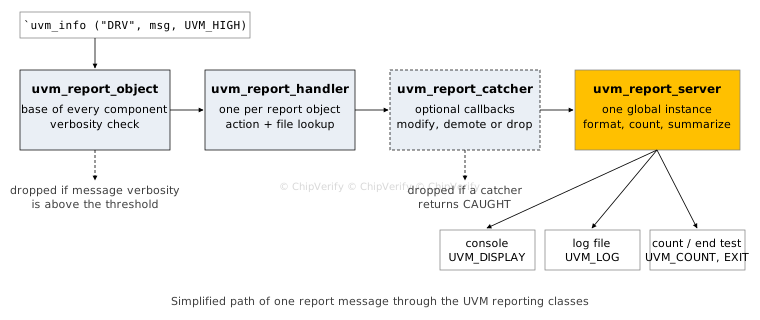
A message first passes the verbosity check in the report object. The handler then attaches the action and file configured for its severity and ID. Any registered catchers can change or drop it, and finally the server formats it and carries out the actions.
Severity, Verbosity and Actions
Severity
Each message has one of four severities, and each severity has a default action.
| Severity | Meaning | Default action |
|---|---|---|
UVM_INFO | Informational or debug message | UVM_DISPLAY |
UVM_WARNING | Something unusual, but the test can continue | UVM_DISPLAY |
UVM_ERROR | A real problem; the test should fail | UVM_DISPLAY | UVM_COUNT |
UVM_FATAL | The simulation cannot continue | UVM_DISPLAY | UVM_EXIT |
Verbosity
Verbosity sets how much detail you want to see. Each component has a verbosity threshold, UVM_MEDIUM by default. A message is printed only if its verbosity is less than or equal to that threshold.
| Level | Value | Typical use |
|---|---|---|
UVM_NONE | 0 | Always printed |
UVM_LOW | 100 | Key milestones such as test start and end |
UVM_MEDIUM | 200 | Normal progress messages (default threshold) |
UVM_HIGH | 300 | Per-transaction details |
UVM_FULL | 400 | Very detailed debug |
UVM_DEBUG | 500 | Deep internal debug |
Actions
An action tells the server what to do with a message. Actions are bit flags, so they are combined with |. The most common are UVM_DISPLAY (print to the console), UVM_LOG (write to a file), UVM_COUNT (add to the quit count), UVM_EXIT (end the simulation), UVM_STOP (call $stop) and UVM_NO_ACTION (do nothing).
Syntax
Messages are normally issued through the reporting macros, which add the file name and line number for you. These are covered in detail in Reporting Functions.
`uvm_info    (ID, MESSAGE, VERBOSITY)   // Only info messages take a verbosity
`uvm_warning (ID, MESSAGE)
`uvm_error   (ID, MESSAGE)
`uvm_fatal   (ID, MESSAGE)
ID- a short string that names the message type, such as "DRV" or "SCB_MISMATCH". Configuration can target it (required)MESSAGE- the text, usually built with$sformatf(required)VERBOSITY- one of the levels above, for`uvm_infoonly (required)
Configuring Reports
Because every component is a report object, its reporting behavior can be changed from outside, usually from the test. Each set_report_* function also has a _hier version that applies to the component and everything below it.
class my_test extends uvm_test;
  `uvm_component_utils (my_test)
  // Rest of the code (constructor, build_phase, etc.)

  UVM_FILE m_err_log;

  virtual function void end_of_elaboration_phase (uvm_phase phase);
    super.end_of_elaboration_phase (phase);

    // 1. Show UVM_HIGH messages from the env and all components below it
    m_env.set_report_verbosity_level_hier (UVM_HIGH);

    // 2. Silence one known, harmless message ID everywhere in the env
    m_env.set_report_id_action_hier ("DRV_IDLE", UVM_NO_ACTION);

    // 3. Also write every error to a separate file, and keep counting them
    m_err_log = $fopen ("errors.log", "w");
    m_env.set_report_severity_file_hier (UVM_ERROR, m_err_log);
    m_env.set_report_severity_action_hier (UVM_ERROR, UVM_DISPLAY | UVM_LOG | UVM_COUNT);
  endfunction
endclass
When more than one setting matches a message, the most specific one wins: a severity-and-ID setting overrides an ID setting, which overrides a severity setting.
Many settings can also be changed without recompiling. For example, +UVM_VERBOSITY=UVM_HIGH sets the default verbosity for every component, and +UVM_MAX_QUIT_COUNT=5 ends the test after five counted errors.
Quick Check
Q: A component's threshold is UVM_MEDIUM. Which of these messages are printed: one at UVM_LOW, one at UVM_HIGH, and a `uvm_error?
Show Answer
The UVM_LOW message and the error. UVM_LOW (100) is below the threshold (200), UVM_HIGH (300) is above it, and errors are issued at UVM_NONE, so they always pass the verbosity check.
Where is Report Configuration Used?
Regression scripts usually run every test at UVM_LOW or UVM_MEDIUM to keep logs small. When a test fails, the same seed is rerun with a higher verbosity on just the failing block, so the detailed log covers only the component under investigation.
The Report Server
The report server counts every message by severity and ID and prints the "UVM Report Summary" at the end of the test. It also tracks the quit count: each message with the UVM_COUNT action increments it, and when it reaches the maximum, the test ends.
uvm_report_server svr = uvm_report_server::get_server ();   // The single global server
svr.set_max_quit_count (10);                               // End the test after 10 counted errors
Stopping early saves simulation time when a design is badly broken, because errors after the first few are rarely useful.
The Report Catcher
A report catcher sees each message before the server processes it. Extend uvm_report_catcher, implement catch(), and return THROW to pass the message on, or CAUGHT to drop it.
A common use is an error-injection test, where certain errors are expected and should not fail the test.
class demote_catcher extends uvm_report_catcher;
  `uvm_object_utils (demote_catcher)

  function new (string name = "demote_catcher");
    super.new (name);
  endfunction

  // Called for every message before the report server sees it
  virtual function action_e catch ();
    if (get_severity () == UVM_ERROR && get_id () == "PARITY_ERR")
      set_severity (UVM_WARNING);    // Expected in this test, so do not fail it
    return THROW;                    // Pass the (possibly modified) message on
  endfunction
endclass

// In the test, for example in end_of_elaboration_phase:
// demote_catcher m_catcher = demote_catcher::type_id::create ("m_catcher");
// uvm_report_cb::add (null, m_catcher);    // null = apply to all report objects
Always limit a catcher to specific IDs and only use it in tests that inject that error on purpose. A catcher that demotes every error makes a broken design look like a passing test.
Where are Report Catchers Used?
Error-injection and negative tests use catchers widely. For example, a test that deliberately corrupts parity on a bus expects the monitor to flag parity errors, so it demotes exactly that message ID while every other error still fails the test.
Common Mistakes
Mistake #1: Setting verbosity before the components exist
Wrong: calling m_env.set_report_verbosity_level_hier(UVM_HIGH) in the test's build_phase, right after creating m_env
Right: make the call in end_of_elaboration_phase
Why? The _hier functions apply only to components that already exist. In the test's build_phase, the env has not built its agents yet, so they keep the default UVM_MEDIUM.
Mistake #2: Using verbosity to hide warnings or errors
The `uvm_warning, `uvm_error and `uvm_fatal macros are issued at UVM_NONE, so no verbosity setting can hide them. To silence a known warning, change its action with set_report_id_action() or demote it with a report catcher.
Mistake #3: Overriding an error action and dropping UVM_COUNT
Wrong: set_report_severity_action_hier(UVM_ERROR, UVM_DISPLAY | UVM_LOG)
Right: set_report_severity_action_hier(UVM_ERROR, UVM_DISPLAY | UVM_LOG | UVM_COUNT)
Why? A new action replaces the default completely. Without UVM_COUNT, errors are still printed but no longer counted, so the quit count never triggers, and pass/fail scripts that check the error count can report a failing test as passing.
Practice Exercise
Challenge: Debug One Component, Log One ID
In my_test, configure reporting so that:
- Only the monitor m_env.m_agent.m_mon prints messages up to
UVM_FULL - Info messages with ID "SCB" from anywhere in the env are also written to
scoreboard.log - Errors with ID "SCB" still count toward the quit count
Hint
Use the non-_hier verbosity function for a single component. For the ID, set both a file and an action, but use a severity-and-ID action so errors are not affected.
Solution
class my_test extends uvm_test;
  `uvm_component_utils (my_test)
  // Rest of the code (constructor, build_phase, etc.)

  UVM_FILE m_scb_log;

  virtual function void end_of_elaboration_phase (uvm_phase phase);
    super.end_of_elaboration_phase (phase);

    // Only the monitor gets full detail
    m_env.m_agent.m_mon.set_report_verbosity_level (UVM_FULL);

    // Route all "SCB" messages in the env to scoreboard.log
    m_scb_log = $fopen ("scoreboard.log", "w");
    m_env.set_report_id_file_hier ("SCB", m_scb_log);

    // Add UVM_LOG only for info; errors keep their default action (DISPLAY | COUNT)
    m_env.set_report_severity_id_action_hier (UVM_INFO, "SCB", UVM_DISPLAY | UVM_LOG);
  endfunction

  virtual function void final_phase (uvm_phase phase);
    super.final_phase (phase);
    $fclose (m_scb_log);                 // Flush and close the log file
  endfunction
endclass
Using set_report_id_action_hier("SCB", ...) instead would replace the action for every severity with that ID, and SCB errors would stop being counted.
Summary
In this tutorial, you learned:
- UVM reporting replaces
$displaywith messages that carry a severity, an ID and a verbosity uvm_report_object,uvm_report_handler,uvm_report_serveranduvm_report_catchereach handle one stage of a message's path- Info messages print only if their verbosity is at or below the threshold, which is
UVM_MEDIUMby default - Actions such as
UVM_DISPLAY,UVM_LOG,UVM_COUNTandUVM_EXITare combined with|and set by severity, ID or both - Configuration with the
_hierfunctions belongs inend_of_elaboration_phase, after the hierarchy is built - The report server counts errors and can end the test, and catchers can demote expected errors in specific tests
