
Every UVM testbench in this tutorial is built around one running example: a small DUT with a handful of registers you can write to and read back from. Instead of jumping straight into uvm_driver or uvm_monitor code with no context, this article defines that DUT once, so every other article in this chapter can simply reference it instead of re-explaining what it does - the same way a real project defines its DUT and interface once, then builds the driver, monitor, sequencer, and environment around that fixed contract.
8 min read | Intermediate Level
What You'll Learn
- The DUT used throughout this chapter: a simple memory-mapped register block
- Why a SystemVerilog
interfaceis used to connect a testbench to a DUT - The signals in
reg_ifand what each one does - How the DUT and interface fit into the bigger testbench picture you'll build next
The DUT: a Register Block
The DUT for this chapter is reg_block - a register file with 16 addressable locations, each 8 bits wide. It supports two operations: write a byte to an address, and read a byte back from an address. No protocol quirks, no burst transfers, no clock domain crossings - just enough behavior to keep every article in this chapter focused on the UVM component being taught, not on the hardware.
Functionally, the DUT behaves like this:
- On a write, the value on wdata is stored into
mem[addr]on the same clock edge that wr_en is asserted - once it's sent, it's done - On a read, rdata holds the value at
mem[addr]starting one clock cycle after rd_en is asserted
There's no completion or handshake signal here, and that's a deliberate choice, not an oversight. Because every operation has the same fixed, known latency - a write lands immediately, a read's data is valid exactly one cycle later - the testbench doesn't need the DUT to tell it when something finished. It already knows. A handshake signal like ack or a stall signal like APB's PREADY only earns its place when an operation's latency can vary; for a single-cycle register file, it would just be unused wiring.
Where is This Pattern Used?
Memory-mapped register blocks like this one show up everywhere in chip design - configuration registers in a peripheral, control/status registers in an IP block, or the register space behind a bus protocol like APB or AHB-Lite. This article's reg_block is a simplified, protocol-agnostic version of that idea, not a model of any specific bus - which keeps it a good DUT to learn UVM with, without dragging in a real protocol's full signal list and timing rules.
Why an Interface, Not Loose Signals
You could connect a testbench to a DUT by declaring every signal individually, but that becomes unmanageable fast - especially once a driver, a monitor, and a top-level module all need access to the same signals. SystemVerilog's interface construct bundles a group of related signals into a single named object that gets passed around as one handle.
An interface is just a container for signals. It doesn't drive or sample anything by itself - the driver and monitor classes do that work, as UVM Driver and UVM Monitor show. The interface just gives them a shared place to connect.
Here is the interface used for this DUT:
interface reg_if (input bit clk);
  logic        rst_n;
  logic        wr_en;
  logic        rd_en;
  logic [3:0]  addr;
  logic [7:0]  wdata;
  logic [7:0]  rdata;
endinterface
Walking through each signal:
clk- the clock, passed in through the interface's port list since every signal inside is timed relative to it- rst_n - active-low reset; the DUT clears its outputs when this is driven low
- wr_en / rd_en - one-cycle pulses telling the DUT to perform a write or a read
- addr - a 4-bit address, enough to select one of the 16 register locations
- wdata - the byte to write, driven by the testbench
- rdata - the byte read back, driven by the DUT one cycle after rd_en
wr_en/rd_en/addr/wdata are driven by the testbench side, while rdata is driven by the DUT side. Keep that direction in mind when you reach UVM Driver and UVM Monitor: the driver only ever drives the first group, relying on the DUT's known one-cycle read latency rather than waiting on any response signal. The monitor, which doesn't drive anything, still needs to sample every signal - including wr_en/rd_en/addr/wdata - to reconstruct what transaction actually happened.
The DUT Module
With the interface defined, the DUT itself connects to it through a single port - the interface handle - instead of a long list of individual signal ports:
module reg_block (reg_if vif);

  logic [7:0] mem [0:15];

  always @(posedge vif.clk or negedge vif.rst_n) begin
    if (!vif.rst_n) begin
      vif.rdata <= 8'h00;
    end
    else begin
      if (vif.wr_en) begin
        mem[vif.addr] <= vif.wdata;
      end
      else if (vif.rd_en) begin
        vif.rdata <= mem[vif.addr];
      end
    end
  end

endmodule
The behavior is straightforward synchronous logic: on every rising edge of vif.clk, the DUT checks reset first, then checks wr_en, then rd_en. A write stores wdata into the memory array at addr on that same edge. A read copies the stored byte out to rdata, which becomes valid for the testbench to sample starting the following cycle.
Quick Check
Q: If wr_en and rd_en were both high on the same clock edge, what would reg_block do, based on the code above?
Show Answer
It would perform the write and ignore the read, because the if (vif.wr_en) ... else if (vif.rd_en) structure checks wr_en first. In a real testbench you'd typically constrain your transaction so the two signals are never asserted together, since the DUT doesn't define meaningful behavior for that case.
How the Pieces Connect
The diagram below shows the relationship that every component in this chapter will plug into: the testbench drives one side of reg_if, the DUT drives the other side, and both sides reference the exact same interface instance through a shared handle.
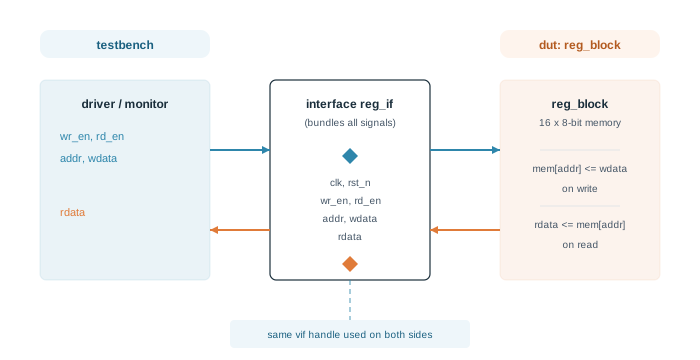
This single shared handle is what makes the interface useful. The top-level module instantiates reg_if once, connects that one instance to the DUT, and later hands the same instance to the testbench through uvm_config_db - a mechanism UVM Driver uses to retrieve it, and UVM Config Database covers in full.
Where is This Used in Practice
This same driver-side/DUT-side split through one interface is how production testbenches connect to real protocols like AXI or APB. The signal list gets longer and the protocol more involved, but the structure - one interface, two consumers, one shared handle - doesn't change.
Common Mistakes
Mistake #1: Declaring the DUT's ports as individual signals instead of an interface
This works for a tiny DUT but stops scaling the moment you add a monitor or a second testbench. Every new consumer needs its own port list, and keeping them in sync becomes error-prone. Using an interface from the start avoids this.
Mistake #2: Sampling rdata on the same cycle as rd_en
Because rdata is driven inside a clocked block, its new value only appears on the clock edge after rd_en was asserted - not on the same edge. Sample it one cycle too early and you'll capture whatever was left over from the previous operation. This one-cycle latency is exactly what a UVM monitor needs to model correctly, which UVM Monitor shows how to handle.
Practice Exercise
Challenge: Extend the Register Count
The current design supports 16 registers, addressed with a 4-bit addr. Modify reg_if and reg_block so the DUT supports 64 registers instead.
Hint
Sixty-four locations need 6 bits of address width. Check how the width of addr in the interface relates to the size of the mem array declared inside the module.
Solution
// In reg_if: widen the address
logic [5:0]  addr;

// In reg_block: widen the memory array to match
logic [7:0] mem [0:63];
The data width (wdata/rdata at 8 bits) doesn't need to change - only the address width and the memory array size need to grow to cover 64 locations instead of 16.
Summary
In this article, you learned:
- The chapter's DUT is a simple 16-entry, 8-bit register block supporting write and read
- A SystemVerilog
interfacebundles related signals into one shared handle instead of individual ports reg_ifcarriesclk,rst_n,wr_en/rd_en,addr,wdata, andrdata- The testbench drives one direction of signals and the DUT drives the other, all through the same interface instance
Going Deeper
- How a virtual interface reaches the testbench classes: UVM Config Database
- When each phase runs: UVM Phases
