
A UVM transaction object is a class that holds one unit of stimulus or observed activity, such as a single bus read or write. It usually contains the control and data values that are randomized and driven to the DUT, along with any values the DUT returns.
Sequences create and randomize transactions, drivers turn them into pin activity, monitors rebuild them from the pins, and scoreboards compare them. Because the same object type is used everywhere, a well-written transaction class makes the whole testbench easier to build and debug.
8 min read | Intermediate Level
What You'll Learn
- Why transaction classes extend
uvm_sequence_item - The steps to write a transaction class: class, variables, factory registration, constraints and
convert2string() - How field macro flags such as
UVM_NOCOMPAREchange the built-in methods - How to create, randomize, print, copy and compare a transaction
Where Transactions are Used
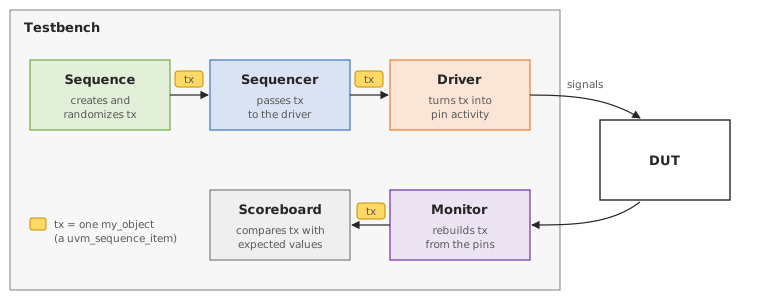
A transaction class is derived from uvm_sequence_item, which itself extends uvm_transaction and uvm_object. Along with the usual object methods such as print(), copy() and compare(), uvm_sequence_item stores the sequence and sequencer that an item belongs to. The sequencer and driver need this information, so any item sent with start_item() and finish_item() must be a uvm_sequence_item.
Steps to Create a UVM Transaction Object
1. Create a class derived from uvm_sequence_item and define new()
The class needs a constructor with a single name argument that has a default value. The factory calls this constructor when it creates the object.
// my_object is user-given name for this class that has been derived from "uvm_sequence_item"
class my_object extends uvm_sequence_item;

	// This is standard code for all objects
	function new (string name = "my_object");
		super.new (name);
	endfunction

	// Code for rest of the steps come here
endclass
2. Declare variables related to this transaction class
Variables that the test should randomize are declared with the rand keyword. Values that the DUT returns, such as read data or a response status, are usually declared without rand.
	// Declare variables and make the ones that has to be randomized as "rand"
	rand bit [15:0] addr;
	rand bit [31:0] data;
	rand bit [2:0]  burst;
3. Register the class with the factory and apply field macros if required
The `uvm_object_utils_begin and `uvm_object_utils_end macros register the class with the factory. The `uvm_field_int macros between them add each variable to the built-in print(), copy(), compare(), pack() and record() methods.
	`uvm_object_utils_begin (my_object)
		// Apply the given object macros to the corresponding variables
		`uvm_field_int (addr,  UVM_ALL_ON | UVM_NOCOMPARE)
		`uvm_field_int (data,  UVM_ALL_ON)
		`uvm_field_int (burst, UVM_ALL_ON)
	`uvm_object_utils_end
The flags after each variable control which methods use it. UVM_ALL_ON turns on all of them, and the extra flag UVM_NOCOMPARE removes addr from compare().
| Flag | Effect on the field |
|---|---|
UVM_ALL_ON | Included in copy, compare, print, record and pack |
UVM_NOCOMPARE | Ignored by compare() |
UVM_NOPRINT | Not shown by print() |
UVM_NOCOPY | Not copied by copy() or clone() |
UVM_NOPACK | Not included by pack() and unpack() |
If the class does not use field macros, register it with `uvm_object_utils(my_object) instead. Use either this macro or the _begin/_end pair, not both.
4. Add constraints as required
Constraints keep the random values legal. Here, addr stays at or below 16'hBFFF, and burst is limited to the values 0 to 4.
	constraint c_addr { addr <= 16'hBFFF; }
	constraint c_burst { burst inside {[0:4]}; }
5. Define the convert2string() function
convert2string() returns the contents of the object as a single line of text. It is handy inside `uvm_info messages, where a full print() table would take too much space.
	function string convert2string();
		return $sformatf("addr=0x%0h data=0x%0h burst=0x%0h", addr, data, burst);
	endfunction
print() does not call convert2string(). print() uses the field macros (or do_print()), while convert2string() is only called when your code calls it.
Using the Transaction
Put together, the steps above give the complete class:
class my_object extends uvm_sequence_item;
  rand bit [15:0] addr;
  rand bit [31:0] data;
  rand bit [2:0]  burst;

  `uvm_object_utils_begin (my_object)
    `uvm_field_int (addr,  UVM_ALL_ON | UVM_NOCOMPARE)
    `uvm_field_int (data,  UVM_ALL_ON)
    `uvm_field_int (burst, UVM_ALL_ON)
  `uvm_object_utils_end

  constraint c_addr  { addr <= 16'hBFFF; }
  constraint c_burst { burst inside {[0:4]}; }

  function new (string name = "my_object");
    super.new (name);
  endfunction

  function string convert2string();
    return $sformatf("addr=0x%0h data=0x%0h burst=0x%0h", addr, data, burst);
  endfunction
endclass
The code below, for example inside a sequence's body(), creates two objects and uses the built-in methods:
my_object tx, tx2;

tx = my_object::type_id::create ("tx");
if (!tx.randomize () with { burst == 2; })     // Inline constraint for this call only
  `uvm_error ("TX", "Randomization failed")

`uvm_info ("TX", tx.convert2string (), UVM_MEDIUM)  // One-line summary
tx.print ();                                    // Table with all fields

tx2 = my_object::type_id::create ("tx2");
tx2.copy (tx);                                   // tx2 now has the same values
tx2.addr = 0;

if (tx2.compare (tx))                            // Returns 1: addr is not compared
  `uvm_info ("TX", "tx and tx2 match", UVM_MEDIUM)
Even though addr is different in the two objects, compare() returns 1, because addr was registered with UVM_NOCOMPARE.
Quick Check
Q: In the code above, the line tx2.data = 0; is added after tx2.addr = 0;. What does compare() return now, assuming data was not already 0 in tx?
Show Answer
It returns 0. data uses UVM_ALL_ON, so it is compared, and the two values now differ.
Where is This Used?
A bus agent, for example for APB or AXI, usually has one transaction class shared by its sequences, driver and monitor. The scoreboard receives these objects from the monitor and calls compare() on them, often with fields like timestamps or IDs excluded through UVM_NOCOMPARE.
Common Mistakes
Mistake #1: Extending uvm_object instead of uvm_sequence_item
A class derived directly from uvm_object cannot be passed to start_item() or finish_item(), which expect a uvm_sequence_item. The code fails to compile. Extend uvm_sequence_item for any item that goes through a sequencer.
Mistake #2: Forgetting the rand keyword
A variable declared without rand is not changed by randomize(). It keeps its current value, which is 0 for a newly created object, and the test silently sends the same value every time.
Mistake #3: Ignoring the result of randomize()
Wrong: tx.randomize() with { burst == 6; };
Right: if (!tx.randomize() with { burst == 6; }) `uvm_error(...)
Why? burst == 6 conflicts with c_burst, so randomization fails and returns 0. The variables keep their old values, and without the check nothing reports the failure.
Practice Exercise
Challenge: Add a Write Flag
Add a random 1-bit field write to my_object. Register it with the field macros, add a constraint so that write transactions use a burst of at most 2, and include it in convert2string().
Hint
An implication constraint, a -> b, applies b only when a is true.
Solution
rand bit write;

`uvm_object_utils_begin (my_object)
  `uvm_field_int (addr,  UVM_ALL_ON | UVM_NOCOMPARE)
  `uvm_field_int (data,  UVM_ALL_ON)
  `uvm_field_int (burst, UVM_ALL_ON)
  `uvm_field_int (write, UVM_ALL_ON)
`uvm_object_utils_end

constraint c_wr_burst { write -> burst <= 2; }

function string convert2string();
  return $sformatf("write=%0b addr=0x%0h data=0x%0h burst=0x%0h", write, addr, data, burst);
endfunction
Reads can still use any burst from 0 to 4, because c_burst still applies. For writes, both constraints apply, so the burst is 0, 1 or 2.
Summary
In this tutorial, you learned:
- A transaction object holds one unit of activity and is shared by sequences, drivers, monitors and scoreboards
- Transactions extend
uvm_sequence_itemso that they can be sent through a sequencer - The class needs a constructor with a default name,
randvariables, factory registration and constraints - Field macro flags decide which fields
print(),copy(),compare()andpack()use convert2string()gives a one-line summary for messages, and the result ofrandomize()should always be checked
