
In a random verification environment, data objects are generated and passed between components all the time. Debug becomes much easier when you can display the full contents of an object in one call, and that is what uvm_printer and the print() method give you.
9 min read | Intermediate Level
What You'll Learn
- How
print()anduvm_printerreplace custom display functions - The table, tree and line printer styles and when to use each
- Add fields to printing with field macros or a
do_print()method - Customize output with printer knobs without side effects
Old-school style
Traditionally, object contents are printed to a log file or the screen with $display statements inside custom print functions.
class Packet;
	bit [31:0]  addr;
	int         count_id;
	bit [3:0]   length;
	...
	function display ();
		$display ("addr=0x%0h count_id=0x%0h length=0x%0h", addr, count_id, length);
	endfunction
endclass

module tb;
	initial begin
		Packet p1 = new();
		p1.display();
	end
endmodule
SystemVerilog has no built-in way to print a class, so testbench developers had to write a custom print function, like display() above, for every class. Each one had its own format, and each had to be updated by hand whenever a field was added.
How its done in UVM
UVM removes the need for custom print functions with its uvm_printer class, which knows how to format class properties. The print() method is defined in uvm_object, so every class derived from it, including sequence items and components, can call print().
An object does not contain its own printer. Instead, print() takes a printer as an argument and falls back to the global uvm_default_printer if none is given.
virtual class uvm_object extends uvm_void;
	...
	function void print (uvm_printer printer=null);
		if (printer==null)
    		printer = uvm_default_printer;
    	...
	endfunction
	...
endclass
The main advantage is the `uvm_field_* macros. They register class members with UVM so that print(), copy(), compare() and similar methods handle them automatically, with no hand-written print code.
Syntax
obj.print ();                              // Print with uvm_default_printer (a table printer)
obj.print (PRINTER);                       // Print with a specific printer instance
str = obj.sprint (PRINTER);                // Return the same text as a string instead

virtual function void do_print (uvm_printer printer);   // Hook for fields that are not
  super.do_print (printer);                             // registered with field macros
  printer.print_int ("NAME", VALUE, $bits(VALUE));
endfunction
Styles
UVM provides three printers, each with its own output format. The examples below print the same nested object.
Table printer - columns for name, type, size and value. Easiest to scan for small objects.
  ---------------------------------------------------
  Name        Type            Size        Value
  ---------------------------------------------------
  c1          container       -           @1013
  d1          mydata          -           @1022
  v1          integral        32          'hcb8f1c97
  e1          enum            32          THREE
  str         string          2           hi
  value       integral        12          'h2d
  ---------------------------------------------------
Tree printer - one field per line, with indentation and braces showing the nesting.
  c1: (container@1013) {
    d1: (mydata@1022) {
         v1: 'hcb8f1c97
         e1: THREE
         str: hi
    }
    value: 'h2d
  }
Line printer - the tree format collapsed onto a single line. Useful for one-line-per-transaction logs that are searched with tools like grep.
c1: (container@1013) { d1: (mydata@1022) { v1: 'hcb8f1c97 e1: THREE str: hi } value: 'h2d }
Usage
By default, UVM uses a table printer for every print() call, through the global handle uvm_default_printer. For convenience, a global instance of each printer type is also available everywhere in your testbench.
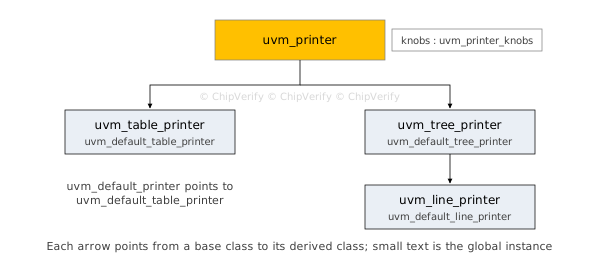
Note that uvm_line_printer is derived from uvm_tree_printer. It uses the same layout, with the newlines and indentation removed.
uvm_table_printer   uvm_default_table_printer = new();
uvm_tree_printer    uvm_default_tree_printer = new();
uvm_line_printer    uvm_default_line_printer = new();

uvm_printer uvm_default_printer = uvm_default_table_printer;
Pass any of the three printer instances to print() to print in that style.
class my_data extends uvm_sequence_item;
	bit [2:0] mode;
endclass

my_data obj0 = new ();                       // Object must exist before print()
obj0.print ();                               // Calls table printer by default
obj0.print (uvm_default_line_printer);       // Calls line printer
In the newer IEEE 1800.2 versions of UVM, the default printer is accessed with uvm_printer::get_default(), and printer settings are changed with setter methods instead of knobs. The concepts in this article are the same.
Quick Check
Q: You call obj.print() with no argument and have not changed any defaults. Which printer style do you get?
Show Answer
The table printer. print() uses uvm_default_printer, which points to uvm_default_table_printer unless you reassign it.
Conditions
print() can always be called, but it shows only the object's name, type and ID unless UVM knows which fields to print. There are two ways to tell it.
1. Register fields with field macros. Place each member that should be printed between `uvm_object_utils_begin and `uvm_object_utils_end.
class my_data extends uvm_sequence_item;
   rand bit [7:0]   data;
   rand bit [7:0]   addr;

   constraint c_addr { addr > 0; addr < 8;}

   `uvm_object_utils_begin (my_data)
      `uvm_field_int (data, UVM_ALL_ON)
      `uvm_field_int (addr, UVM_ALL_ON)
   `uvm_object_utils_end

   function new (string name = "my_data");
      super.new (name);
   endfunction
endclass
Members registered this way are automatically included in the common uvm_object methods, such as print(), copy() and compare().
2. Define a do_print() method. If you do not use the utils_begin/end macros for a member, print it yourself in do_print(), using methods of the uvm_printer class such as print_int(), print_string() and print_object().
class derivative extends my_data;
   `uvm_object_utils (derivative)

   rand bit [2:0] mode;

   function new (string name="derivative");
      super.new (name);
   endfunction

   virtual function void do_print (uvm_printer printer);
      printer.print_int ("mode", mode, $bits(mode));
      `uvm_info ("DVR", "do_print called", UVM_MEDIUM)
   endfunction
endclass
Both approaches can also be combined. Fields registered with macros are printed first, and whatever do_print() adds is appended after them.
class derivative extends my_data;

   rand bit [2:0] mode;
   rand bit [1:0] format;

   `uvm_object_utils_begin (derivative)
   		`uvm_field_int (format, UVM_ALL_ON)
   `uvm_object_utils_end

   function new (string name="derivative");
      super.new (name);
   endfunction

   virtual function void do_print (uvm_printer printer);
      printer.print_int ("mode", mode, $bits(mode));
      `uvm_info ("DVR", "do_print called", UVM_MEDIUM)
   endfunction
endclass
Many teams avoid field macros in performance-critical classes and use only do_print(), because the macros add simulation overhead. See UVM Field Macros for the trade-offs.
Where is print() Used?
Scoreboards commonly call sprint() on both the expected and actual transaction when a mismatch is found, and include both in the `uvm_error message. The failing log then shows every field of both objects side by side, without any extra debug run.
Knobs
Every printer contains an instance of uvm_printer_knobs, available as printer.knobs. Its fields control what print() shows and how.
uvm_default_printer.knobs.size = 0;                   // Will not display the size column
uvm_default_printer.knobs.indent = 4;                 // Indents to the right by 4 spaces instead of the default 2
uvm_default_printer.knobs.hex_radix = "0x";           // Replaces the hex radix of 'h with 0x
| Knob | Default | Effect |
|---|---|---|
depth | -1 | Levels of nested objects to expand; -1 means all levels |
indent | 2 | Spaces added per nesting level |
full_name | 0 | 1 prints each field with its full path, such as obj0.data |
type_name | 1 | 0 hides the Type column |
size | 1 | 0 hides the Size column |
reference | 1 | 0 hides object IDs such as @2687 |
hex_radix | 'h | Prefix used for hexadecimal values |
These knobs can be set on any printer instance; the example below shows several of them in use.
Example
This example defines a few nested data objects. colors is nested inside format, which is in turn nested inside my_data. A fourth class, derivative, extends my_data.
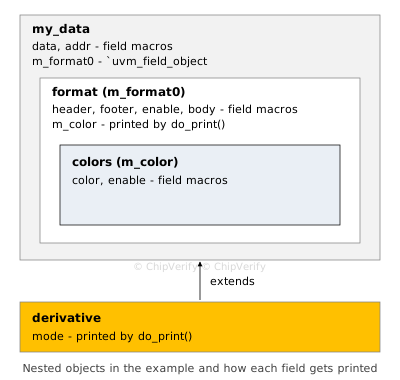
//---------------------- colors --------------------------
class colors extends uvm_sequence_item;
   rand bit [3:0] color;
   rand bit       enable;

   `uvm_object_utils_begin (colors)
      `uvm_field_int (color, UVM_ALL_ON)
      `uvm_field_int (enable, UVM_ALL_ON)
   `uvm_object_utils_end

endclass

//---------------------- format --------------------------
class format extends uvm_sequence_item;

   rand bit [3:0]    header;
   rand bit [2:0]    footer;
   rand bit          enable;
   rand bit [1:0]    body;
   rand colors       m_color;

   `uvm_object_utils_begin (format)
      `uvm_field_int (header, UVM_ALL_ON)
      `uvm_field_int (footer, UVM_ALL_ON)
      `uvm_field_int (enable, UVM_ALL_ON)
      `uvm_field_int (body, UVM_ALL_ON)
   `uvm_object_utils_end

   function new (string name = "format");
      super.new (name);
      m_color = colors::type_id::create ("m_color");
   endfunction

   virtual function void do_print (uvm_printer printer);
      printer.print_object ("m_color", m_color);
   endfunction
endclass


//---------------------- my_data --------------------------
class my_data extends uvm_sequence_item;
   rand format      m_format0;
   rand bit [7:0]   data;
   rand bit [7:0]   addr;

   constraint c_addr { addr > 0; addr < 8;}

   `uvm_object_utils_begin (my_data)
      `uvm_field_int (data, UVM_ALL_ON)
      `uvm_field_int (addr, UVM_ALL_ON)
      `uvm_field_object (m_format0, UVM_ALL_ON)
   `uvm_object_utils_end

   function new (string name = "my_data");
      super.new (name);
      m_format0 = format::type_id::create ("m_format0");
   endfunction
endclass

//---------------------- derivative --------------------------
class derivative extends my_data;
   `uvm_object_utils (derivative)

   rand bit [2:0] mode;

   function new (string name="derivative");
      super.new (name);
   endfunction

   virtual function void do_print (uvm_printer printer);
      printer.knobs.depth=0;
      printer.print_int ("mode", mode, $bits(mode));
      `uvm_info ("DVR", "do_print called", UVM_MEDIUM)
   endfunction
endclass
Note the following about the code above:
- All members of the class colors are added to the
`uvm_object_utils_begin/endmacros - All class objects must be created with
new()ortype_id::create(), here in each constructor, before they can be printed - In the class format, every member except m_color is registered with a macro, while m_color is printed in
do_print() - The class derivative adds mode through its
do_print()method
The test prints the same object with every printer style, then with a custom table printer tprinter whose knobs are changed in cfg_printer().
class base_test extends uvm_test;
   `uvm_component_utils (base_test)

   my_data obj0;
   derivative dv0;
   uvm_table_printer tprinter;

   function new (string name = "base_test", uvm_component parent);
      super.new (name, parent);
   endfunction

   virtual function void build_phase (uvm_phase phase);
      super.build_phase (phase);
      obj0 = my_data::type_id::create ("obj0");
      dv0 = derivative::type_id::create ("dv0");
      tprinter = new();
      cfg_printer();
   endfunction

   virtual task run_phase (uvm_phase phase);
      void'(obj0.randomize());
      `uvm_info ("TST", "print() called with no arguments", UVM_MEDIUM)
      obj0.print ();     // uses uvm_default_printer

      `uvm_info ("TST", "Calling print (uvm_default_line_printer)", UVM_MEDIUM)
      obj0.print (uvm_default_line_printer);

      `uvm_info ("TST", "Calling print (uvm_default_tree_printer)", UVM_MEDIUM)
      obj0.print (uvm_default_tree_printer);

      `uvm_info ("TST", "Calling print (uvm_default_table_printer)", UVM_MEDIUM)
      obj0.print (uvm_default_table_printer);

      `uvm_info ("TST", "Calling print (tprinter)", UVM_MEDIUM)
      obj0.print (tprinter);

      `uvm_info ("TST", "Print derivative (tprinter)", UVM_MEDIUM)
      dv0.print (uvm_default_table_printer);
   endtask

   // Configuration to change display settings for the printer
   virtual function void cfg_printer ();
      tprinter.knobs.full_name = 1;               // Show full name of the variable relative to class instance
      tprinter.knobs.size = 0;                    // Do not show size column
      tprinter.knobs.depth = 1;                   // Only show upto 1 level of the nested hierarchy
      tprinter.knobs.reference = 0;               // Do not print object ID handles
      tprinter.knobs.type_name = 0;               // Do not show Type column
      tprinter.knobs.indent = 4;                  // Indent from the left by 4
      tprinter.knobs.hex_radix = "0x";            // Replace 'h radix by 0x - observe Value field to see this
   endfunction
endclass
----------------------------------------------------------------
CDNS-UVM-1.1d (14.22-s009)
(C) 2007-2013 Mentor Graphics Corporation
(C) 2007-2013 Cadence Design Systems, Inc.
(C) 2006-2013 Synopsys, Inc.
(C) 2011-2013 Cypress Semiconductor Corp.
----------------------------------------------------------------
UVM_INFO @ 0: reporter [RNTST] Running test base_test...
UVM_INFO ./tb/test_pkg.sv(34) @ 0: uvm_test_top [TST] print() called with no arguments
-----------------------------------
Name          Type      Size  Value
-----------------------------------
obj0          my_data   -     @2687
  data        integral  8     'h5a
  addr        integral  8     'h1
  m_format0   format    -     @2700
    header    integral  4     'hb
    footer    integral  3     'h0
    enable    integral  1     'h1
    body      integral  2     'h1
    m_color   colors    -     @2711
      color   integral  4     'h8
      enable  integral  1     'h0
-----------------------------------
UVM_INFO ./tb/test_pkg.sv(37) @ 0: uvm_test_top [TST] Calling print (uvm_default_line_printer)
obj0: (my_data@2687) { data: 'h5a  addr: 'h1  m_format0: (format@2700) { header: 'hb  footer: 'h0  enable: 'h1  body: 'h1  m_color: (colors@2711) { color: 'h8  enable: 'h0  } } }
UVM_INFO ./tb/test_pkg.sv(40) @ 0: uvm_test_top [TST] Calling print (uvm_default_tree_printer)
obj0: (my_data@2687) {
  data: 'h5a
  addr: 'h1
  m_format0: (format@2700) {
    header: 'hb
    footer: 'h0
    enable: 'h1
    body: 'h1
    m_color: (colors@2711) {
      color: 'h8
      enable: 'h0
    }
  }
}
UVM_INFO ./tb/test_pkg.sv(43) @ 0: uvm_test_top [TST] Calling print (uvm_default_table_printer)
-----------------------------------
Name          Type      Size  Value
-----------------------------------
obj0          my_data   -     @2687
  data        integral  8     'h5a
  addr        integral  8     'h1
  m_format0   format    -     @2700
    header    integral  4     'hb
    footer    integral  3     'h0
    enable    integral  1     'h1
    body      integral  2     'h1
    m_color   colors    -     @2711
      color   integral  4     'h8
      enable  integral  1     'h0
-----------------------------------
UVM_INFO ./tb/test_pkg.sv(46) @ 0: uvm_test_top [TST] Calling print (tprinter)
-------------------------
Name                Value
-------------------------
obj0                -
    obj0.data       0x5a
    obj0.addr       0x1
    obj0.m_format0  -
-------------------------
UVM_INFO ./tb/test_pkg.sv(49) @ 0: uvm_test_top [TST] Print derivative (tprinter)
UVM_INFO ./tb/my_pkg.sv(94) @ 0: reporter@@dv0 [DVR] do_print called
-------------------------------------
Name          Type        Size  Value
-------------------------------------
dv0           derivative  -     @2722
  data        integral    8     'h0
  addr        integral    8     'h0
  m_format0   format      -     @2732
    header    integral    4     'h0
    footer    integral    3     'h0
    enable    integral    1     'h0
    body      integral    2     'h0
    m_color   colors      -     @2741
      color   integral    4     'h0
      enable  integral    1     'h0
  mode        integral    3     'h0
-------------------------------------

--- UVM Report catcher Summary ---
Points to notice in the output:
- The default, table, tree and line printers all show the same fields. Only the layout changes. m_color appears inside m_format0 even though it is printed by
do_print()rather than a macro. - tprinter shows full names, no Type or Size columns, the
0xradix, and stops at m_format0 becausedepthis 1. Object IDs are hidden becausereferenceis 0. - For dv0, "do_print called" appears before the table. The table printer collects all rows first and emits the table at the end. mode is the last row because
do_print()output is appended after the macro fields.
Where are Printer Knobs Used?
Large transactions, such as a packet with a 1 KB payload array, can fill thousands of lines with the default settings. Teams often create a dedicated printer with a reduced depth or a line printer for regression logs, and keep the full table printer for interactive debug.
Common Mistakes
Mistake #1: Changing knobs on a shared global printer
Wrong: uvm_default_printer.knobs.depth = 0; to shorten one print, or changing printer.knobs inside do_print(), as the derivative class does
Right: create your own printer, like tprinter, configure it once, and pass it to print()
Why? The global printers are shared by every print() call in the simulation. A knob changed for one object silently changes the output for all later prints, which makes logs confusing to read.
Mistake #2: Forgetting to create nested objects
A nested object registered with `uvm_field_object or printed with print_object() must be created before print() runs. If m_format0 were never created in the constructor, the printer would show it as a null object, and none of its fields would appear.
Mistake #3: Overriding do_print() without calling super.do_print()
Wrong: a class extending format whose do_print() prints only its own new fields
Right: call super.do_print(printer); first, then print the new fields
Why? Without the super call, the parent's do_print() never runs, so anything it printed, such as m_color in format, disappears from the child's output.
Practice Exercise
Challenge: Print a Transaction Without Field Macros
Write a class bus_txn that extends uvm_sequence_item and has an 8-bit addr, a string tag and a nested colors object m_color. Do not use field macros. Make print() show all three, then print an instance with the tree printer.
Hint
Register the class with `uvm_object_utils, create m_color in the constructor, and use print_int(), print_string() and print_object() in do_print().
Solution
class bus_txn extends uvm_sequence_item;
  `uvm_object_utils (bus_txn)              // No field macros

  rand bit [7:0] addr;
  string         tag = "WR";
  colors         m_color;

  function new (string name = "bus_txn");
    super.new (name);
    m_color = colors::type_id::create ("m_color");   // Must exist before printing
  endfunction

  virtual function void do_print (uvm_printer printer);
    super.do_print (printer);                         // Keep anything the parent prints
    printer.print_int    ("addr", addr, $bits(addr), UVM_HEX);
    printer.print_string ("tag", tag);
    printer.print_object ("m_color", m_color);        // Nested object, expanded by the printer
  endfunction
endclass

// In a test or sequence:
// bus_txn txn = bus_txn::type_id::create ("txn");
// void'(txn.randomize ());
// txn.print (uvm_default_tree_printer);
Because colors registers its own fields with macros, print_object() expands m_color to show color and enable inside the tree.
Summary
In this tutorial, you learned:
print()is defined inuvm_objectand replaces hand-written display functions for every class- UVM provides table, tree and line printers, and
uvm_default_printeris a table printer uvm_line_printeris derived fromuvm_tree_printerand prints the same structure on one line- Fields are printed when registered with
`uvm_field_*macros or printed indo_print(), anddo_print()output is appended after macro fields - Knobs such as
depth,size,full_nameandhex_radixcontrol the output, and are best changed on your own printer instance - Nested objects must be created before printing, and overridden
do_print()methods should callsuper.do_print()
