
UVM field macros are the `uvm_field_* macros placed between `uvm_object_utils_begin and `uvm_object_utils_end (or the component equivalents). Each one registers a single class property, so that the automatic copy(), compare(), print(), pack() and record() methods include it. A flag argument decides which of those operations apply to the field and how it is printed.
Data objects and configuration objects are copied, compared and printed constantly as they move through a testbench. Field macros let you get all of that working with one line per field instead of writing do_copy(), do_compare() and do_print() for every class.
7 min read | Intermediate Level
What You'll Learn
- Pick the right field macro for each data type
- Use FLAG values to include or exclude a field from individual operations
- Control the print radix of integral fields
- Use field macros in components for automatic configuration
Syntax
`uvm_object_utils_begin(TYPE)
  `uvm_field_int    (ARG, FLAG)          // integral property
  `uvm_field_enum   (T, ARG, FLAG)       // enum property of enum type T
  `uvm_field_string (ARG, FLAG)          // string property
  `uvm_field_object (ARG, FLAG)          // class handle derived from uvm_object
`uvm_object_utils_end
ARGis the property name. Its type must match the macro, so astringuses`uvm_field_string, not`uvm_field_int.FLAGcontrols which operations include the field, plus an optional print radix.UVM_DEFAULTis the recommended value; it currently turns every operation on, the same asUVM_ALL_ON.- Enum fields need the extra type argument
T, so the printer can show the enum's name rather than its number.
Field Macros by Data Type
There is a macro for every common property type, and for arrays of each type.
| Property | Macros |
|---|---|
| Single value | `uvm_field_int, `uvm_field_enum, `uvm_field_string, `uvm_field_real, `uvm_field_object, `uvm_field_event |
| Static array | `uvm_field_sarray_int, _sarray_enum, _sarray_string, _sarray_object |
| Dynamic array | `uvm_field_array_int, _array_enum, _array_string, _array_object |
| Queue | `uvm_field_queue_int, _queue_enum, _queue_string, _queue_object |
| Associative array | `uvm_field_aa_int_string, `uvm_field_aa_string_string, `uvm_field_aa_object_string, and `uvm_field_aa_int_<key> for integral keys |
For associative arrays the macro name encodes both types: `uvm_field_aa_int_string is an array of integral values indexed by strings.
FLAG Values
Flags are combined with the | operator. A flag other than UVM_ALL_ON or UVM_DEFAULT names the operations to leave out, and the field still takes part in all the others.
| Flag | Effect |
|---|---|
UVM_ALL_ON | Turn every operation on |
UVM_DEFAULT | Recommended setting; currently identical to UVM_ALL_ON |
UVM_NOCOPY | Leave the field out of copy() |
UVM_NOCOMPARE | Leave the field out of compare() |
UVM_NOPRINT | Leave the field out of print() and sprint() |
UVM_NOPACK | Leave the field out of pack() and unpack() |
UVM_REFERENCE | For object fields, act on the handle only, with no deep copy |
UVM_READONLY | Do not let automatic configuration set this field |
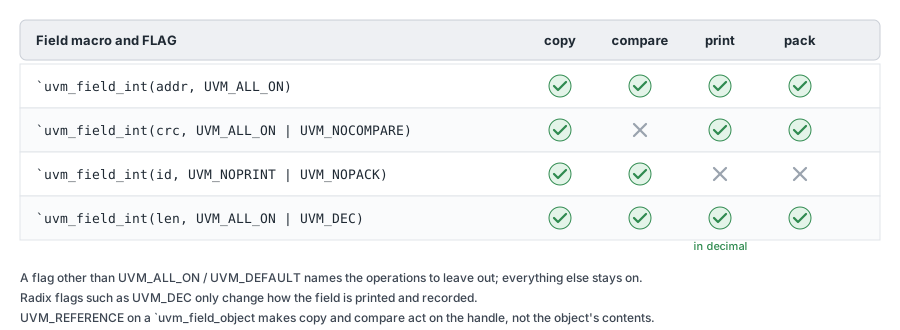
A typical use is a checksum or timestamp field. You want it copied and printed, but two otherwise identical transactions captured at different times should still compare equal, so it gets UVM_NOCOMPARE.
Print Radix
Integral fields print in hexadecimal unless you OR a radix flag into FLAG. The radix affects only printing and recording, never copy or compare.
| Flag | Prints as |
|---|---|
UVM_BIN | Binary |
UVM_OCT | Octal |
UVM_DEC | Signed decimal |
UVM_UNSIGNED | Unsigned decimal |
UVM_HEX | Hexadecimal (the default) |
UVM_STRING | String |
UVM_TIME | Time |
For example, `uvm_field_int(m_len, UVM_ALL_ON | UVM_DEC) prints a length as 16 instead of 'h10.
Example: Nested Objects
In this example Parent registers an enum, an integral field, a queue, a string and a handle to a Child object, which registers its own two fields.
typedef enum {FALSE, TRUE} e_bool;

class Child extends uvm_object;
  string 	 m_name;
  logic[3:0] m_age;

  `uvm_object_utils_begin(Child)
  	`uvm_field_string 	(m_name, UVM_ALL_ON)
  	`uvm_field_int 		(m_age, UVM_ALL_ON)
  `uvm_object_utils_end

  function new(string name="Child");
    super.new(name);
  endfunction
endclass

class Parent extends uvm_object;

  string 	m_name;
  bit[15:0]	m_age;
  int 		m_numbers[$];
  e_bool 	m_employed;
  Child 	m_child;

  `uvm_object_utils_begin(Parent)
  	`uvm_field_enum			(e_bool, m_employed, UVM_ALL_ON)
  	`uvm_field_int			(m_age, UVM_ALL_ON)
  	`uvm_field_queue_int 	(m_numbers, UVM_ALL_ON)
  	`uvm_field_string 		(m_name, UVM_ALL_ON)
  	`uvm_field_object 		(m_child, UVM_ALL_ON)
  `uvm_object_utils_end

  function new(string name="Parent");
    super.new(name);
  endfunction

endclass

module tb;
  initial begin
    Parent p = Parent::type_id::create("Parent");
    p.m_name = "Joey";
    p.m_employed = TRUE;
    p.m_age = 29;
    p.m_numbers = '{1234, 5678, 9011};
    p.m_child = new();
    p.m_child.m_name = "Joey Jr";
    p.m_child.m_age  = 1;

    p.print();
  end
endmodule
ncsim> run
UVM_INFO /playground_lib/uvm-1.2/src/base/uvm_root.svh(392) @ 0: reporter [UVM/RELNOTES]

-----------------------------------------
Name          Type          Size  Value
-----------------------------------------
Parent        Parent        -     @1829
  m_employed  e_bool        32    TRUE
  m_age       integral      16    'h1d
  m_numbers   da(integral)  3     -
    [0]       integral      32    'h4d2
    [1]       integral      32    'h162e
    [2]       integral      32    'h2333
  m_name      string        4     Joey
  m_child     Child         -     @1830
    m_name    string        7     Joey Jr
    m_age     integral      4     'h1
-----------------------------------------
ncsim: *W,RNQUIE: Simulation is complete.
The fields print in the order they were registered, not the order they were declared, which is why m_employed comes first. Integral values use the default hex radix, so m_age value 29 appears as 'h1d. The nested m_child is printed in full, indented under its handle, because `uvm_field_object without UVM_REFERENCE works on the object's contents.
Quick Check
Q: How would you change Parent so that m_age prints as 29 and is ignored by compare()?
Show Answer
Use `uvm_field_int(m_age, UVM_ALL_ON | UVM_DEC | UVM_NOCOMPARE). UVM_DEC changes the print radix and UVM_NOCOMPARE removes the field from comparisons, while copy, print and pack still include it.
When to Use Field Macros
Field macros are ideal for configuration objects and low-traffic classes, where convenience matters more than speed. For transactions that are created millions of times in a regression, the generic code the macros expand into adds measurable simulation time, and many teams write do_copy(), do_compare() and do_print() by hand instead. Both approaches can be mixed in one testbench, as covered in UVM Utility & Field Macros.
Field Macros in Components
Components can register fields with `uvm_component_utils_begin too, and there they add one more feature: automatic configuration. In uvm_component::build_phase, UVM looks up every configuration setting aimed at the component and assigns matching registered fields for you.
class my_agent extends uvm_agent;
  int unsigned num_masters = 1;            // default if nobody configures it

  `uvm_component_utils_begin(my_agent)
    `uvm_field_int(num_masters, UVM_DEFAULT)
  `uvm_component_utils_end

  function new(string name = "my_agent", uvm_component parent = null);
    super.new(name, parent);
  endfunction

  virtual function void build_phase(uvm_phase phase);
    super.build_phase(phase);              // applies matching config settings to fields
    // num_masters now holds any value configured for this agent
    // Rest of the code (create driver, monitor, ...)
  endfunction
endclass

// In the test, before the agent's build_phase runs
uvm_config_int::set(this, "m_env.m_agent", "num_masters", 4);
uvm_config_int is a convenience typedef for the configuration database with the integral type that automatic configuration uses for `uvm_field_int fields. The call to super.build_phase(phase) is what triggers the lookup, so leaving it out turns automatic configuration off for that component. The full mechanism is covered in UVM Config Database.
Common Mistakes
Mistake #1: Registering a component handle without UVM_REFERENCE
Wrong: `uvm_field_object(m_sequencer, UVM_DEFAULT) in a configuration object
Right: `uvm_field_object(m_sequencer, UVM_DEFAULT | UVM_REFERENCE)
Why? Without UVM_REFERENCE, the macro tries to deep-copy the field, and copying a component is illegal. Copying or cloning the containing object then ends in a FATAL error, and printing shows duplicate entries for the component.
Mistake #2: Using the wrong macro for the property type
Wrong: `uvm_field_int(m_name, UVM_DEFAULT) for a string
Right: `uvm_field_string(m_name, UVM_DEFAULT)
Why? Each macro generates code for one data type. A mismatch either fails to compile or treats the value as the wrong type, for example printing a string as a large hex number.
Mistake #3: Skipping super.build_phase() and expecting auto-configuration
A component that registers fields but overrides build_phase without calling super.build_phase(phase) never has those fields configured. The value set in the test is silently ignored and the field keeps its default.
Mistake #4: Forgetting the enum type argument
`uvm_field_enum takes three arguments, with the enum type first: `uvm_field_enum(e_bool, m_employed, UVM_ALL_ON). Leaving the type out is a compile error, and using `uvm_field_int instead loses the readable enum names in printed output.
Summary
In this article, you learned:
- Each
`uvm_field_*macro registers one property for copy, compare, print, pack and record - There is a macro per data type and per array kind, and the macro must match the property's type
- FLAG values such as
UVM_NOCOMPAREleave a field out of specific operations, andUVM_DEFAULTincludes it in all of them - Radix flags such as
UVM_DECchange only printing and recording, and hex is the default - In components, registered fields are configured automatically when
super.build_phase()runs, and component handles needUVM_REFERENCE
