
RTL simulation is where most SoC verification happens, but it has a hard ceiling: a full chip simulates at a tiny fraction of its real speed, so anything that needs billions of cycles - booting an operating system, running a real driver stack, measuring sustained bandwidth - never finishes in a useful amount of time. Emulation and FPGA prototyping run the same RTL on hardware instead of in software, fast enough to reach those workloads before silicon exists. This article covers what each platform is for in an SoC verification flow, how a testbench and C tests move onto them, and how to debug a failure that only shows up there.
11 min read | Intermediate Level
What You'll Learn
- Why simulation runs out of speed at SoC scale, and which verification goals need a faster platform
- How emulation and FPGA prototyping differ in speed, visibility, cost and setup effort
- How stimulus reaches an emulated design: transactors, speed bridges and hybrid setups with a virtual CPU
- How C tests and testbench components are reused across simulation, emulation and prototypes
- How to debug a failure that only appears after billions of cycles, and bring it back to simulation
Why Simulation Runs Out of Speed
An RTL simulator evaluates the design in software, event by event. That gives full visibility and exact control, but the cost grows with design size: a large SoC with many cores, an interconnect and dozens of peripherals often simulates at only hundreds to a few thousand clock cycles per second. A block-level test that needs a few hundred thousand cycles is fine at that speed. A Linux boot that needs billions of cycles would take weeks.
Several SoC verification goals sit on the far side of that limit:
- Software bring-up. Boot ROM code, bootloaders, operating system kernels and device drivers need to run end to end, not just their first few thousand instructions.
- Performance and power analysis. Bandwidth, latency under contention and activity-based power estimates only mean something over long, realistic workloads, as covered in Performance & System Level Checks.
- Deep corner cases. Some bugs need a long history to appear: a counter that wraps after hours of operation, a buffer that only fills under sustained traffic, a coherency race that needs millions of accesses before the timing lines up.
- Long regressions. Late in a project, re-running a large suite of system tests on every RTL drop can be faster on hardware than on a simulation farm.
Emulation and FPGA prototyping both answer the same question - run the real RTL much faster - but they make different trade-offs. The underlying mechanics, such as how a design is mapped onto the hardware, are covered in FPGA Prototyping and Emulation in the SoC Design tutorial. This article focuses on how they fit into verification.
Emulation: Speed With Visibility
An emulator is a purpose-built system that compiles the RTL onto large arrays of custom processors or FPGAs, designed specifically for running designs under verification. A large SoC typically runs at around a megahertz on an emulator - roughly a thousand times faster than simulation, though still hundreds of times slower than the final silicon.
What makes an emulator a verification tool rather than just a fast computer is visibility. It can capture the value of internal signals over a window of time and dump them as a waveform, set triggers on complex conditions, and run the design deterministically so that the same stimulus produces the same result. That keeps debug possible even when the failure happened billions of cycles in.
The trade-offs are cost and capacity. Emulators are expensive shared resources, often booked by many teams at once, and compile times for a full SoC can run to hours. Teams usually reserve emulation for the work that genuinely needs it: OS boot, driver bring-up, performance and power runs, and long system regressions.
FPGA Prototyping: Speed for Software
An FPGA prototype maps the RTL onto one or more commercial FPGAs on a board. It typically runs at tens of megahertz - fast enough for software engineers to boot an operating system in minutes and work interactively, much as they would on a development board.
That speed comes with real limits. Visibility is poor: only signals that were deliberately routed to logic analyzers or on-chip capture logic can be seen, and changing that list means rebuilding the FPGA images, which can take many hours. A large SoC usually needs to be split across several FPGAs, and the wires between them become a bottleneck. The design itself often needs changes to fit: ASIC memories replaced with FPGA memories, gated clocks converted to clock enables, and analog blocks replaced with models or external components. Every change is a difference between the prototype and the real chip, so a prototype result is strong evidence about software and system behavior but weaker evidence about exact RTL timing.
Because a prototype is much cheaper per copy than emulator time, teams often build several and hand them to software and firmware developers months before silicon, while verification engineers keep using simulation and emulation for debug.
Choosing Between Them
| Property | RTL simulation | Emulation | FPGA prototype |
|---|---|---|---|
| Typical SoC speed | Hundreds to thousands of Hz | Around 1 MHz | Tens of MHz |
| Internal visibility | Every signal | Wide, through trace capture | Only pre-selected probes |
| Turnaround after an RTL change | Minutes | Hours | Hours to a day |
| Fidelity to the final RTL | Exact | Exact | Modified to fit the FPGAs |
| Main users | Verification engineers | Verification and software bring-up | Software and firmware developers |
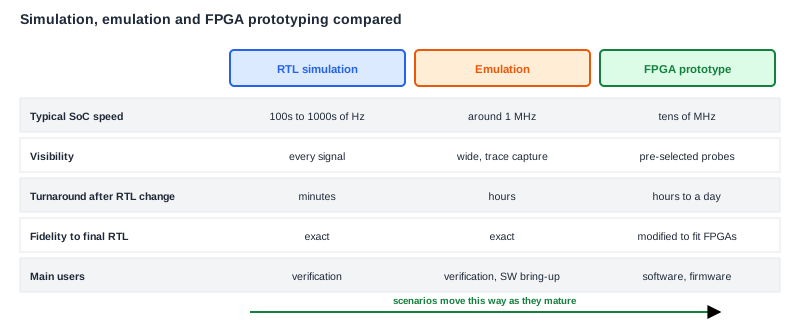
The three are not competitors. A typical project moves a scenario down the table as it matures: it is written and debugged in simulation, run for billions of cycles on the emulator, and handed to software teams on a prototype. Bugs flow the other way, from prototype or emulator back to simulation, where they can be fixed and checked with full visibility.
Getting Stimulus Into the Design
A simulation testbench is software running alongside the RTL, and that does not carry over to hardware for free. If a UVM driver on the host computer had to exchange every pin value with the emulator on every clock, the communication would cost more than the emulation itself. Emulation flows solve this in three main ways.
Transactors
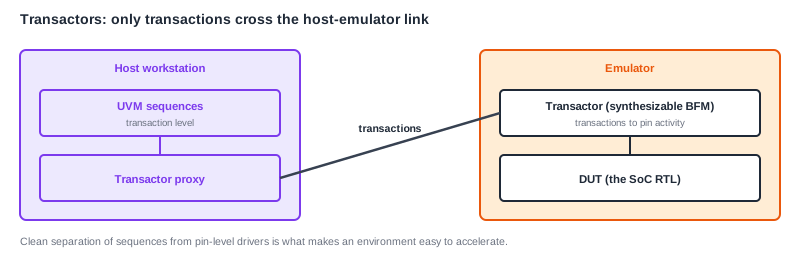
The testbench is split in two. A synthesizable part - often called a transactor or bus functional model - runs inside the emulator next to the design and handles cycle-by-cycle pin activity. The untimed part stays on the host and exchanges whole transactions with it: "write this burst to address X" instead of a thousand individual pin toggles. Because only transactions cross the link, the emulator can run close to full speed. This is why a well-structured UVM environment, with clean separation between transaction-level sequences and pin-level drivers, is much easier to accelerate than one where test code pokes signals directly.
Speed bridges and in-circuit connection
Sometimes the design is connected to real equipment instead: a real network, a real display, a real host PC over PCIe. Real interfaces run far faster than an emulated design, so a speed bridge sits between them, buffering traffic and handling the protocol at both speeds. This exercises the design against real-world traffic, at the cost of determinism - real equipment does not replay identically from run to run.
Hybrid setups with a virtual CPU
Running the CPU cluster in RTL is often the slowest part of an emulated SoC. In a hybrid setup, the CPU subsystem runs as a fast instruction-level software model on the host, while the rest of the SoC - the blocks actually under test - runs in the emulator. The operating system boots in minutes on the virtual CPU, and the new RTL still gets exercised by real driver code. The trade-off is that bugs in the CPU subsystem itself, or in its interaction with the interconnect at cycle level, are not covered by that setup.
Reusing Tests Across Platforms
The biggest payoff comes from not writing a separate test suite for each platform. Two things make reuse practical.
C tests. A self-checking C test that runs on the CPU inside the DUT is the most portable stimulus there is: the same binary can run in simulation, on the emulator, on a prototype and on first silicon. That only works if the test avoids simulation-only shortcuts. A test that relies on a backdoor memory load, a testbench mailbox that only exists in simulation, or a zero-time register peek needs a small platform layer - for example, separate implementations of "print", "report pass/fail" and "wait for event" - so the test body itself stays the same everywhere.
Transaction-level testbench code. Sequences, scoreboards and coverage that work purely at the transaction level can stay on the host and be reused with transactors in the emulator. Pin-level code has to be rewritten in synthesizable form, so keeping it small and isolated pays off long before the project reaches emulation.
Checking also needs to scale. Comparing every transaction against a host-side scoreboard can slow the emulator down, so long runs often rely more on self-checking software, on assertions synthesized into the emulator, and on periodic checkpoints such as memory signatures, rather than a full transaction-by-transaction comparison.
Debugging a Failure at Billions of Cycles
A failure on the emulator after four billion cycles cannot be debugged the way a simulation failure is. Capturing every signal for the whole run is impossible, so debug works by narrowing the window:
- Detect. A self-checking test, an assertion or a software crash reports that something went wrong, and roughly when.
- Trigger and capture. The run is repeated with a trigger set shortly before the failure, and the emulator captures a waveform for a limited window around it. Deterministic replay is what makes this work.
- Localize. The captured signals show which block first behaved incorrectly - the same backward tracing as in simulation, just on a shorter window.
- Move to simulation. The emulator saves the design state at a point just before the failure, and simulation restarts from that state. The engineer then has full visibility and fast edit-compile cycles to find and fix the bug, and adds a test that reproduces it to the regular regression.
On an FPGA prototype the same steps are harder, because visibility is limited to the probes compiled into the image. The usual practice is to reproduce a prototype failure on the emulator or in simulation as soon as possible, rather than debugging it on the board.
Common Mistakes
Treating emulation as the place where simulation bugs get found.
A bug that a simulation test could have found costs far more to debug on an emulator: longer compiles, shared hardware time and less visibility. Emulation should find the bugs that need its speed, not the ones that block-level and SoC simulation should already have caught.
Writing tests that only work in simulation.
Backdoor loads, testbench-only mailboxes and direct signal access make a C test impossible to reuse on hardware. Keep platform-specific actions behind a small library so the same test body runs everywhere.
Trusting prototype timing numbers as if they came from silicon.
A prototype runs at a different speed, with different memories and clocking, than the real chip. It is excellent for software and functional behavior, but cycle-level performance numbers need to come from emulation or be scaled with care.
Debugging a long-run failure only on the emulator.
Once a failure has been localized to a window, saving state and moving to simulation is usually faster than repeated emulator runs. The fixed bug should also leave behind a shorter simulation test, so it never needs the emulator to be caught again.
Summary
In this article, you learned:
- RTL simulation is too slow for workloads that need billions of cycles, such as OS boot, driver bring-up, long performance studies and deep corner cases
- Emulation runs the exact RTL at around a megahertz with wide visibility and deterministic replay, at high cost and long compile times
- FPGA prototypes run at tens of megahertz and suit software teams, but have limited visibility and need design changes to fit the FPGAs
- Transactors, speed bridges and hybrid virtual-CPU setups connect stimulus to an emulated design without slowing it to simulation speed
- Portable C tests and transaction-level testbench code let the same scenarios run across simulation, emulation, prototypes and silicon
- Long-run failures are debugged by triggering, capturing a window, localizing, and then moving the saved state back into simulation
